IONOS: the former German 1&1, listed in Frankfurt since February 2023
IONOS, formerly 1&1, sells WordPress hosting at €5 to €20 per month excl. VAT at the regular price (from €1 per month for the first year). This article covers its WordPress and shared hosting plans with the real renewal prices, the advertised technical setup, what the host does for security (automatic updates, vulnerability scanning, backups) and what remains your job.
It is part of our comparison of WordPress hosts. We have no account with IONOS and measured nothing: the information comes from the ionos.fr website, its help center and the group’s publications. No affiliate links.
IONOS at a glance
- Origin: 1&1, founded in 1988 in Germany, became 1&1 IONOS in 2018 after merging with ProfitBricks, then IONOS.
- Company: IONOS Group SE, headquartered in Montabaur (Germany), listed on the Frankfurt Stock Exchange since February 8, 2023. United Internet holds 63.8%, according to the group’s shareholder page.
- In France: the contract is with IONOS SARL, in Sarreguemines (Moselle).
- Size: IONOS reports more than 6.2 million customers, 4,300 employees, more than 100,000 servers and 31 data centers.
- Data centers: the WordPress plan page mentions “geo-redundant data centers” without stating the hosting country for French sites. IONOS Cloud lists Frankfurt, Berlin, Paris, London, Worcester, Logroño, Las Vegas, Newark and Lenexa.
IONOS’s WordPress plans and their real prices
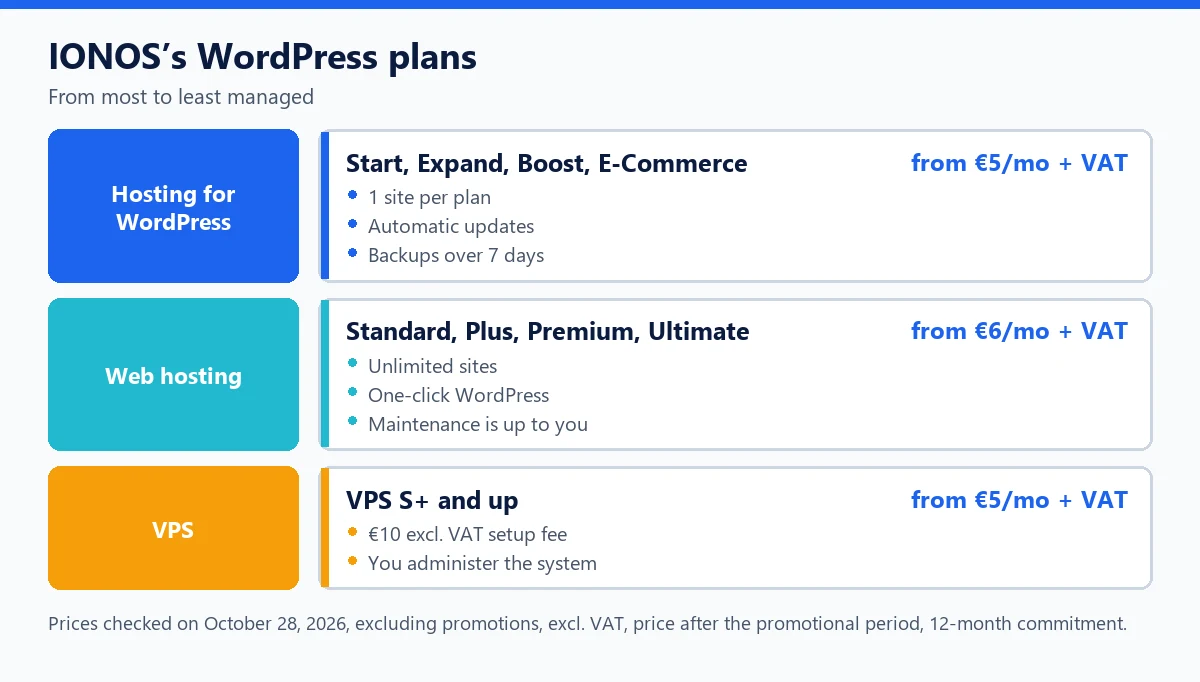
Three paths lead to WordPress at IONOS. Hosting for WordPress (Start, Expand, Boost, E-Commerce) is an offer dedicated to a single site, with automatic updates. Shared web hosting (Standard, Plus, Premium, Ultimate) accepts unlimited sites, with one-click WordPress installation. VPS and dedicated servers leave the system administration to you.
Introductory prices only last 6 or 12 months: the Expand plan, for example, costs €10 per month excl. VAT once the promotion ends (€1 during the promotion). The order data on these pages indicate a minimum term of 12 months with monthly billing. The table gives the price after the promotional period.
| Plan | Type | Starting price | Sites | Storage | Key limits |
|---|---|---|---|---|---|
| Start | Hosting for WordPress | €5/month excl. VAT (€6 incl. VAT) | 1 | 25 GB NVMe | 2 GB database, 1 email address, malware scanning without repair |
| Expand | Hosting for WordPress | €10/month excl. VAT (€12 incl. VAT) | 1 | 50 GB NVMe | 5 email addresses, Jetpack VaultPress Backup free for 12 months |
| Boost | Hosting for WordPress | €15/month excl. VAT (€18 incl. VAT) | 1 | 75 GB NVMe | Automatic malware scanning and removal |
| E-Commerce | Hosting for WordPress | €20/month excl. VAT (€24 incl. VAT) | 1 | 100 GB NVMe | WooCommerce, 5 GB database |
| Standard to Ultimate | Shared web hosting | €6/month excl. VAT (€7.20 incl. VAT) | Unlimited | 100 to 500 GB NVMe | 10 to 500 MariaDB databases of 2 GB, CDN from Plus up |
| VPS S+ | VPS | €5/month excl. VAT (€6 incl. VAT) | Up to you | 60 GB NVMe | 1 vCore, 2 GB of RAM, €10 excl. VAT setup fee, unmanaged |
The four WordPress plans share the same base: PHP 8.2, 8.3 or 8.4, HTTP/2, OPcache, unlimited traffic, a free domain for the first year, an SSL certificate and daily backups kept for 7 days. The difference lies in PHP resources (“performance level” 3, 4 or 5), storage and security options. Shared web hosting is more flexible for several sites, but WordPress there is a standard installation that you manage yourself.
Technical setup and support of IONOS WordPress hosting
| Item | Hosting for WordPress |
|---|---|
| Platform | Managed, containerized Linux hosting, NVMe storage |
| Web server | Not named; the .htaccess file is listed among the features |
| PHP | 8.2, 8.3 and 8.4, with OPcache; version updated automatically by default |
| Developer access | SFTP (unlimited accounts), SSH, WP-CLI, Git |
| Backups | One per day, last 7 days, restore from the IONOS account |
| Staging | Not documented |
| Cache and CDN | Object cache not documented; CDN advertised on shared web hosting plans from Plus up |
| Support | 24/7 by phone, chat and email, personal consultant |
Support covers ordering, the domain, SFTP access and WordPress installation. It does not cover manual site migration, theme customization or detailed investigation of plugin or theme problems: for these, IONOS provides a quote. HTTP/3 is not mentioned.
Security at IONOS: what the host takes care of
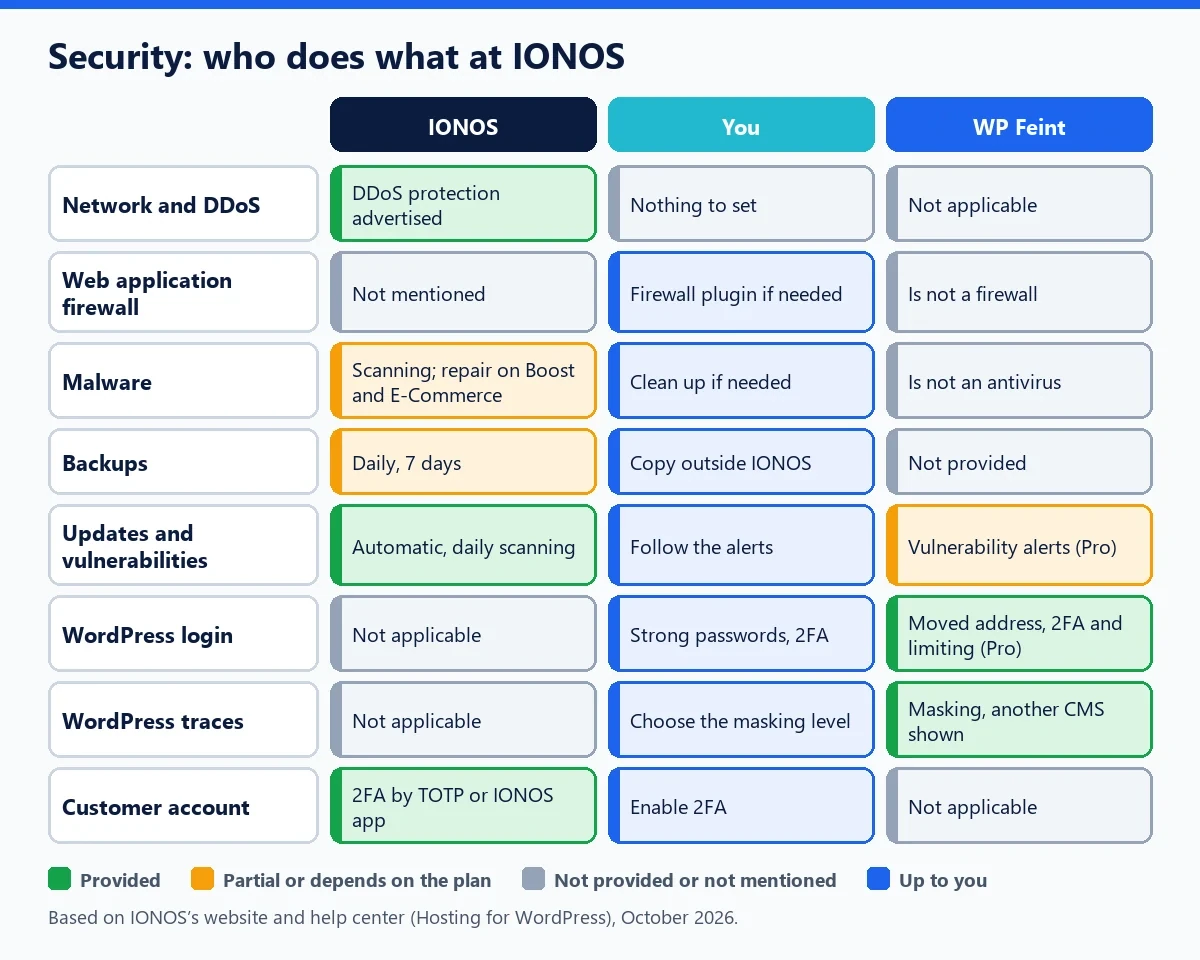
- Automatic updates: enabled by default for core, themes, plugins and the PHP version. IONOS advises against turning them off; a setting lets you choose which items are covered.
- Vulnerability scanning: the “IONOS Security” plugin, installed by default, compares core, themes and plugins with the WPScan database every day. It warns you in the admin area and by email, and can block the installation of a plugin with a serious vulnerability. IONOS states that it does not update or remove a plugin on your behalf.
- Malware: scanning on all WordPress plans, automatic removal only on Boost and E-Commerce.
- Network: DDoS protection and geo-redundant data centers advertised; no web application firewall is mentioned for the WordPress offer.
- Backups: 7 days, restore in a few clicks that overwrites everything changed since, WooCommerce orders included.
- Customer account: two-factor authentication with a TOTP app or the IONOS mobile app, with a recovery code.
We looked for major incidents (data breach, lasting outage) affecting IONOS WordPress hosting in the specialized press: to our knowledge, no major incident is publicly documented as of the date of this article. Seven days of backups are still short: a mistake discovered late cannot be undone without a copy of WordPress outside the host.
To go further: our comparison of web application firewalls for WordPress and our guide to hardening PHP on a hosting account.
IONOS’s strengths and weaknesses for WordPress
| Strengths | Weaknesses |
|---|---|
| Automatic updates for core, plugins, themes and PHP | Introductory prices for 6 or 12 months, then up to ten times more expensive (Expand) |
| Daily vulnerability scanning and anti-malware included | A single site per WordPress plan |
| SSH, WP-CLI, Git and .htaccess from the Start plan | Backups limited to 7 days |
| 24/7 support by phone, chat and email, personal consultant | Hosting country for French sites not specified |
| Listed European group, French contract | No documented staging or web application firewall |
| 30-day money-back guarantee | 12-month minimum commitment |
IONOS automates a good part of the maintenance: automatic updates and vulnerability alerts close the door on many opportunistic hacks. In return, the price rises sharply after the promotion. WordPress hosting at OVHcloud plays on the same introductory-price field, with more open but less automated shared hosting; Hostinger’s WordPress plans and WordPress hosting at GoDaddy are its most direct competitors.
Who is it for?
- Beginner, blog, brochure site: Start or Expand, which handle updates for you.
- Small business: Boost, for automatic malware removal.
- WooCommerce store: E-Commerce, with frequent external backups, since a restore overwrites recent orders.
- Agency or several sites: shared web hosting (unlimited sites), at the cost of doing the maintenance yourself.
- Developer: VPS or dedicated server.
- Avoid it if you want built-in staging, want to know exactly where your data is hosted, or want to pay the same price every year.
Getting started: installing and securing WordPress at IONOS
- Create the project: in the IONOS account, “Menu” then “Web projects”; WordPress is installed with the plan (one-click installation on shared web hosting). Connect the domain from the project.
- Check updates: the project’s “Settings” tab, “Update everything automatically” slider. Leave it on, as IONOS recommends (see also automatic updates for plugins).
- Check PHP: keep a maintained version (8.3 or 8.4) and test your plugins before a version change.
- Follow IONOS Security: “IONOS” menu then “Security”, “Vulnerability scan” tab; act on every red or yellow alert.
- Back up: the project’s “Backups” tab to restore one of the last 7 days; add a regular external copy.
- Test without breaking anything: since no staging is documented, copy the site to a subdomain before a major update (WordPress staging).
- Lock down access: two-factor authentication for the IONOS account (login security section in “My account”) and for WordPress (WordPress two-factor authentication). For SFTP and SSH access, create one account per person.
WP Feint on IONOS
- Server and .htaccess: IONOS does not name its web server but lists the .htaccess file among its features. Based on how WP Feint works, if the server applies this file, the plugin folder returns 404 without any setting. Check it by opening the folder’s address and in the plugin’s local diagnostics. Pro’s aliases are pasted at the top of .htaccess, before “# BEGIN WordPress”, then “Check and activate” confirms that they work.
- Jetpack VaultPress Backup: free for 12 months on Expand, Boost and E-Commerce, it relies on the Jetpack connection. Yet WP Feint’s XML-RPC blocking breaks the Jetpack connection: if you use this backup, leave XML-RPC open (see the risks of XML-RPC).
- Duplicate alerts: IONOS Security and Pro’s vulnerability alerts both report vulnerable plugins; keep a single alert channel if the duplicates bother you. IONOS’s automatic updates also apply to WP Feint.
- CDN on web hosting plans: after enabling the masking, clear all caches and exclude the new login address from every cache layer. The documentation we consulted does not describe how to purge the IONOS CDN: ask support.
- VPS: under Nginx, add the line that hides the plugin folder and the alias rules yourself.
Details per server are on the WP Feint compatibility with hosts and caches page; moving the login is described on the custom login page. IONOS takes care of updates and scanning; WP Feint reduces what bots see: WordPress presented as another CMS, wp-login.php closed, and with Pro, two-factor authentication, login limiting and security headers. It is not a firewall, an antivirus or a backup.
Our take on IONOS
For a first WordPress site, IONOS offers automated maintenance that is rare at this price: updates by default, vulnerability scanning, anti-malware and support reachable at any time. On the other hand, you have to reason in terms of the price after the promotion, accept one site per plan and make up for short backups. To see where IONOS stands among other hosts, check our ranking of web hosts for WordPress, and to strengthen the site itself, the best WordPress security plugins.
Key takeaways
- Hosting for WordPress from €5 to €20 per month excl. VAT after the promotion, 12-month commitment, one site per plan.
- Automatic updates and IONOS Security vulnerability scanning enabled by default.
- Daily backups kept for 7 days: add an external copy.
- SSH, WP-CLI, Git and .htaccess available from Start.
- With WP Feint, leave XML-RPC open if you use Jetpack VaultPress Backup.
Sources
- IONOS Help: configuring automatic updates (external link, opens in a new tab)
- IONOS Help: IONOS Security plugin and vulnerability scanning (external link, opens in a new tab)
- IONOS Help Centre: What is two-factor authentication? (external link, opens in a new tab)
Other sources consulted: official pages of the hosting provider and software vendors.