GoDaddy: listed on the NYSE, 20.4 million customers at the end of 2025
GoDaddy, one of the largest web hosts in the world, sells a managed WordPress offer, cPanel shared hosting and VPS plans in France. Here are its plans and their real prices, its technical platform, its protections, the security incidents it has declared itself and the settings to plan for WP Feint.
Disclosure: we have no account with GoDaddy and have tested nothing there. The information comes from its website, its help center, its SEC filings and the FTC. No affiliate links. To see where GoDaddy stands against the others, see our ranking of web hosts for WordPress.
GoDaddy at a glance
- Company: GoDaddy Inc., listed on the New York Stock Exchange (GDDY), headquartered in Tempe, Arizona.
- Size: 20.4 million customers at the end of 2025, including 9.8 million outside the United States, and $4.95 billion in revenue in 2025, according to its annual report.
- Data centers: one owned center in Arizona, the rest leased. cPanel shared hosting is advertised in North America and Europe; VPS plans can be placed in North America, Europe or Asia-Pacific. For the managed offer, the location is not specified.
GoDaddy’s WordPress plans and their prices
Three families suit WordPress: Managed WordPress Hosting (Basic, Deluxe, Ultimate), a managed offer with WordPress preinstalled, caching, CDN and backups; Web Hosting (Économie, Deluxe, Ultimate), cPanel shared hosting; and VPS, virtual servers with root access that you administer yourself.
The headline prices are introductory prices. The table gives the displayed reference price (struck through) and, in parentheses, the first-period price. GoDaddy states that its prices are excl. tax and that “the product renewal price may change”: check it in the cart.
| Plan | Type | Starting price | Sites | Storage | Key limits |
|---|---|---|---|---|---|
| WordPress Basic | Managed | €13.99/month excl. VAT (€2.79 the 1st year) | 1 | 10 GB NVMe | Neither SSH nor staging |
| WordPress Deluxe | Managed | €17.99/month excl. VAT (€9.99) | 1 | 20 GB NVMe | Staging, SSH |
| WordPress Ultimate | Managed | €24.99/month excl. VAT (€12.99) | 3 | 30 GB NVMe | Object Cache Pro, Git, priority support |
| Web Hosting Économie to Ultimate | cPanel shared | €10.99/month excl. VAT (€2.19) | 1, 10 or 25 | 25 to 75 GB NVMe | Unlimited bandwidth, CloudLinux |
| VPS 1 vCPU, 2 GB | Unmanaged VPS | €13.99/month excl. VAT (€8.49 over 3 years) | Unrestricted | 40 GB NVMe | Linux, root, cPanel or Plesk as an option |
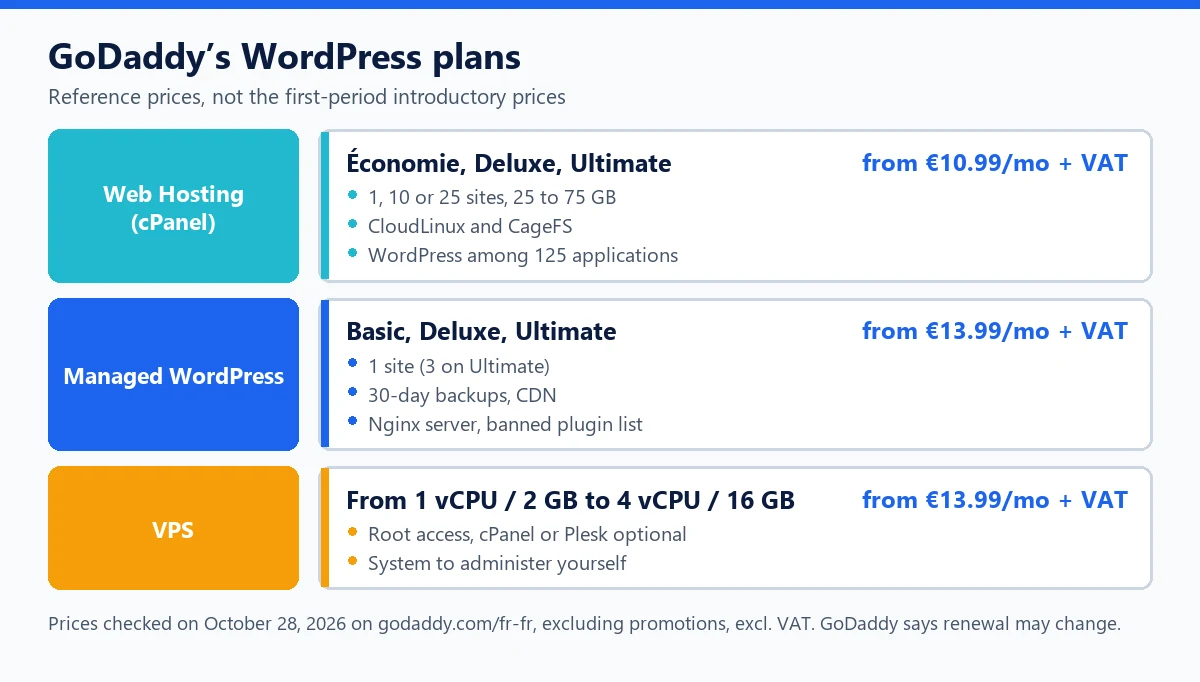
On Basic and Deluxe, only one site is included: additional ones are paid. And the page contradicts itself on WooCommerce, shown as an Ultimate feature while the FAQ says all plans are compatible. Ask for confirmation before opening a store on Basic.
Technical platform and support
Between March 2025 and April 2026, GoDaddy migrated its managed offer to a new platform, from Apache to Nginx. According to its help center, custom .htaccess rules “will no longer work as before”: only the root .htaccess is recognized, and those in subfolders are not supported.
| Item | Managed WordPress | cPanel Web Hosting |
|---|---|---|
| Web server | Nginx | Not specified |
| PHP | Version of your choice; 7.4 maintained by Zend until November 2026 | Adjustable in cPanel |
| Cache and CDN | Server cache, object cache, Cloudflare CDN | Not included by default |
| Backups | Daily, 30 days, plus on demand | Daily |
| Staging | Deluxe and Ultimate | Not documented |
| SSH, WP-CLI, Git | SSH and WP-CLI except on Basic, Git on Ultimate | Not detailed |
If your site still runs on PHP 7.4, move to a maintained version before Zend support ends, after a trial on staging (see end-of-life PHP versions).
Support: GoDaddy advertises more than 3,500 advisors, by chat, phone and email. Its contact page lists the French number +33 9 70 01 93 53 as “24/7 in English”; the Belgian number is advertised as “24/7 in French”.
Security at GoDaddy: protections and incidents
What GoDaddy documents
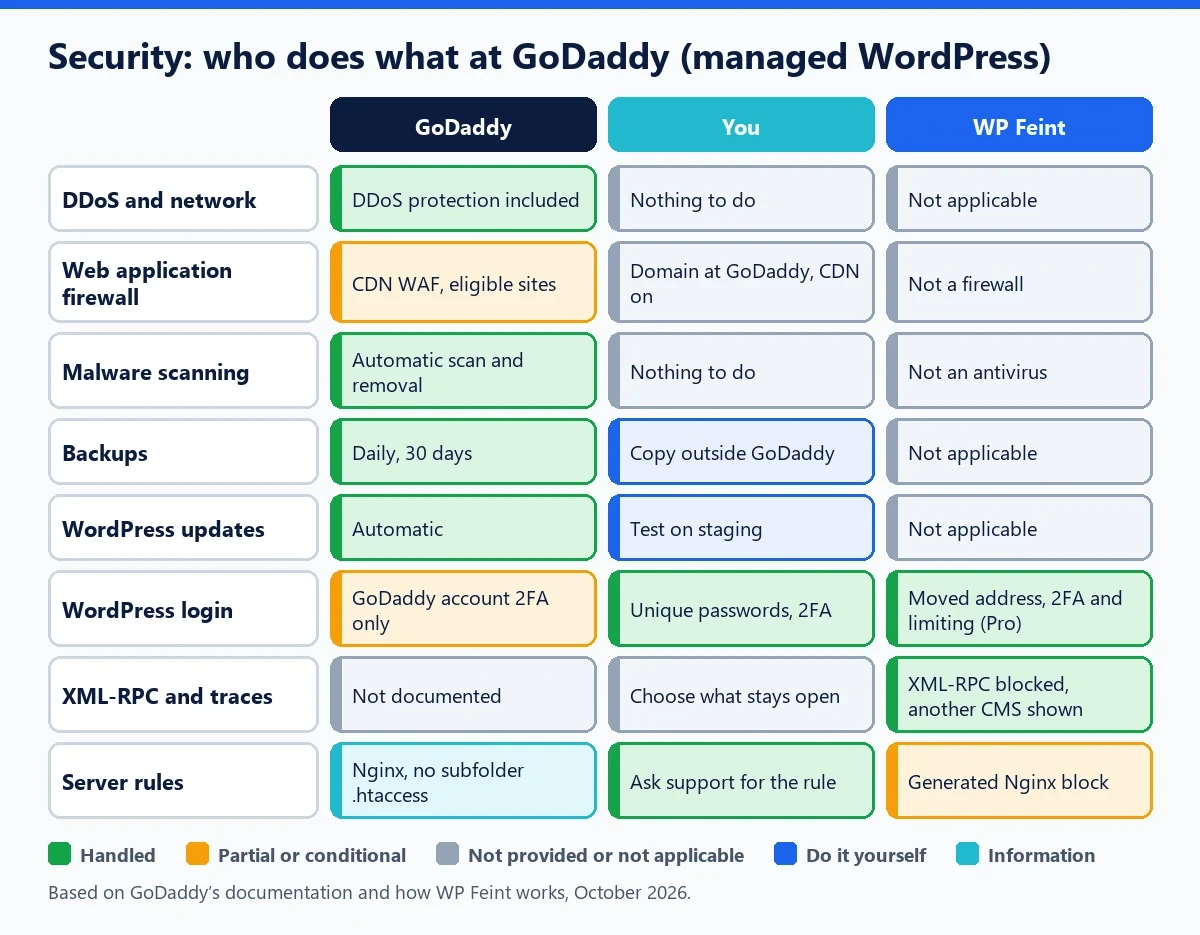
- WAF and DDoS advertised on all WordPress plans. The WAF comes with the full-page cache CDN, reserved for “eligible” sites (domain registered at GoDaddy, CDN enabled).
- Malware: automatic scanning and removal, Patchstack vulnerability scanning.
- PHP execution blocked outside WordPress in
/wp-content,/wp-includes,/uploadsand a few other folders (403 response). - Plugin blocklist (backup, cache, vulnerable or slow plugins) and mail ports 25, 465 and 587 closed.
- Isolation: CloudLinux and CageFS on cPanel shared hosting; not specified for the managed offer.
- Customer account: 2-step verification available, to enable yourself.
Incidents declared by GoDaddy
- March 2020: hosting credentials of about 28,000 customers compromised (annual report published on February 16, 2023).
- November 2021: GoDaddy disclosed to the SEC that a third party, using a compromised password, had accessed the provisioning system of the old managed WordPress platform since September 6, 2021. Up to 1.2 million active and inactive customers were affected (email, customer number). Original WordPress admin passwords, sFTP and database credentials were reset; SSL private keys of some customers were exposed and certificates replaced.
- December 2022: malware installed on cPanel servers intermittently redirected customer sites to malicious sites. GoDaddy links these incidents to “a multi-year campaign” by a sophisticated threat actor group.
- 2025: on January 15, the FTC accused GoDaddy of inadequate security measures (patching, logging, multi-factor authentication, segmentation) and misleading claims. The order, finalized on May 21, 2025, requires a security program and independent assessments every two years, for at least 20 years according to GoDaddy.
The 2021 incident targeted the host’s infrastructure, not a WordPress vulnerability: no plugin could have done anything about it. Hence the value of a backup outside the host and of changing passwords at every alert.
To go further: our comparison of web application firewalls for WordPress and our guide to hardening PHP on a hosting account.
Strengths and weaknesses
| Strengths | Weaknesses |
|---|---|
| Complete managed offer: 30-day backups, automatic updates, CDN | Large gap between introductory and reference prices (€13.99/month excl. VAT versus €2.79 the first year on Basic) |
| Malware scanning and Patchstack included | Incidents in 2020, 2021 and 2022, FTC order in 2025 |
| Staging from Deluxe up, Git and Object Cache Pro on Ultimate | A single site and neither SSH nor staging on Basic |
| VPS in North America, Europe or Asia-Pacific | French number advertised as “24/7 in English” |
| Listed company, required to disclose its incidents | Nginx without subfolder .htaccess, list of banned plugins |
| 7-day free trial | Location of managed servers not specified |
GoDaddy sells simplicity: everything is managed, which suits beginners, but the real price only appears at renewal and the configuration is locked down. To compare with another large general-purpose host present in Europe, see IONOS’s WordPress plans; on the American side, compare renewal prices and backups with WordPress hosting at Bluehost and HostGator’s WordPress hosting.
Who is it for?
- A good fit: a beginner’s blog or brochure site that wants to hand everything off, with the domain already at GoDaddy (a condition for the full CDN and its WAF); a small business ready to pay the reference price from the second year.
- Can work: a small WooCommerce store on Ultimate; a developer comfortable administering a VPS.
- A poor fit: a multisite (not supported); a site that depends on
.htaccessrules or blocklisted plugins; a site that must be hosted in France; an agency that wants phone support in French.
Getting started: installing and securing WordPress at GoDaddy
- Enable 2-step verification for the GoDaddy account (Security page, “2-Step Verification”), with an authenticator app and a backup method.
- Create the site: WordPress is preinstalled on the managed offer, with a migration assistant; on cPanel, use the application installer.
- Choose the PHP version: My Products, Manage All, Settings, Production Site, PHP Version, Edit.
- Check HTTPS: the certificate is included and renewed automatically; make sure every page opens over HTTPS.
- Backups: use “Backup Now” before every change and keep a copy outside GoDaddy, without a blocklisted plugin (BackWPup, old versions of UpdraftPlus, and so on); see our 3-2-1 backups.
- Test updates and plugins on staging (Deluxe and Ultimate), as in our article on WordPress staging.
- Close XML-RPC if you use neither Jetpack nor the mobile app (why disable XML-RPC) and enable two-factor authentication for every WordPress administrator.
WP Feint on GoDaddy: what you need to know
These remarks combine how WP Feint works with GoDaddy’s documentation; we have not checked them on site. Test on staging and see the WP Feint compatibility with hosts and caches page.
- Plugin folder: based on how WP Feint works, it returns 404 thanks to an
.htaccessfile placed in that folder. Yet, according to GoDaddy’s documentation, subfolder.htaccessfiles are not supported on the managed offer, and blocking PHP in/wp-contentdoes not hide the other files. You need the Nginx linelocation ~ ^/wp-content/plugins/feint-security(-pro)?/(?!assets/) { return 404; }, to be requested from support: GoDaddy does not document adding rules on request. - Pro aliases (file addresses): they require a server-side rewrite rule. Without support’s agreement for the generated Nginx block, do not enable this feature; the rest of the plugin works without any server rule.
- cPanel shared hosting and VPS: GoDaddy does not specify the shared hosting server software, which WP Feint’s local diagnostics show. On Apache or LiteSpeed, the folder’s 404 is automatic and the alias block is pasted at the top of
.htaccess; on a VPS, you add it to the server configuration. - Cache and CDN: the plugin does not purge GoDaddy’s cache. After enabling, clear it with “Flush Cache” (GoDaddy Quick Links menu or Settings, Tools) and have support exclude the login address from the cache, since no setting is documented. WP Super Cache, which WP Feint can purge, is on the blocklist.
- Real visitor address: GoDaddy advertises a Cloudflare CDN. WP Feint Pro reads the real address only if the connection comes from Cloudflare’s official ranges (Cloudflare support). If WordPress sees a GoDaddy address, the restore is done on the server side: ask for it, otherwise login limiting would count all visitors together.
- Overlaps: keep GoDaddy’s firewall and antivirus scanning. GoDaddy’s 2-step verification protects the hosting account, not WordPress: a WordPress two-factor authentication (Pro’s or another, only one) remains useful. Neither the managed offer nor WP Feint supports multisite; WP Feint is not on the blocklist, a list GoDaddy says is not exhaustive.
What WP Feint brings: a reduced attack surface (another CMS shown, a moved login address, wp-login.php and xmlrpc.php returning 404, bot traps) and, with Pro, two-factor authentication, login limiting and alerts. It is not a firewall, an antivirus or a backup, and it does not fix any vulnerability.
Our take on GoDaddy for WordPress
On paper, GoDaddy’s managed offer is complete: 30-day backups, automatic updates, malware scanning, CDN and firewall for domains registered with it. But the reference price is nearly five times the introductory price on Basic, the French number is advertised in English, and the security track record, acknowledged in its filings and sanctioned by the FTC, makes two-factor authentication, an external backup and unique passwords a must. A defensible option for a beginner who wants to hand everything off; for a site hosted in France or a fine-tuned configuration, look at the other hosts in our comparison of WordPress hosting, and complement the protections with the best WordPress security plugins.
Key takeaways
- Managed WordPress: €13.99 to €24.99/month excl. VAT at reference price (€2.79 to €12.99 the first year).
- Platform moved to Nginx in 2025 and 2026: no subfolder
.htaccess, banned plugins, no multisite. - 30-day backups, automatic updates, antivirus scanning; WAF tied to the CDN for eligible sites.
- Incidents declared in 2020, 2021 and 2022; FTC order in 2025.
- WP Feint: have GoDaddy add an Nginx rule to hide the folder and use the aliases; clear the GoDaddy cache after enabling.
Sources
- GoDaddy Help: migration to an updated platform (external link, opens in a new tab)
- GoDaddy Help: Managed Hosting for WordPress security (external link, opens in a new tab)
- GoDaddy Help: Enable SSH (external link, opens in a new tab)
Other sources consulted: official pages of the hosting provider and official documentation.