Imitate another CMS
Joomla!, Drupal, PrestaShop, TYPO3 or MediaWiki in the free version; 41 profiles and Wappalyzer markers with Pro.
Free + Pro
Free version, Pro from €59 excl. tax per year
Hide WordPress, close the doors bots target. WP Feint makes your site look like Joomla!, Drupal or PrestaShop to detection tools, moves the login page, blocks XML-RPC and spots bots probing for vulnerabilities. With Pro, you are alerted when a plugin becomes vulnerable, when a core file changes or when an administrator signs in from a new device, and you follow the updates of all your sites from your member area. Your visitors still see exactly the same site.
Product tour
Real screenshots of the WP Feint Pro admin, step by step.
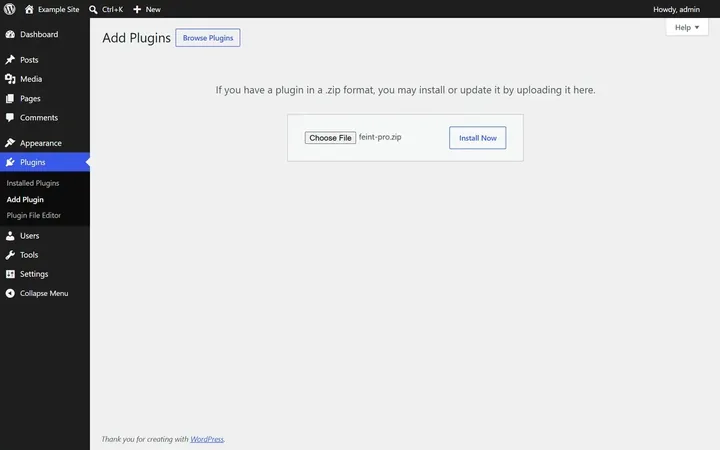
Plugins > Add New > Upload Plugin: choose the wp-feint-pro.zip file from your account, then click Install Now.
Left and right arrow keys: previous or next step.
Plugins > Add New > Upload Plugin: choose the wp-feint-pro.zip file from your account, then click Install Now.
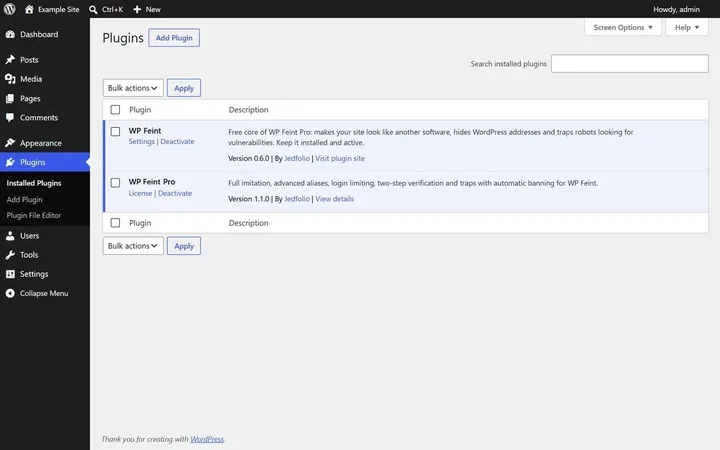
Activate WP Feint and WP Feint Pro, then open the settings with the Settings link.
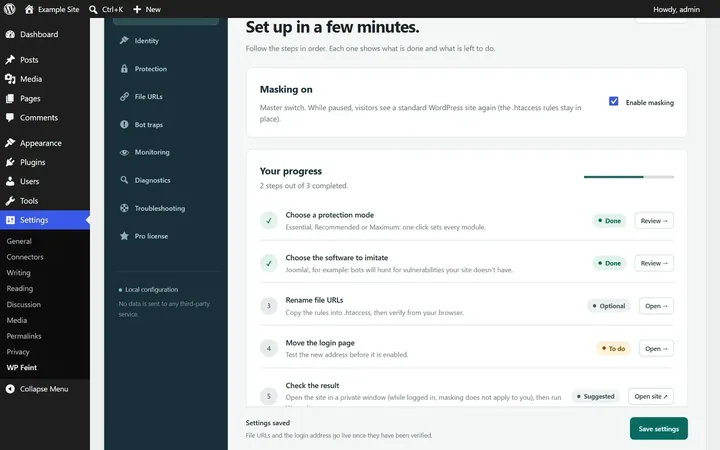
The Getting started tab shows what is done and what is left to do, one step at a time.
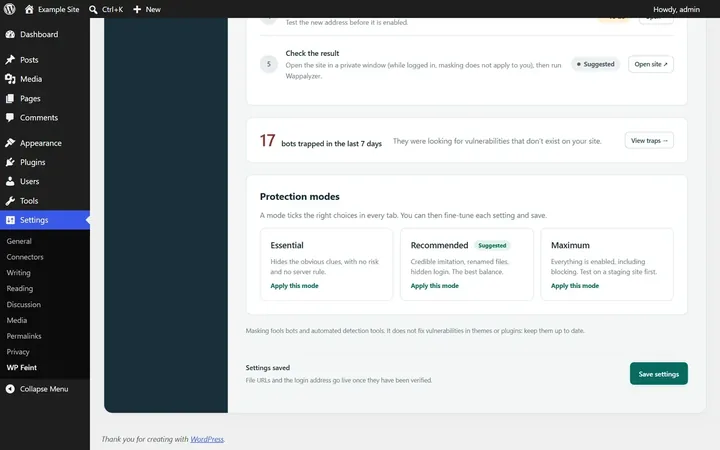
Essential, Recommended or Maximum: one click ticks the right choices in every tab. You can fine-tune each setting afterwards.
Joomla!, for example: bots then hunt for vulnerabilities your site does not have. The look of your site does not change.
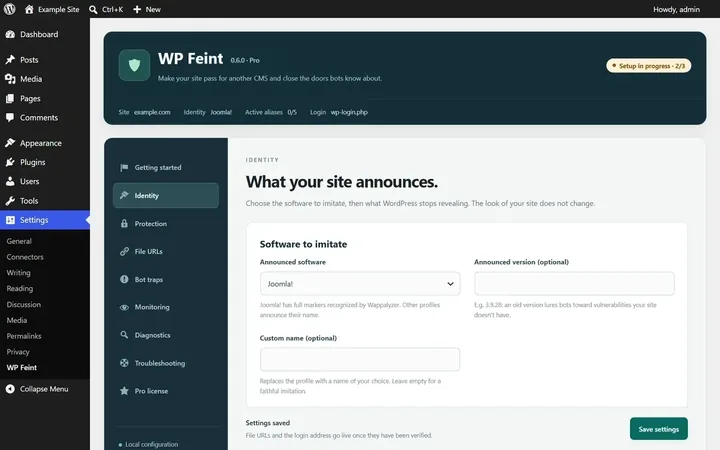
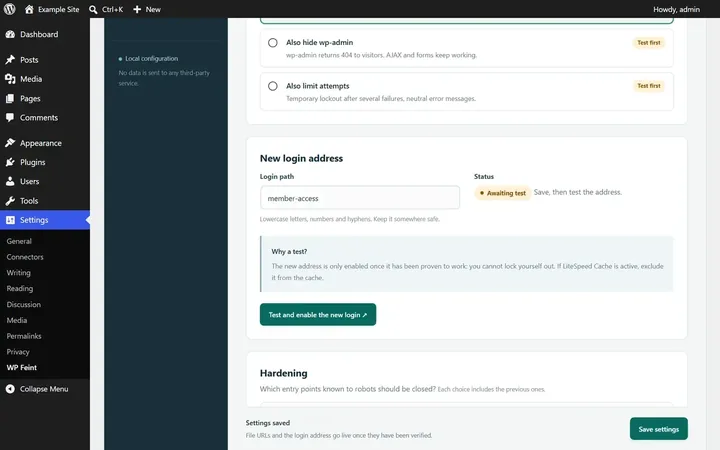
Choose a new login address, then test it: it is enabled only once it has been proven to work, so you cannot lock yourself out.
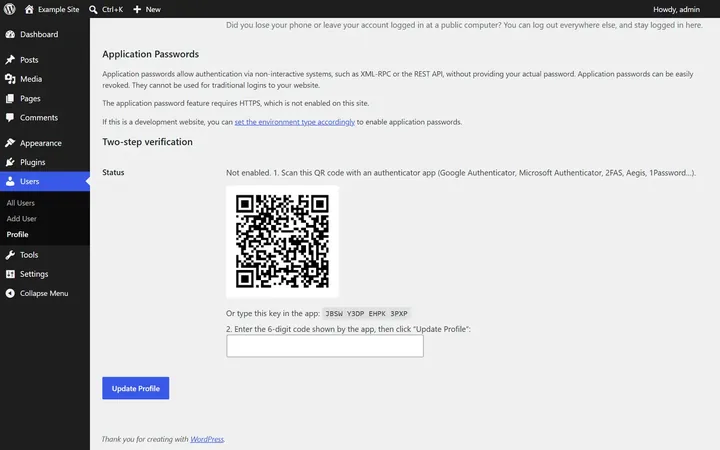
Scan the QR code with an authenticator app, then enter the 6-digit code it shows. A stolen password is no longer enough.
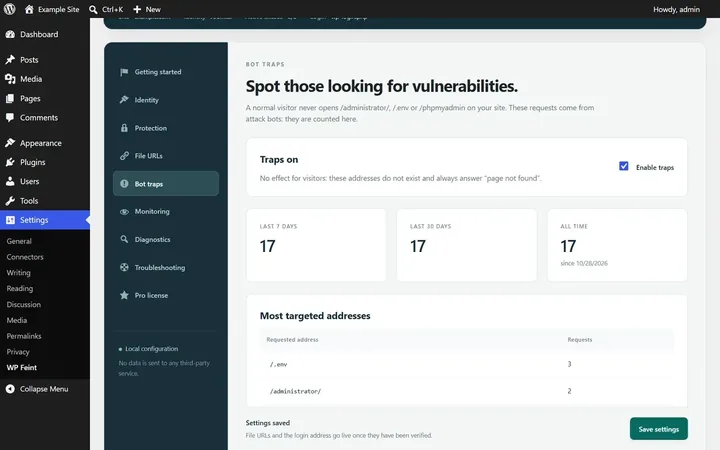
Requests for /.env, /administrator/ or /phpmyadmin come from attack bots: they are counted, with the most targeted addresses.
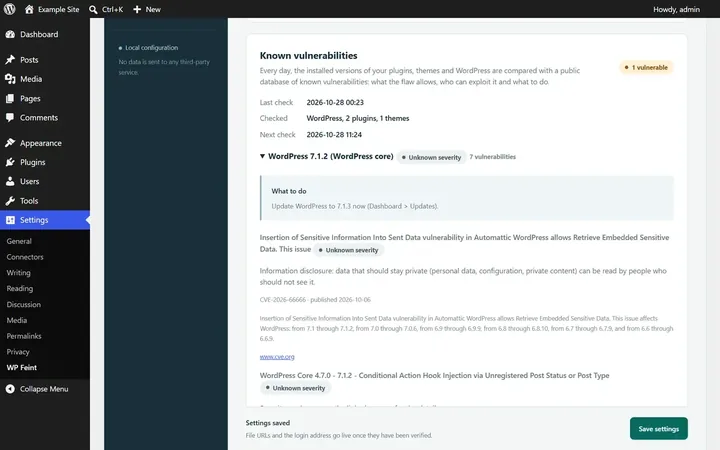
Every day, your plugins, themes and WordPress are checked against a public database of known vulnerabilities, with what to do. Alerts can go by e-mail.
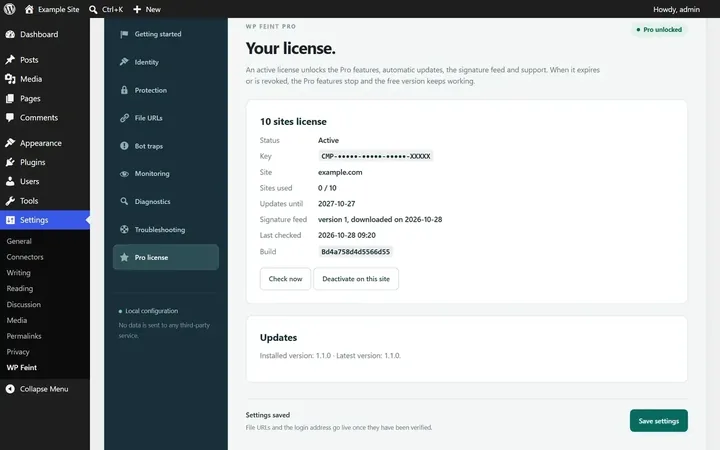
Your licence key unlocks the Pro features, automatic updates and the signature feed. You can check it or move it to another site at any time.
Features
Each module is configured on its own, with choices explained in plain language and a label: “No risk”, “Test first” or “May break links”.
Joomla!, Drupal, PrestaShop, TYPO3 or MediaWiki in the free version; 41 profiles and Wappalyzer markers with Pro.
Free + ProA login URL of your own, tested before it goes live, with wp-login.php and wp-admin returning 404. With Pro: limited attempts and two-factor authentication.
Free + ProPingbacks and XML-RPC blocked; with Pro, the author list is hidden (/?author=, REST API, sitemap).
Free + ProBots looking for /.env or /phpmyadmin get counted; with Pro, persistent ones get banned.
Free + Pro/wp-content/ becomes /assets/ or any name you choose, with each alias verified from your browser.
Pro featureA 6-digit code after the password, backup codes, and enforcement by role.
Pro featureX-Frame-Options, Referrer-Policy, Permissions-Policy; basic CSP and HSTS as options.
Pro featureWordPress core checked daily against the official checksums, weekly report, new-device alert.
Pro featureWhat a bot sees
Before attacking, a bot checks whether it’s dealing with WordPress and which of its doors are open. WP Feint removes those clues.
/wp-login.phppassword guessing/xmlrpc.phpbulk login attempts/?author=1usernames exposed/wp-content/plugins/plugins identifiedA “WordPress” generator tag, telltale paths, the author list: these public clues are how targets get sorted.
WP Feint is not a firewall or an antivirus, and no tool can make a site undetectable. It reduces what bots learn about your site. Updates, backups and strong passwords are still essential. What the plugin doesn’t do
Active monitoring
A hack rarely starts without warning signs: a plugin that becomes vulnerable, password guessing, a modified file. WP Feint Pro shows you these signs every day, without you having to open each dashboard.
WP Feint reduces your site’s exposure and warns you early. It is neither an antivirus that cleans infected files nor a web application firewall: keep off-server backups and pair it with those tools if needed. How day-to-day monitoring works
Who is it for?
Whether you run your own site, your clients’ sites or an online store, every WordPress site is visited by bots looking for an open door.
Blog, media, business site: your audience and your search rankings are your capital. A hack can put a warning next to your site in Google.
What Pro brings to publishers
Dozens of client sites, different plugins on each one: checking everything by hand every day is impossible.
What Pro brings to agencies
WooCommerce store, customer area, forms: an intrusion stops sales and may require you to notify your data protection authority within 72 hours.
What Pro brings to businesses
Getting started
The Getting started tab walks you through it. Until a check has passed, nothing changes for your visitors.
Add WP Feint like any other plugin. The diagnostic detects your server and your cache.
Essential, Recommended or Maximum: one click configures every module, then you choose the software to imitate.
The new login URL is tested before it goes live; with Pro, so is every file alias.
Trapped bots, core integrity, email alerts. If anything goes wrong, one line in wp-config.php suspends everything.
Free or Pro
Pro installs as a single plugin that includes the free version. Already using the free version? Keep it or delete it: your settings are kept.
Hide WordPress and close the most targeted doors.
Everything else: full camouflage, locked-down logins, monitoring.
New in Pro
Features available now, included in every Pro license at no extra cost.
Every Pro site sends its update status to your member area each day: WordPress, plugins, themes, PHP version and known vulnerabilities. Sites that need attention come first.
Pro featureEvery day, your plugins, themes and WordPress version are checked against known vulnerabilities: severity, explanation and the fix to apply.
Pro featureLogins, accounts, plugins, updates and sensitive settings: who did what, and when, with CSV export.
Pro featureSee which sites display your images from your server and the bandwidth they use, then allow, block or protect.
Pro featurePrevent or repair
The cleanup bill is only part of the cost: you also need to find a specialist who is available, stop or slow down your business, win back Google’s trust and, sometimes, notify your data protection authority.
| Item | Repairing after a hack | Preventing with WP Feint Pro |
|---|---|---|
| Cleanup | Public offers that include cleanup: from 229 to 1,250 USD per year depending on the provider and response time (Sucuri, MalCare, Wordfence). | No cleanup included: Pro reduces exposure and alerts you early, from €59 per year excl. tax. |
| Response time | Advertised response times between 1 and 30 hours depending on the plan, often bought in a hurry. | Daily checks and email alerts as soon as a problem is detected. |
| Search rankings | “This site may be hacked” label in Google; review takes from a few days (malware) to several weeks (spam). | Fewer open doors: locked-down login, known vulnerabilities flagged with their fix. |
| Personal data | Notification to the supervisory authority (CNIL in France) within 72 hours when there is a risk to people, and informing the people concerned when the risk is high (GDPR, Articles 33 and 34). | Administrator activity log: who did what, and when. |
| Revenue | To be estimated: online revenue per day × days of disruption, plus the time spent by your team. | 1-site license at €59 per year excl. tax, less than €5 per month. |
Public prices from the official pages of Sucuri (opens in a new tab), MalCare (opens in a new tab) and Wordfence (opens in a new tab); review times from Search Console Help (opens in a new tab); obligations under the GDPR (opens in a new tab). These services do more than cleanup and can complement WP Feint, which does not clean an infected site. Details, sources and an example calculation
Pricing
Every license includes the same Pro features; only the number of sites changes. The 10-site, 50-site and unlimited licenses are designed for agencies and businesses that run several sites. Compare Free and Pro
Your own site, personal or professional.
€59 excl. tax / year
Price excl. tax. VAT not applicable (art. 293 B of the French Tax Code): “TVA non applicable, art. 293 B du CGI”
Most popular
Freelancers and small site portfolios.
€189 excl. tax / year
Price excl. tax. VAT not applicable (art. 293 B of the French Tax Code): “TVA non applicable, art. 293 B du CGI”
Agencies
Agencies and managed service providers.
€499 excl. tax / year
Price excl. tax. VAT not applicable (art. 293 B of the French Tax Code): “TVA non applicable, art. 293 B du CGI”
Lifetime
One payment, no subscription.
€990 excl. tax, one-time payment
Price excl. tax. VAT not applicable (art. 293 B of the French Tax Code): “TVA non applicable, art. 293 B du CGI”
Secure payment by Stripe. License key delivered instantly. Annual licenses can be canceled anytime from your member area. When a license expires, Pro features stop and the free plugin keeps working.
Member area
In “My account”, you’ll find your licenses and their end dates, your purchases and invoices, downloads of the latest version and, above all, the status of each of your sites: pending updates, PHP version, known vulnerabilities. Sites that need attention come first.
Open My account
FAQ
All the answers about installation, licenses and the plugin’s limits.
All questions
No. WP Feint changes what machines read in your pages’ code and headers, not what your visitors see. The only thing that changes is file URLs, and only if you turn on Pro aliases.
No, and no plugin can honestly promise that. WP Feint removes the clues automated tools rely on most; a few traces may remain in some plugins’ files.
No, it complements it. WP Feint has neither a web application firewall nor a malware scanner: it reduces what bots see of your site and locks down the login. Compare WordPress security plugins to choose a combination.
One line in wp-config.php, define('CMS_FEINT_DISABLE', true);, suspends all transformations and reopens wp-login.php.
A 10-site license costs €189 per year excl. tax, less than €19 per site per year; the 50-site license works out at less than €10 per site. In return, the update status of all your sites comes into a single member area, and each site emails you about known vulnerabilities, modified core files or sign-ins from a new device. What Pro brings to agencies
No: WP Feint does not clean infected files. First follow our step-by-step guide to cleaning a hacked WordPress site, or call on a specialist service. Once the site is clean, WP Feint helps close the doors attackers target and spot a new attempt early.
Pro features stop, along with updates, the signature feed and support; the free features keep working, with nothing to reinstall. Your site doesn’t break: an alias map that’s already been verified stays in place, and accounts already using two-factor authentication keep it.
Blog
Recent vulnerabilities, useful settings and best practices, with sources.
Bots request .env, .git or .sql backups on every site. How to test yours in two minutes, what to delete and which Apache or Nginx rules…
An elFinder example file made executable let anonymous visitors take over WordPress sites in 2020. Mechanism, timeline, checks and best practices.
Miracle cure or cover-up? What hiding WordPress really brings, what it does not do, and where it belongs in your security.
The free version already hides WordPress and moves the login page. Pro adds aliases, two-factor authentication and monitoring.