
The idea rests on virtualization: a piece of software called a hypervisor splits one physical server into several independent machines. With KVM, the hypervisor built into the Linux kernel, each virtual machine has, according to its documentation, its own virtualized hardware: network card, disk, graphics adapter. To you, a VPS therefore looks like a complete server that you manage remotely.
How a VPS works
You choose a number of virtual CPUs, an amount of memory and disk space, then an operating system (often a Linux distribution). Once the machine is ready, you connect over SSH with root access: you install whatever you want, such as an Nginx or Apache web server, PHP, MariaDB or Redis.
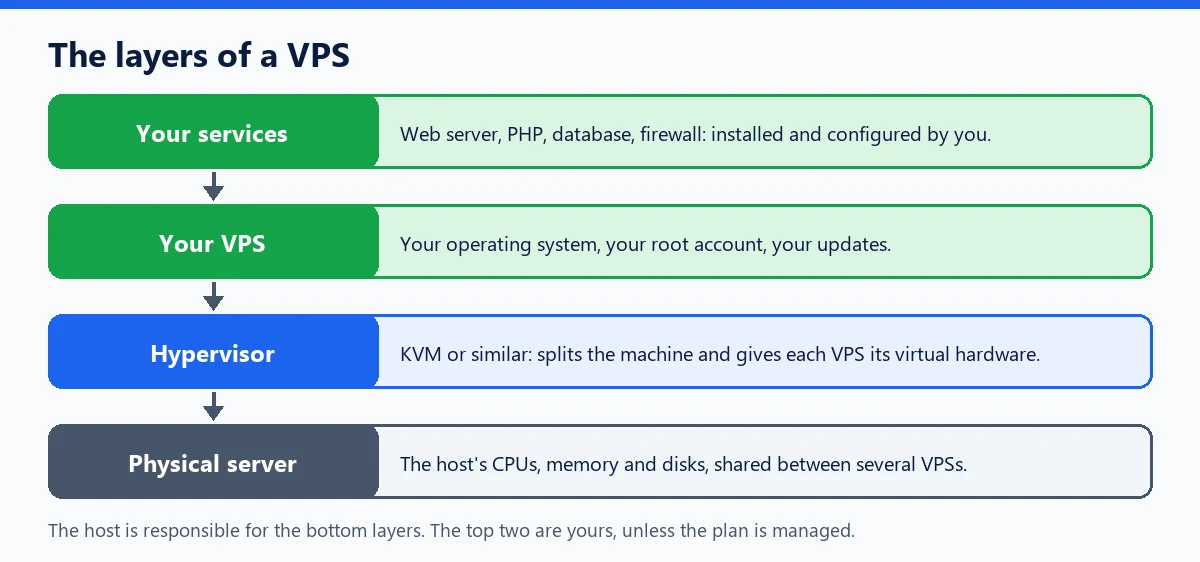
Unlike shared hosting, your resources are reserved and the operating system is yours: no other customer shares your processes or your files. The hardware, however, is still shared. Depending on the plan, a very busy neighbor can still weigh on the disks or the network, which is why it pays to read the host's guarantees.
What you gain, what you manage
- Freedom: your choice of PHP version, modules, web server, scheduled tasks and services such as an object cache.
- Predictable performance: memory and CPU set aside for your machine.
- Responsibility: system updates, firewall, backups, monitoring and incident response. On Ubuntu, for example, the unattended-upgrades package applies security updates automatically once a day, but it replaces neither monitoring nor release upgrades.
If you don't have sysadmin skills, a managed plan hands these tasks to the host or a service provider.
For WordPress
A VPS lets you build a stack tailored to WordPress: Nginx or Apache with PHP-FPM, OPcache, MariaDB and a persistent object cache. A few points not to forget:
- Install a PHP version that is still supported and keep an eye on the PHP end-of-life schedule: on a VPS, nobody will upgrade it for you.
- Apply the PHP hardening settings (disable_functions, open_basedir, expose_php).
- Give each site its own user and its own PHP-FPM pool if you host several.
- Schedule backups off the machine: a snapshot with the same host won't protect you from an account mistake or an incident at the data center.
Common mistakes
Leaving root password login open to the internet, forgetting the firewall, or installing a stack and then never updating it again. Another trap: comparing a VPS and a dedicated server on core count alone, when a VPS's virtual cores may be shared depending on the plan.