A .env file, a .git folder or a .sql backup forgotten at the root of a site can be downloaded with a single request, without any software vulnerability. Bots request them constantly, on every domain. Here you will learn which files to look for, how to test your site in a few seconds and which Apache or Nginx rules block them.
Why these files are so sought after
These files require no exploit: the web server serves them as is, like an image. If one of them contains a password, the attacker no longer needs to guess anything. The most telling example was documented by Palo Alto Networks' Unit 42 team in August 2024: an extortion campaign targeted 110,000 domains simply by requesting http://domain/.env. It harvested more than 90,000 unique variables, about 7,000 of them tied to cloud services, and scanned more than 230 million targets from the victims' own infrastructure.
Unit 42 stresses one point: no vulnerability in the cloud providers was involved. Everything relied on misconfigurations, long-lived credentials and overly broad permissions.
Files to watch on a WordPress site
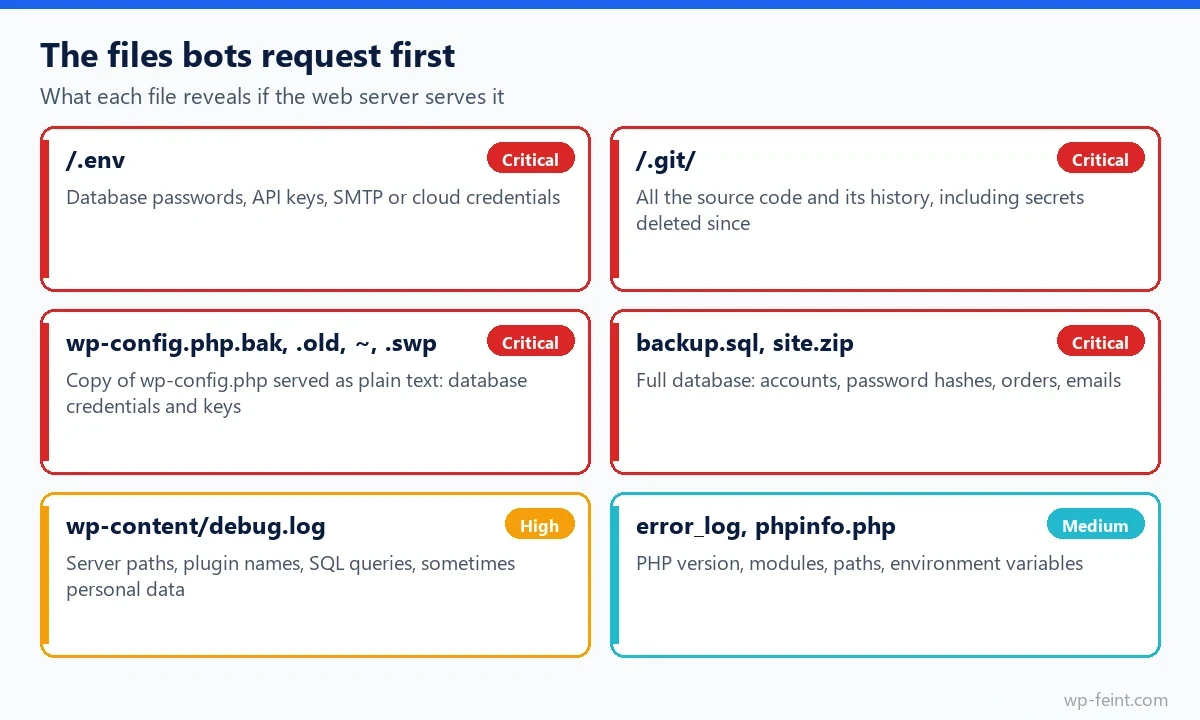
Copies of wp-config.php
The wp-config.php file is protected by nature: the server executes it as PHP and returns nothing from it. Its copies are not. An editor that leaves wp-config.php~ or .wp-config.php.swp behind, a manual backup named wp-config.php.bak or .old: since the extension is no longer .php, the server sends the file as plain text, with the database username and password, plus the keys and salts.
The .git folder
A site deployed with git clone directly into the web root often exposes /.git/. Even without directory listing, open source tools such as git-dumper rebuild the full repository from the Git objects. The history sometimes contains secrets "deleted" long ago but still present in old commits. A simple test: if https://your-site/.git/HEAD returns a line starting with ref:, the repository is exposed.
.sql backups and archives
A database export dropped at the root for a migration, or a site.zip archive left behind after a transfer, contains everything: accounts, password hashes, orders, email addresses. Backup plugins often protect their folder with an .htaccess file, but Nginx ignores those files: on that server, protection depends entirely on the configuration.
The debug.log file
When WP_DEBUG and WP_DEBUG_LOG are set to true, WordPress writes errors to wp-content/debug.log, in a public folder. This log reveals server paths, installed plugins, and sometimes SQL queries or form data. The official documentation advises against using these debugging tools in production, and lets you set a different path for the log.
Diagnostic files
A phpinfo.php created for troubleshooting displays the PHP version, the modules and the environment variables. The error_log files that some hosts create in every folder reveal absolute paths and plugin errors.
Test your site in two minutes
The most reliable method is to request these files yourself, from the outside. The expected response is 403 (forbidden) or 404 (not found). A 200 code means the file exists and is being served.
# Replace example.com with your domain
for f in .env .git/HEAD wp-config.php.bak wp-config.php~ wp-content/debug.log backup.sql; do
  printf '%-25s ' "$f"
  curl -s -o /dev/null -w '%{http_code}\n' "https://example.com/$f"
done
Follow up with a search on the server, since real file names vary (dump-2025.sql, wp-config-old.php.txt, etc.):
# From the site root
find . -maxdepth 3 \( -name "*.sql" -o -name "*.sql.gz" -o -name "*.bak" -o -name "*.old" \
  -o -name "*~" -o -name "*.swp" -o -name ".env" -o -name "phpinfo.php" -o -name "debug.log" \) -print
ls -la .git 2>/dev/null
The OWASP testing guide (WSTG-CONF-04) recommends the same approach: look for old versions, backups and unreferenced files, because they slip past the usual checks.
Delete first, block second
A blocking rule protects you, but a file that is not there cannot leak, even after a future configuration mistake. The logical order:
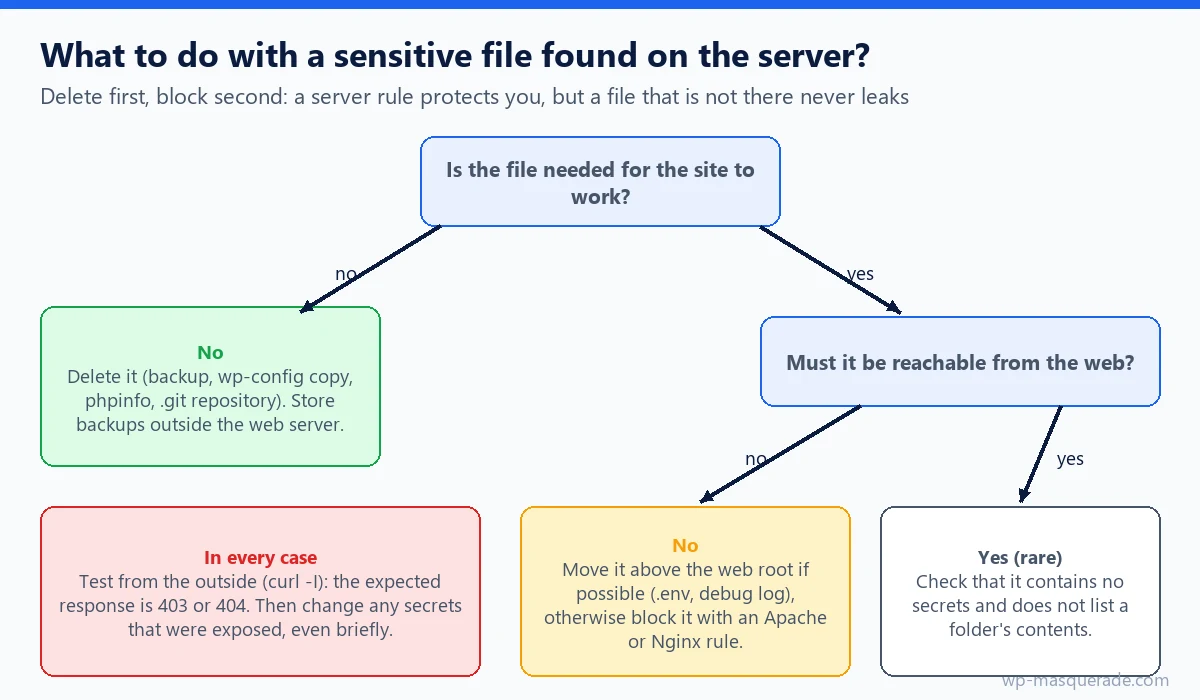
- Delete backups, SQL exports, configuration copies and
phpinfo.php. Store backups outside the web server, ideally off the server altogether. - Move what has to stay: a
.envbelongs above the web root; the debug log can be redirected withdefine( 'WP_DEBUG_LOG', '/home/account/logs/wp-debug.log' );. - Deploy without .git: use an export (
git archive, rsync with exclusions) rather than a clone in the web root. - Change any secrets that were exposed, even for a few hours: database password, keys and salts in
wp-config.php, API keys. Deleting a file does not make what has already been downloaded confidential again.
Server-side blocking rules
The default configuration shipped with Apache 2.4 already denies .ht* files (such as .htaccess and .htpasswd), but not .env or .git. Nginx's sample configuration only contains a commented-out rule for .ht. You therefore need to add your own rules.
Apache and LiteSpeed (.htaccess at the root)
# Hidden files and folders (.env, .git, .svn...), except /.well-known/
RedirectMatch 404 /\.(?!well-known/)

# Backups, exports, logs and editor copies
<FilesMatch "(\.(sql|sql\.gz|bak|old|orig|save|swp|log)|~)$">
    Require all denied
</FilesMatch>
Nginx (server block, before the other regular expression location blocks)
location ~ /\.(?!well-known/) { deny all; }
location ~* (\.(sql|sql\.gz|bak|old|orig|save|swp|log)|~)$ { deny all; }
The /.well-known/ folder stays accessible because it is used, among other things, for Let's Encrypt certificate validation. Avoid adding .zip to the list if your site offers archives for download: delete backup archives instead. After each change, run the curl test above again.
| File or pattern | Recommended action | Fallback rule |
|---|---|---|
.env | Move above the web root | Hidden files rule |
.git/, .svn/ | Deploy without the repository | Hidden files rule |
wp-config.php.bak, ~, .swp | Delete, then change the secrets | Copy extensions rule |
*.sql, *.sql.gz | Delete, store backups elsewhere | Copy extensions rule |
wp-content/debug.log | Disable debugging or move the log | .log rule |
phpinfo.php | Delete after use | None: do not leave the file in place |
Turn off directory listing too
A folder without an index file can display a list of its contents if automatic listing is enabled. That is how archives with unpredictable names end up indexed. On Apache, add Options -Indexes to the root .htaccess (if your host allows this directive). On Nginx, the autoindex directive is off by default: just check that no block turns it on.
If a file has leaked: what to do
Finding a 200 code on /.env or on a backup does not tell you whether anyone downloaded it. The access logs answer that question:
# Who got a 200 response for these files? (adjust the log path)
grep -E '"GET /(\.env|\.git/|[^ "]*\.(sql|bak|old))[^"]*" 200' /var/log/apache2/access.log*- Delete or block the file, then check with
curlthat it returns 403 or 404. - Change the database user's password with your host, then in
wp-config.php. - Regenerate the keys and salts in
wp-config.php(the official generator is at api.wordpress.org/secret-key/1.1/salt/): all sessions are then closed. - Revoke and recreate the API keys stored in the file: payment gateway, email service, cloud storage.
- If a database backup leaked, treat customer accounts and data as exposed: reset passwords and, depending on the contents, assess whether the GDPR notification obligation applies.
See who is looking for these files on your site
WP Feint's bot traps count, starting with the free version, requests for sensitive files that do not exist on your site, such as /.env, /phpmyadmin or .sql and .bak backups. A page that really exists is never counted, and neither are logged-in visitors. With the Pro version, a detailed log keeps requests for 30 days with a truncated IP address, and bots are banned automatically after three traps by default.
This counting does not replace cleanup: a file that is really present is still served by the server. What it does show you, with numbers, is that these requests really do reach your site. The hardening rules round out the setup.
Read also: Understanding WordPress errors and debugging your site.
Key takeaways
- A .env, .git or .sql file, or a copy of wp-config.php, can be downloaded without any vulnerability: the server serves it like an image.
- Test your URLs with curl: only 403 and 404 are acceptable.
- Delete or move first, then block with RedirectMatch (Apache) or location (Nginx).
- Any secret that was exposed, even briefly, must be changed.
Sources
- WordPress Developer Resources: Debugging in WordPress (opens in a new tab)
- OWASP WSTG-CONF-04: Review Old Backup and Unreferenced Files for Sensitive Information (opens in a new tab)
- Apache HTTP Server: RedirectMatch directive (mod_alias) (opens in a new tab)
- Nginx: location directive (opens in a new tab)
Other sources consulted: official vendor pages and security research publications.