o2switch is one of the most popular shared hosting providers for WordPress in France, with an in-house technical stack that combines performance and security. You still need to know what each component actually protects, and what remains your responsibility. This article reviews TigerProtect, PowerBoost and JetBackup backups, then covers best practices on the WordPress side, including a compatibility point worth knowing about.
The o2switch protection stack
On its hosting plan, o2switch stacks several layers, from network defense to an application-level antivirus. Knowing them helps you understand what is already covered.
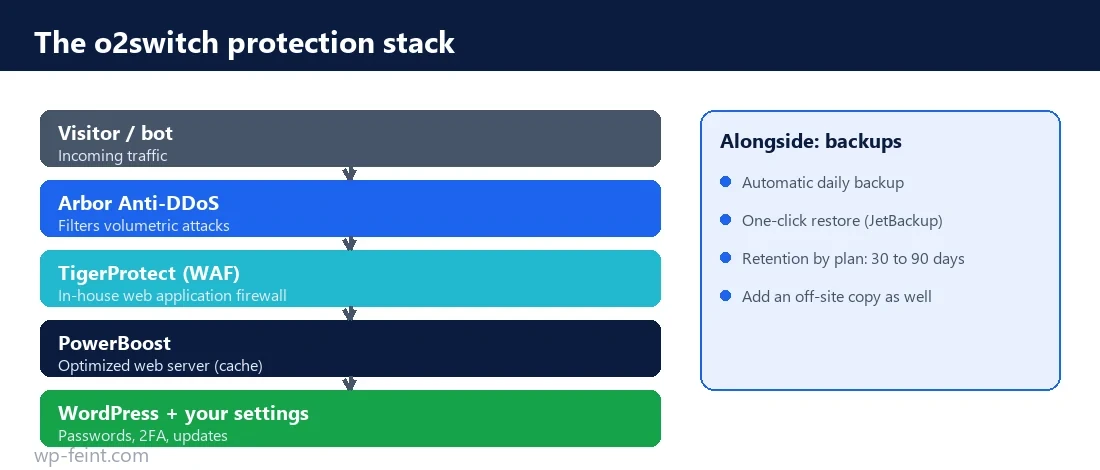
- Arbor Anti-DDoS protection. It filters volumetric attacks upstream, before they reach your site. It is a network defense, useful against saturation, but it does not replace application security.
- TigerProtect. According to o2switch, it is an exclusive web firewall based on OpenResty, presented as filtering more than 99% of attacks. It acts on HTTP requests and blocks a large number of automated probes.
- PowerBoost. This is o2switch's in-house, performance-oriented web server. Strictly speaking it is not a security tool, but its presence changes the way some requests are served, which has practical consequences, as we will see.
- ImunifyAV+ PHP antivirus. It scans files for known malicious code, which is useful for spotting an infection after the fact.
This stack is solid for shared hosting. But none of these layers fixes a vulnerable plugin, chooses your passwords or turns on two-factor authentication. WordPress application security remains your responsibility.
JetBackup backups
o2switch makes several backups of your data every day, sent to another data center, and manages them through the JetBackup tool built into cPanel. The retention period depends on the plan.
| Plan | Backups | History kept |
|---|---|---|
| Grow | Daily | 30 days |
| Cloud | Daily | 45 days |
| Pro | Daily | 90 days |
This is a real convenience: restoring takes a few clicks from cPanel. But these backups do not exempt you from keeping one under your own control. They are managed by the host, limited in time and tied to your account. An off-site copy with another provider is a useful addition and follows the logic of the 3-2-1 rule, which we cover in another article.
Best practices on the WordPress side
With the host's protection in place, your work focuses on what it does not cover.
- Keep core, themes and plugins up to date, and remove whatever you do not use.
- Turn on two-factor authentication, at least for administrators.
- Limit login attempts to counter brute force and credential stuffing.
- Get file permissions right and never allow PHP execution in the uploads folder.
- Check the integrity of core files regularly to spot a suspicious change.
A handy o2switch tool is WP Tiger, available from cPanel, which lets you manage and monitor your WordPress sites. It makes it easier to keep track of updates, a central part of security.
A compatibility point to know about with TigerProtect
TigerProtect protects effectively, but its vigilance can be surprising. While the o2switch mode of WP Feint was being developed, a specific behavior was observed and documented: TigerProtect rejects requests that a site sends to itself when they carry a user agent of the WordPress/... type. The response is then a 429 status code, along with a Tiger-Protect-Security header.
This observation, made on October 26, 2026 on a site hosted with o2switch, is not a defect: it is a security measure that blocks certain self-requests. But it has a concrete consequence. A tool that checks its own settings by querying the server from WordPress can fail, not because the configuration is wrong, but because the request is filtered. That is why WP Feint, in its o2switch mode, checks its file aliases from the browser rather than through a server-to-server request. If you automate checks on an o2switch site, keep this in mind.
WP Feint on o2switch
WP Feint explicitly supports o2switch and its PowerBoost server. Compatibility with hosts and caches includes a dedicated mode that takes the platform's behavior into account, notably for rewriting file addresses and purging the LiteSpeed cache when it is present. The plugin's files (readme, translations) are made invisible to scanners thanks to server rules tailored to Apache, LiteSpeed and o2switch.
Its role complements the o2switch stack. TigerProtect filters known malicious requests; WP Feint reduces the clues that identify your site as WordPress, limits login attempts and adds two-factor authentication. One works at the hosting level, the other at the application level. Together, they reduce the exposed surface without competing with each other.
Responding to an infection
Even when well protected, a site can be compromised, often through a vulnerable plugin rather than the hosting itself. On o2switch, a few habits help you respond quickly.
- Run an ImunifyAV+ scan from cPanel to spot files recognized as malicious. The antivirus only detects known code, but it is a useful first filter.
- Review the access logs to identify the entry point and the period involved.
- Restore a backup from before the infection through JetBackup, choosing a date when the site was clean. This is where retention over several weeks really pays off: if the compromise dates back ten days, a backup from the day before would already be infected.
- Change the secrets after restoring: account passwords,
wp-config.phpkeys, database access.
This ability to go back in time shows why the retention period varies between plans. Thirty days is enough for a simple site that is closely monitored; a store or a high-traffic site benefits from the forty-five or ninety days of the higher plans, because a stealthy intrusion can go unnoticed for several weeks.
A clear division of responsibilities
The most common mistake is believing that a good host removes the need for any vigilance. In reality, security on a shared site is shared: the host protects the infrastructure, the network and the server, while you remain responsible for the application, meaning WordPress, its plugins, its accounts and its settings. TigerProtect will block many malicious requests, but it will not choose a strong password for you or turn on two-factor authentication. Keeping this boundary in mind avoids unpleasant surprises.
Key takeaways
- o2switch stacks Arbor Anti-DDoS, the TigerProtect firewall, the PowerBoost server and the ImunifyAV+ antivirus.
- JetBackup backups are daily and kept for 30 to 90 days depending on the plan, but keep an off-site copy too.
- No layer at the host fixes a vulnerable plugin or replaces two-factor authentication.
- TigerProtect can block self-requests carrying a WordPress user agent (status 429): something to know for verification tools.