In a WordPress site's logs, /xmlrpc.php is almost always among the most requested URLs, and rarely by legitimate visitors. This file dates from a time when people published from desktop software. Here you will learn what it still does, what risks it really poses in 2026, what closing it breaks and how to do it properly.
Quick definition: XML-RPC. Ready-made solution: WordPress hardening with WP Feint.
What xmlrpc.php is for
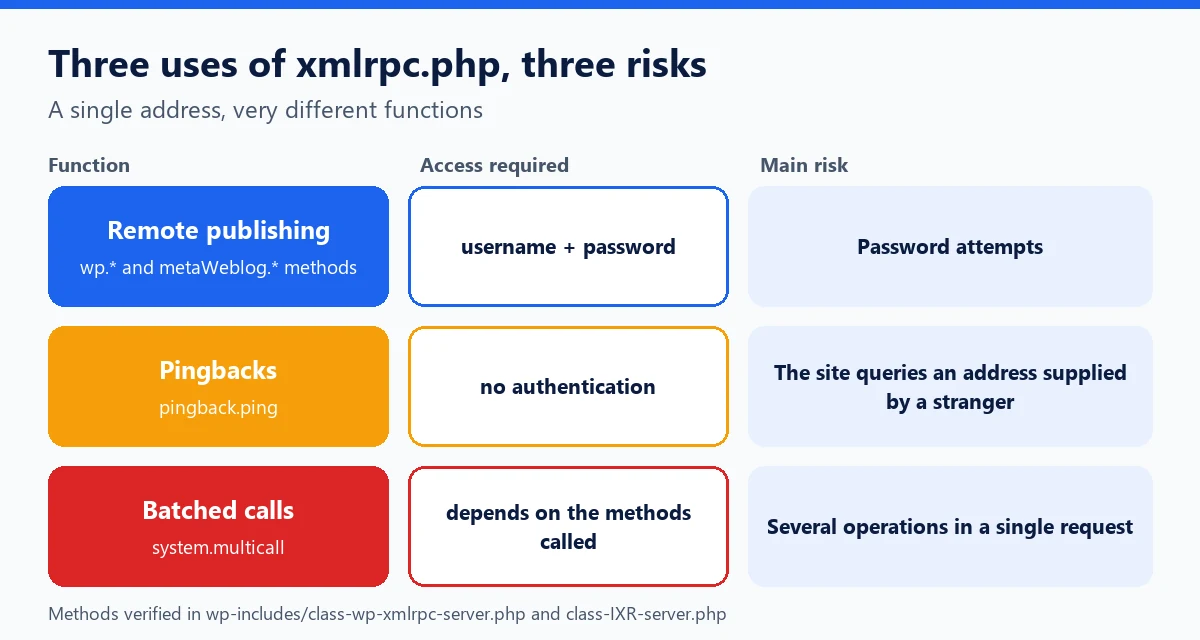
XML-RPC is a remote procedure call protocol: a program sends an XML request to xmlrpc.php naming a method, WordPress runs it and replies in XML. It is enabled by default on every WordPress installation. Its main uses are:
- publishing and editing content from an external app or program (
wp.*,metaWeblog.*,blogger.*methods); - receiving pingbacks, the notifications another blog sends you when it links to you (
pingback.pingmethod); - running certain connected services, in particular Jetpack, whose documentation states that the connection with WordPress.com depends on
xmlrpc.php.
Since WordPress 4.7, the REST API covers most of these needs with a more modern interface. A ticket in the WordPress development tracker (#62789) even calls XML-RPC a "legacy" API, while noting that it was still used by the WordPress mobile apps for Android and iOS at the time it was written.
The real risks
A second door for passwords
The publishing methods accept a username and password with every request. A bot can therefore test passwords on xmlrpc.php exactly as it would on wp-login.php, without loading a page or a cookie. The official WordPress documentation lists xmlrpc.php as a frequent brute force target.
system.multicall: yesterday's amplification
XML-RPC lets you bundle several calls into a single request using system.multicall. In October 2015, Sucuri described attacks that used this mechanism to test hundreds of passwords per HTTP request, which bypassed protections that counted requests.
WordPress responded in version 4.4 (ticket #34336): as soon as one authentication fails within an XML-RPC request, all subsequent ones in the same request fail too. The current code still shows this with an auth_failed flag. On an up-to-date WordPress, password-guessing amplification therefore no longer works: each request is worth only one useful attempt. The mechanism nonetheless remains a source of load, and firewalls often block it as a precaution, since it is very rarely used legitimately.
Abused pingbacks
When it receives a pingback, WordPress fetches the source page to check that it really contains a link to you. This check is done without authentication, from a URL supplied by the sender: your server will therefore query an address chosen by a stranger. This is the basis of reflection denial of service. In March 2014, Sucuri reported an attack in which more than 162,000 legitimate, non-hacked WordPress sites were used to send mass requests to a single victim through pingbacks.
The current WordPress code mitigates the original abuse by announcing the IP address that triggered the pingback, in the user agent and in an X-Pingback-Forwarded-For header: the victim can then filter it. This does not eliminate the request itself.
| Risk | Still relevant? | Defense |
|---|---|---|
| Password attempts | Yes | Application passwords, two-factor authentication, closing it if unused |
| Amplification via system.multicall | Greatly reduced since WordPress 4.4 | Blocking system.multicall at the firewall |
| Pingback reflection (denial of service) | Yes, the site acts as a relay | Removing the pingback.ping method |
| Server load from bots | Yes | Blocking at the server or CDN level |
What closing it breaks
Closing XML-RPC has no effect on most sites, but not on all of them. Before you cut it off, check:
- Jetpack: its connection to WordPress.com goes through
xmlrpc.php. Jetpack recommends allowing only its published IP addresses rather than leaving the file open to everyone. Some hosts (Pantheon, Flywheel, some WP Engine environments) already block this file by default. - Publishing apps: mobile apps, writing software or automated publishing tools configured with a username and password.
- Incoming pingbacks: you will no longer receive link notifications.
- Some older-generation remote management tools. Recent tools generally go through the REST API or their own plugin.
| Method | What it cuts off | What it leaves | Load avoided |
|---|---|---|---|
xmlrpc_enabled filter set to false | Authenticated methods | Pingbacks and other unauthenticated methods | None: PHP processes every request |
xmlrpc_methods filter | The removed methods (for example pingback.ping) | Everything else | None |
| Blocking in the security plugin | The whole file | Nothing | Low: WordPress still loads |
| Server or CDN rule | The whole file, before PHP | Any exceptions by IP address | Maximum |
A commonly misunderstood point: despite its name, the xmlrpc_enabled filter does not disable XML-RPC. Its own comment in the WordPress code states that it only controls methods that require authentication, not pingbacks.
The right method for your site
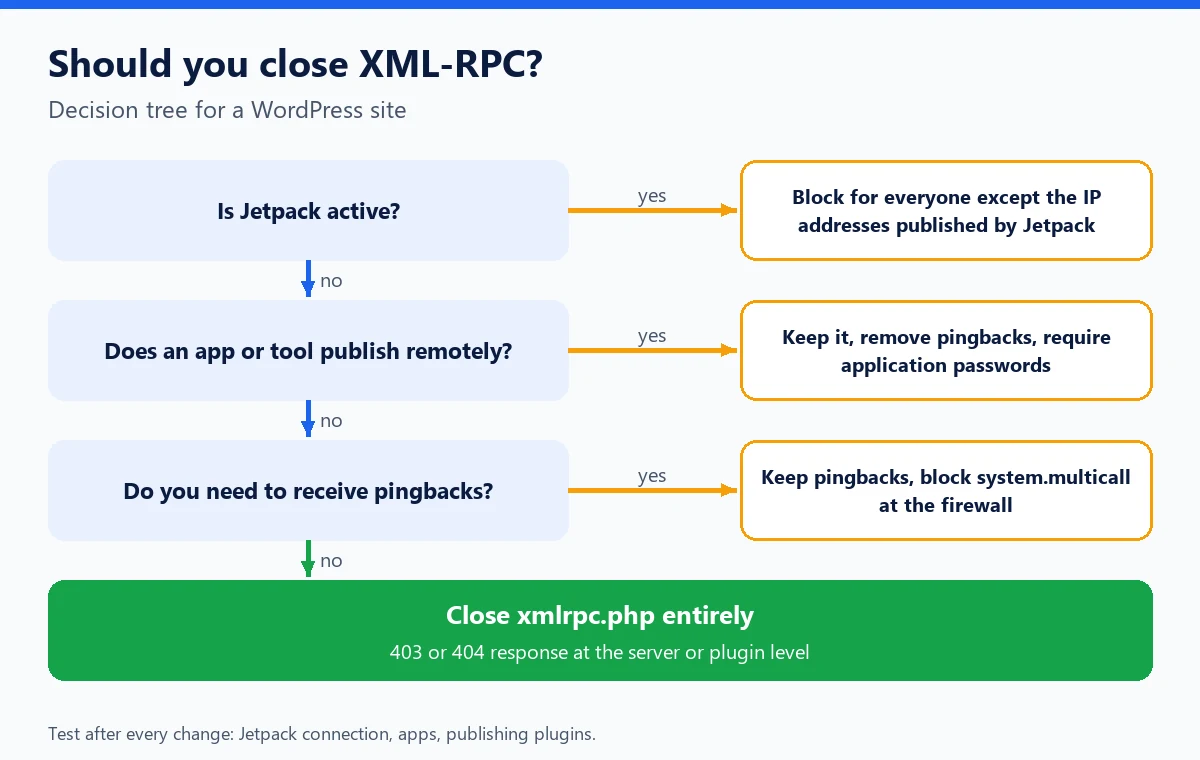
- No use (the most common case): block
/xmlrpc.phpat the server or CDN level. On Apache and LiteSpeed, a<Files "xmlrpc.php">block withRequire all denied; on Nginx, alocation = /xmlrpc.phpwithdeny all;. - Jetpack only: the same block, with an exception for the IP addresses published by Jetpack.
- An app publishes remotely: keep XML-RPC, remove
pingback.pingand use application passwords, available since WordPress 5.6 on HTTPS sites. They can be revoked one by one and cannot be used to log in to the Dashboard. - You want to keep pingbacks: keep the file, but block
system.multicallat the firewall and enable two-factor authentication on the accounts that publish.
After the change, test in a private window: /xmlrpc.php should respond with 403 or 404, and the Jetpack connection (Tools, Site Health) should remain valid if you use it.
With WP Feint
The free plugin Feint Security handles XML-RPC in its Hardening module. The first level removes the pingback methods and adds the nosniff header. The next level blocks xmlrpc.php with a 404 response, with a warning that some mobile apps and remote integrations may stop working. Requests to this closed URL are counted by the bot traps. With WP Feint Pro, an account protected by two-factor authentication accepts only application passwords on XML-RPC and the REST API. The blocking is still done by WordPress: to remove the load as well, add a server or CDN rule. Turning off pingbacks also stops pingback spam, but not comment spam, which calls for a WordPress anti-spam plugin.
Key takeaways
xmlrpc.phpis enabled by default; most sites no longer need it.- Amplification through
system.multicallhas been neutralized since WordPress 4.4, but password attempts and abused pingbacks remain possible. - The
xmlrpc_enabledfilter only disables authenticated methods, not pingbacks. - Before closing it, check Jetpack and your publishing apps.
- A server or CDN rule is the only way of closing it that also avoids the load.
Sources
- WordPress Developer Resources: Brute Force Attacks (opens in a new tab)
- WordPress Trac: ticket #34336 (system.multicall stops after the first failure) (opens in a new tab)
- WordPress Trac: ticket #62789 (application passwords and XML-RPC) (opens in a new tab)
- WordPress Developer Resources: Application Passwords (opens in a new tab)
Other sources consulted: official vendor pages, security research publications and trade press articles.