Every public WordPress site receives automated login attempts, often from the day it goes live. Most of them fail, but they eat up resources, and a single weak or reused password is all it takes for one to succeed. This article explains the three main variants of the attack, how to spot them in your logs and which protections actually change the outcome.
Quick definition: Brute-force attack. Ready-made solution: WordPress brute force protection with WP Feint.
What exactly are we talking about
The official WordPress documentation defines a brute force attack as an automated, repeated attempt at username/password pairs until one works. It makes two points that are often overlooked: these attacks usually come from networks of compromised machines (botnets), and therefore from a very large number of addresses, and even when they fail, they can overload the server.
The scale is documented. In its 2024 annual report, Wordfence says it blocked more than 55 billion password attack attempts (brute force, credential stuffing and their variants), coming from nearly 136 million distinct IP addresses. The same report notes a steady decline in these attacks over the year, which it partly attributes to hosting provider protections and better password practices. Less frequent does not mean harmless: they remain the background noise of every WordPress site.
The three variants to know
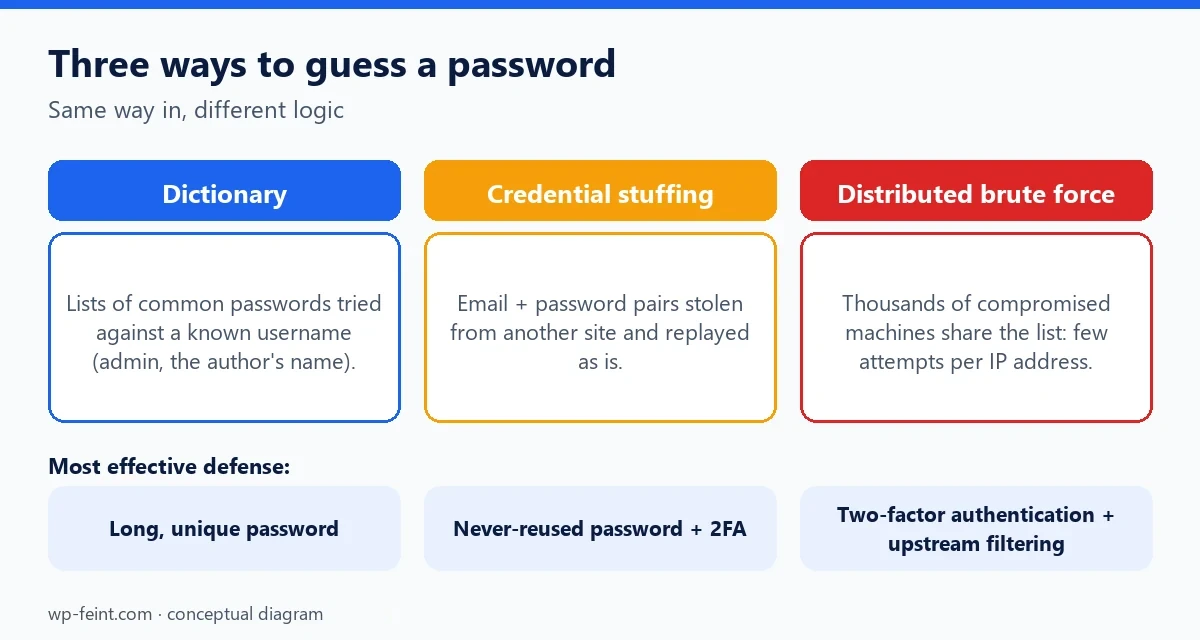
The dictionary attack
The bot tries lists of common passwords against a username it believes is valid: admin, the site name or the name of an author found on the site. It is the oldest form and the least effective against a long, random password. It still works against short passwords, variations of the site name, or dictionary words followed by a year.
Credential stuffing
Here, no password is guessed. OWASP describes credential stuffing as the automated injection of username/password pairs stolen in breaches of other services. If an administrator uses the same password for their WordPress account and for a service that was breached, the attacker gets in on the first try. No complexity rule protects against this: only a password that is never reused, plus two-factor authentication, neutralizes it.
Distributed brute force
Botnets split the list across thousands of addresses. Each address makes only a few attempts, sometimes several minutes apart. A simple "5 failures, then block the address" rule stops some of them, but not all. That is why effective protections combine several layers, from the server down to the account.
| Variant | What the attacker has | Signal in the logs | What stops it |
|---|---|---|---|
| Dictionary | A likely username, a list of passwords | Many failures from a few addresses | Long, unique password, attempt limiting |
| Credential stuffing | Pairs stolen elsewhere | Few attempts per account, often email addresses | Password never reused, two-factor authentication |
| Distributed | A botnet | Failures scattered across thousands of addresses | Upstream filtering (firewall, CDN), two-factor authentication |
Why wp-login.php and xmlrpc.php
Two files accept a username and password without going through an intermediate HTML page.
/wp-login.php: the standard login page. Its address is the same on every WordPress site, so a bot has nothing to look for./xmlrpc.php: the XML-RPC interface, historically used by remote publishing apps. The WordPress documentation calls it a frequent brute force target and advises disabling it if you do not use it. We cover this topic in detail in a dedicated article on XML-RPC.
A third factor helps the attacker: knowing the username. By default, the WordPress error message distinguishes an unknown username ("is not registered on this site") from an incorrect password for an existing username. This behavior is visible in the code of wp-includes/user.php. Combined with the other ways of enumerating accounts, it lets the bot focus its attempts on real usernames.
What you see in your logs
The server access log (Apache, Nginx or LiteSpeed, often available in your hosting control panel) is the best witness. An attack looks like this (documentation addresses, reserved for examples):
203.0.113.24 - - [12/Oct/2026:03:14:07 +0200] "POST /wp-login.php HTTP/1.1" 200 4512 "-" "Mozilla/5.0 ..."
198.51.100.9 - - [12/Oct/2026:03:14:09 +0200] "POST /xmlrpc.php HTTP/1.1" 200 412 "-" "Mozilla/5.0 ..."
203.0.113.77 - - [12/Oct/2026:03:14:12 +0200] "POST /wp-login.php HTTP/1.1" 200 4512 "-" "Mozilla/5.0 ..."
The key is the response code. A failure on wp-login.php returns a 200 status: the page redisplays the form with the error message. A successful login returns a 302 redirect to the admin area (the wp_safe_redirect() function, whose default status is 302). On xmlrpc.php, a failure is also a 200 status: the error is in the body of the XML response.
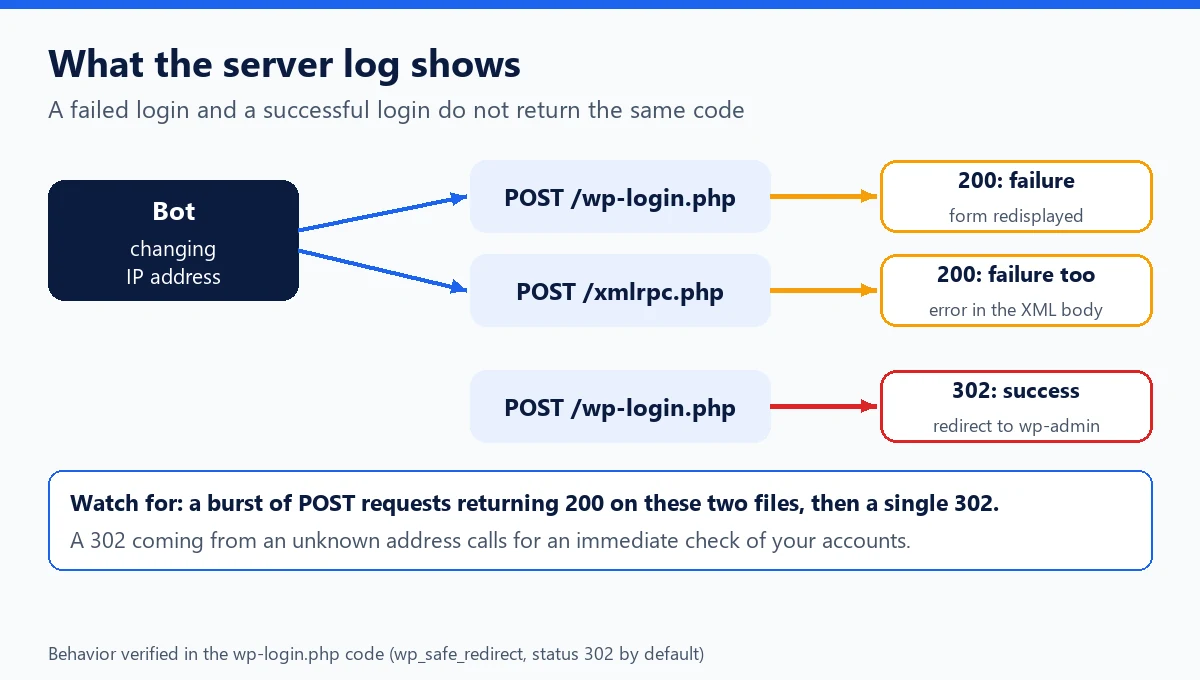
To read a log quickly, look for:
- a large number of
POSTrequests to/wp-login.phpor/xmlrpc.phpin a short time; - identical user agents on very different addresses;
- a
302after a series of200responses, especially if it comes from an address you do not recognize; - spikes in CPU load or PHP memory at the same times.
A suspicious 302 is reason enough to check right away the list of administrator users, the latest logins and any recently installed plugins.
Defenses, in order of effectiveness
No single measure is enough, but they do not all carry the same weight.
- Long, unique passwords managed by a password manager. The NIST guidelines (SP 800-63B-4, August 2025) require at least 15 characters for a password used on its own, checking against a list of compromised passwords, and dropping forced periodic changes.
- Two-factor authentication, at least for administrators. The WordPress documentation points out that core does not provide it: you need a plugin or an identity provider. With it, a guessed or stolen password is no longer enough.
- Limiting attempts per IP address, to slow down dictionary attacks. It has limits against botnets and proxies, which we detail in our article on limiting login attempts.
- Upstream filtering: the host's firewall, a CDN or server rules that rate-limit
wp-login.phpandxmlrpc.php. The WordPress documentation notes that blocking at the application level still consumes PHP on every request, whereas upstream filtering also protects the server load. - Close what you do not use: XML-RPC if no app relies on it, and no account named
admin. - Change the login URL: it does not protect a weak password, but it removes a lot of noise from the logs and reduces the load.
One reassuring point: since WordPress 6.8, user passwords are hashed with bcrypt instead of phpass. This changes nothing for online attempts against the form, but it makes cracking the hashes much more expensive if the database is stolen.
| Measure | Against dictionary attacks | Against credential stuffing | Against server load |
|---|---|---|---|
| Long, unique password | Yes | Yes (if never reused) | No |
| Two-factor authentication | Yes | Yes | No |
| Attempt limiting per IP | Largely | Partially | Slightly |
| Upstream filtering (firewall, CDN) | Partially | Partially | Yes |
| Custom login URL | Reduces noise | Reduces noise | Yes, for wp-login.php |
With WP Feint
The free plugin Feint Security lets you set a custom login URL and close wp-login.php to anonymous visitors once the new address has been tested, as well as block XML-RPC and pingbacks. The bot traps count requests to these closed addresses, which gives you a concrete measure of the noise avoided. WP Feint Pro adds login attempt limiting per IP address and two-factor authentication enforced by role. None of these features replaces a unique password: they reduce exposure and the cost of an attack.
Key takeaways
- Brute force attacks mainly target
wp-login.phpandxmlrpc.php, from thousands of addresses. - Credential stuffing succeeds on the first try if a password is reused: complexity is not enough.
- In the logs, a failure returns 200 and a successful login returns 302.
- Priorities: a long, unique password, two-factor authentication for administrators, then attempt limiting and upstream filtering.
Sources
- WordPress Developer Resources: Brute Force Attacks (opens in a new tab)
- OWASP: Credential stuffing (opens in a new tab)
- NIST SP 800-63B-4: Authentication and Authenticator Management (August 2025) (opens in a new tab)
- Make WordPress Core: WordPress 6.8 will use bcrypt for password hashing (opens in a new tab)
Other sources consulted: official vendor pages and Wordfence database.