On modest shared hosting, a malware scanner that runs on the server can slow the site down, or even stop for lack of resources. MalCare gets around the problem: the scan is done on its own servers. On the other hand, it lacks everything related to keeping the site discreet and to its entry points, which is what WP Feint does. This article presents MalCare in detail, what the pair covers and how to split the shared features.
Disclosure: this article is published by the WP Feint team. MalCare does not pay us and we use no affiliate links. The information about MalCare comes from its wordpress.org page, its pricing page and the code of plugin version 6.76.
MalCare in detail
The MalCare plugin has more than 100,000 active installations on wordpress.org (version 6.76 of September 17, 2026). It works with MalCare’s servers, which do most of the processing: you therefore need a MalCare account, the same one as for BlogVault, the backup tool from the same developer.
Scanning off the server
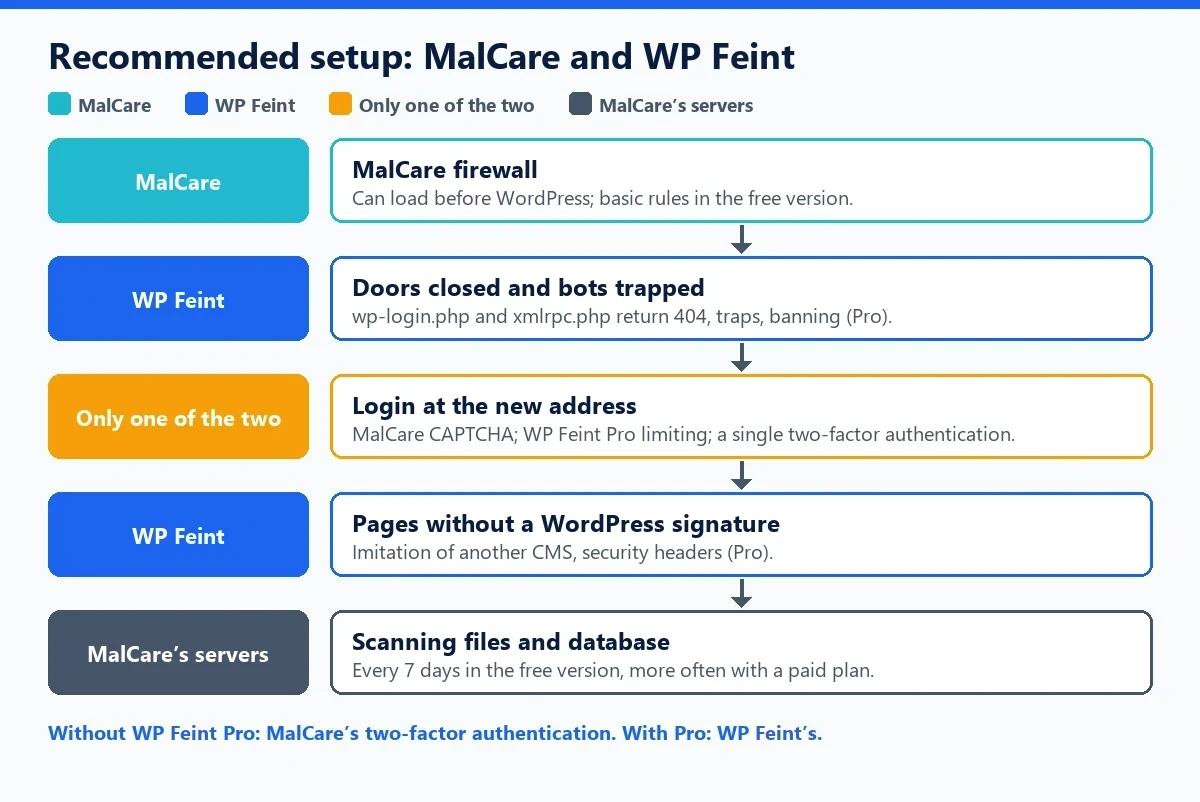
The scanner examines files and the database, including files that do not belong to WordPress, with no scanning load on your hosting. In the free version, it runs every 7 days and reports infections without removing them. The Repair and Fortify plans add instant one-click cleanup, and Fortify adds unlimited manual fixes by the MalCare team.
The firewall and the login
- Firewall in the plugin: basic in the free version, with rules updated every 7 days according to wordpress.org; custom rules and OWASP protection from Protect up, real-time updates from Repair up. According to its code, it can load before WordPress through a
malcare-waf.phpfile. - Login page protection with CAPTCHA and bot protection, free.
- Two-factor authentication for 2 administrators in the free version, 5, 15 or all depending on the plan.
- Vulnerability alerts in all plans.
- Paid: country blocking, activity log (7 or 60 days), one-click hardening (blocking PHP execution in unsafe folders, disabling the file editor, blocking plugin installation, changing the security keys, resetting passwords).
| Plan | Price per year | Scanning | Cleanup | Firewall |
|---|---|---|---|---|
| Free | $0 | Every 7 days | No | Basic |
| Protect | $99 (1 site), $299 (5 sites) | Every 24 hours | No | Advanced, country blocking |
| Repair | $299 (1 site), $899 (5 sites) | Every 12 hours | Instant | Real time |
| Fortify | $499 (1 site), $1,499 (5 sites) | Every hour | Instant and unlimited manual fixes | Real time |
What MalCare does not do, and what WP Feint adds
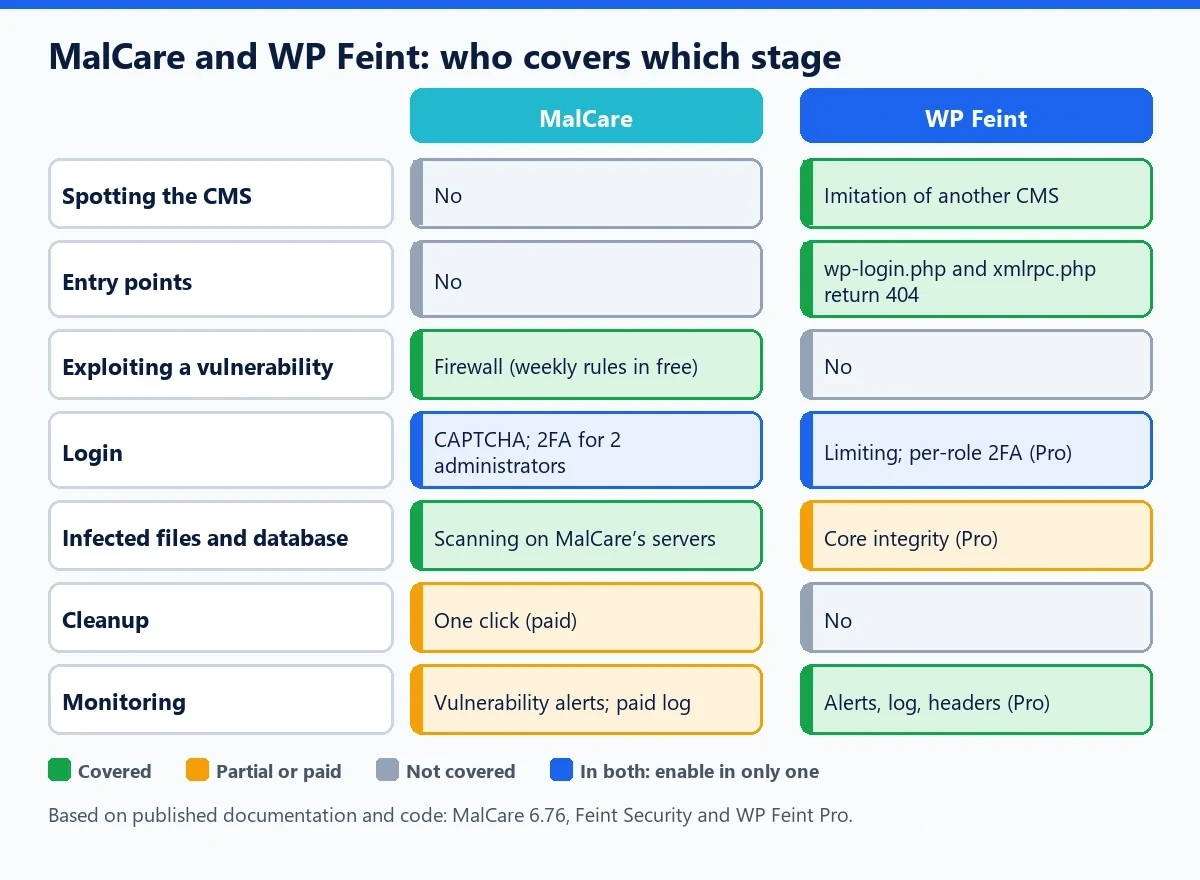
MalCare is designed to detect, block and repair. It does not try to make the site less visible or to move its access points. WP Feint adds:
- a custom login address, with
wp-login.phpreturning 404 to visitors (free); - blocking of XML-RPC and pingbacks (free); MalCare’s code does not use XML-RPC, so this blocking does not interfere with its connection to its servers;
- other CMS imitation and removal of WordPress’s technical links;
- bot traps and, with Pro, automatic banning;
- with Pro: login attempt limiting, security headers, closed author enumeration, the administrator activity log (paid at MalCare) and file URL aliases.
Why this pair suits small hosting plans
Both plugins go easy on the server. MalCare’s scanning runs elsewhere. WP Feint’s features are lightweight: a closed login address or xmlrpc.php returning 404 costs less than a login attempt processed all the way through, and the Pro checks (core integrity, vulnerabilities) stop after 25 seconds so as not to weigh on the hosting. The pair thus covers three moments: before the attack (fewer clues, fewer doors), during (firewall, CAPTCHA, limiting), after (scanning, alert and, if you pay, cleanup).
It has one limitation to know about: in the free version, scanning happens only once a week and the firewall receives its rules every 7 days. Hiding reduces exposure in the meantime; it replaces neither more frequent scanning nor plugin updates.
Who does what: the recommended setup
| Feature | Enable in MalCare | Enable in WP Feint | Turn off |
|---|---|---|---|
| File and database scanning, cleanup | Yes | Not applicable | Nothing |
| Web application firewall | Yes | Not applicable | Nothing |
| Login protection with CAPTCHA | Yes free | Not applicable | Nothing |
| Login attempt limiting | Not applicable | Yes Pro: it counts failures, the CAPTCHA filters bots | Nothing, but test the login after enabling both |
| Two-factor authentication | If you do not have WP Feint Pro (2 administrators in the free version) | Yes if you have Pro (all roles, per-role requirement) | The one you do not use |
| Login address | Not applicable | Yes free | Nothing |
| XML-RPC and pingbacks | Not applicable | Yes free | Nothing |
| Vulnerability alerts | Yes | Optional Pro | A single email recipient |
| Activity log | If you pay for Repair or Fortify | Yes Pro | Only one of the two for alerts |
| File hardening (PHP in uploads, editor) | Yes (paid) | Not applicable | Nothing |
| Headers, imitation, traps | Not applicable | Yes | Nothing |
About two-factor authentication, a technical detail: MalCare’s 2FA applies only to logins that go through the WordPress login page, which it recognizes through the $pagenow variable. WP Feint serves that same page at the new address while keeping this identification, according to the code of both plugins. Still, test it on your site before relying on it, in a private window, with an administrator account it applies to.
Step-by-step setup
- Back up the site. Install MalCare, create the account and run the first scan; deal with its results before any other change.
- Enable the firewall and login protection in the MalCare dashboard.
- Install WP Feint and follow the Getting started tab in Recommended mode. Choose the login address, exclude it from the cache, then click “Test and enable the new login”.
- Choose a single two-factor authentication and apply the table above.
- Test: login at the new address with CAPTCHA and code, lost password, logout,
wp-login.phpandxmlrpc.phpreturning 404. Behind Cloudflare, check that both plugins see visitors’ real address. - Write down WP Feint’s emergency switch:
define('CMS_FEINT_DISABLE', true);inwp-config.php.
Which plan for which site?
| Site | MalCare side | WP Feint side |
|---|---|---|
| Blog or brochure site, shared hosting | Free: weekly scanning, basic firewall, CAPTCHA | Free: login moved, XML-RPC blocked, imitation, traps |
| Company website with several authors | Protect: daily scanning, advanced firewall | Pro: per-role two-factor authentication, activity log, limiting, headers |
| WooCommerce store | Repair or Fortify: real-time firewall, instant cleanup | Pro: required two-factor authentication for sensitive roles, vulnerability alerts |
On the personal data side, the two approaches differ. MalCare relies on its servers to scan the site: mention this processor in your privacy policy. The free plugin Feint Security sends nothing to a third-party service; Pro contacts the developer’s license server and sends plugin names to WPVulnerability.net for vulnerability checks, the WordPress version to wordpress.org for the integrity check and, if the option is left on, the update status to your member area; no content and no users. Our article on security, logs and the GDPR details what you need to declare.
What the pair does not cover
- Cleanup in the free version: free MalCare finds infections but does not remove them. Without a Repair plan, follow our guide to cleaning up a hacked WordPress site.
- Fresh vulnerabilities: a firewall whose rules arrive every week leaves a window; update quickly, and see our firewall comparison for real-time protection.
- Backups are not part of MalCare; keep some off the server, and test them.
- Comment spam: see what WP Feint blocks and what it leaves to an anti-spam plugin.
To compare MalCare with the other plugins, see the comparison of the best WordPress security plugins.
Key takeaways
- MalCare scans files and the database on its own servers: useful on modest hosting.
- In the free version, scanning and firewall rules are weekly and cleanup is paid.
- WP Feint adds a login address, XML-RPC blocking, imitation, traps and, with Pro, limiting, headers and an activity log.
- A single two-factor authentication: MalCare without Pro, WP Feint with Pro.
Sources
- MalCare 6.76 source code (firewall, two-factor authentication) (external link, opens in a new tab)
- WordPress.org: MalCare, changelog (6.76) (external link, opens in a new tab)
Other sources consulted: official vendor pages.