
It is also called two-step verification or, more broadly, multi-factor authentication (MFA). The idea is to stop betting everything on a secret that can be guessed, reused or stolen. Even if the password falls into the wrong hands, the attacker is stopped at the second step, which requires an object or a trait they don't have.
The three types of factors
NIST's digital identity guidelines (SP 800-63B), like most security guidance, use the usual classification:
- Something you know (knowledge): password, passphrase, PIN.
- Something you have (possession): a phone with an app that generates codes, a security key, a smart card, a passkey.
- Something you are (inherence): fingerprint, face.
For there to really be two factors, they must come from two different types. A password followed by a security question is still single-factor authentication, since both rely on knowledge.
How a TOTP code works
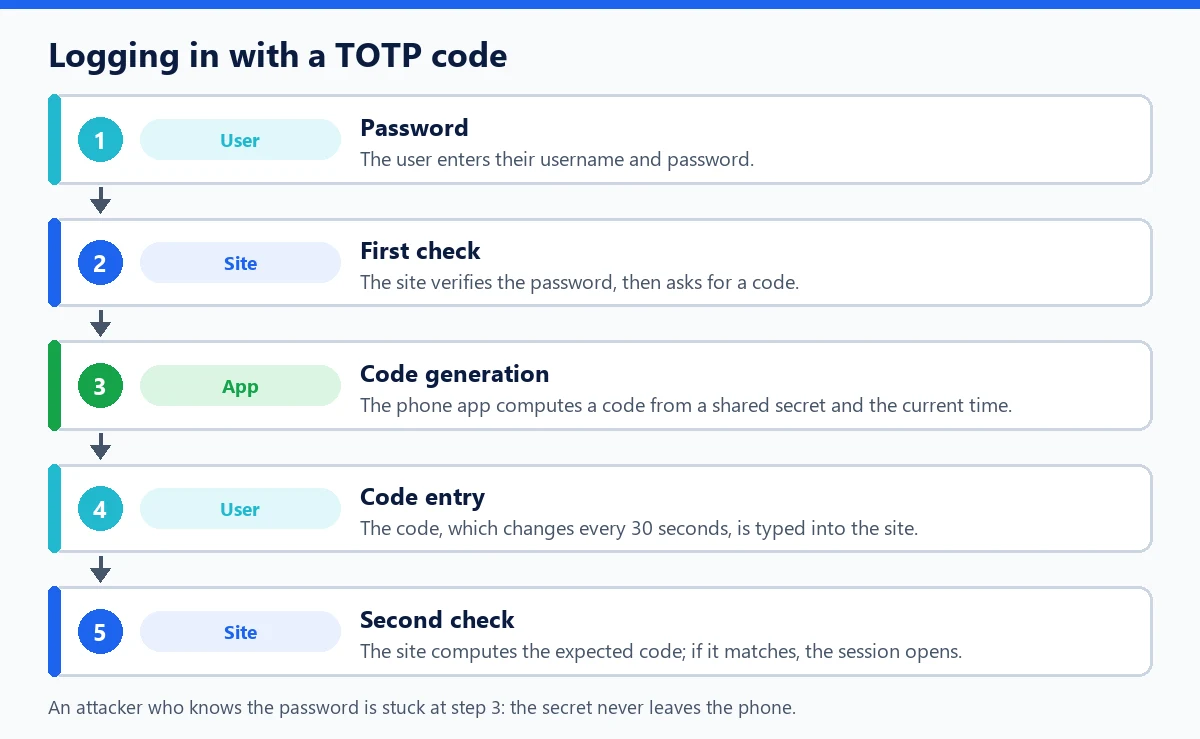
The most common method on websites relies on the TOTP algorithm, standardized in RFC 6238. During setup, the site and the phone app share a secret, usually transmitted through a QR code. Afterward, each one computes a code on its own from that secret and the current time, in 30-second steps by default. The site doesn't need to contact the phone: if both computations match, the person really holds the secret.
Methods, from weakest to strongest
- Code by text message or email: better than nothing, but only as secure as the phone line or the inbox. NIST classifies SMS codes as a “restricted” authenticator because of these risks.
- TOTP app (Google Authenticator, Microsoft Authenticator, Aegis, 2FAS…): works offline, with no dependence on the carrier.
- Security keys and passkeys (WebAuthn): tied to the site's domain name, they resist phishing far better, whereas a TOTP code can be typed into a fake site.
Always plan a fallback: single-use recovery codes, kept somewhere other than the phone.
For WordPress
WordPress doesn't include two-factor authentication: its documentation recommends adding it through a plugin or an identity provider, at least for administrators. It is the most effective defense against brute-force attacks and credential stuffing. A few things to check:
- make it mandatory by role, not just optional;
- cover the other entry points too: since WordPress 5.6, application passwords are used by tools that connect to the REST API or XML-RPC; a protected account shouldn't accept its main password there;
- keep the plugin up to date: a vulnerability can bypass the second step, as the Really Simple Security case showed.
WP Feint Pro's two-factor authentication uses TOTP codes generated on your own site, with no external service, ten backup codes, enforcement by role and restriction of XML-RPC and REST API logins to application passwords for protected accounts. Our guide to TOTP, backup codes and passkeys compares the options in detail.
Common mistakes
- Losing your phone without having saved your backup codes.
- Letting the phone's clock drift: TOTP codes are then rejected.
- Believing two-factor authentication protects a session that is already open: it stops neither an XSS flaw nor the theft of a session cookie.