Open the source code of your home page: chances are you will read “This site is optimized with the Yoast SEO plugin v28.8”, “Site Kit by Google 1.190.0” or “Elementor 4.3.5”. These signatures name plugins that only exist for WordPress, often with their version number. This article lists what common plugins print in your pages, explains how Feint Security (free version) removes it and how to check it yourself.
What plugins print in your source code
Two kinds of traces hide in the HTML every visitor receives:
- The generator tag:
<meta name="generator" content="...">, defined by HTML to name the software that produced the page. WordPress puts its version there, and so do Site Kit, Elementor and WooCommerce. - HTML comments:
<!-- ... -->, invisible on screen but readable in the source code. SEO plugins wrap their tags in them, analytics plugins sign their tracking code, and cache plugins note which tool stored the page.
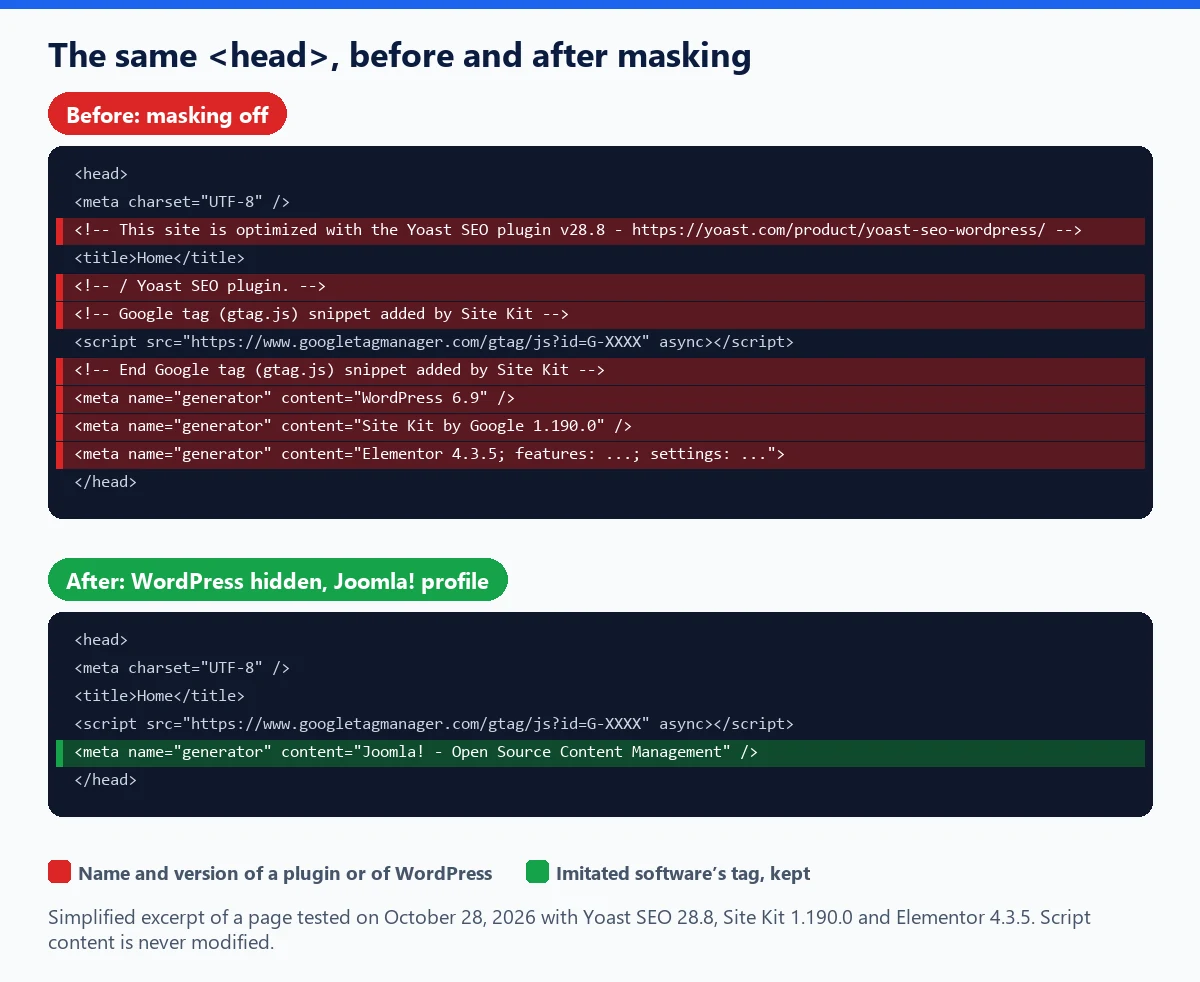
These lines are of no use to any visitor. Several developers provide a filter to remove them, but rarely a visible option.
Why these traces matter
Detection tools read exactly these lines. As we explained in our article on WordPress fingerprinting, a single signal is enough to convince them:
- They reveal WordPress. In the Wappalyzer definitions (webappanalyzer project), the Yoast SEO comment alone leads to WordPress. An Elementor or Site Kit generator tag says it just as clearly: these plugins only exist for WordPress.
- They give version numbers. The same definitions extract the version of Yoast SEO, Elementor and Site Kit. An exact version can be matched against public vulnerability databases in seconds, which is why you should monitor your plugins for vulnerabilities.
- They list your plugins without any extra request. WPScan has a dedicated finder that reads every HTML comment on the page and compares them with the known patterns of each plugin.
- They contradict the imitation. A site that announces Joomla! in its generator tag but keeps a Rank Math comment is unmasked by anyone curious enough to view the source.
Removing these traces fixes no vulnerability: it reduces what bots learn from a simple visit. We cover what masking can and cannot do in hiding WordPress: what it does and what it does not.
What Feint Security removes, plugin by plugin
Here are the traces the free version removes, checked in each plugin’s code and, for the rows marked “tested”, on a live site. In the “Removed by” column, “official” means the setting provided by the developer and “filter” means the output filter described below.
| Plugin | Trace removed | Removed by | Cached pages |
|---|---|---|---|
| Yoast SEO (tested, 28.8) | Comments optimized with the Yoast SEO plugin v{version}, Premium included | Official, filter as a fallback | Clean |
| Rank Math (tested) | Comments Search Engine Optimization by Rank Math, even translated | Official and filter | Clean |
| All in One SEO | Generator All in One SEO (AIOSEO) {version} and comments | Official (tag), filter (comments) | Clean |
| The SEO Framework | Comments The SEO Framework by Sybre Waaijer, even translated | Official and filter | Clean |
| Site Kit by Google (tested, 1.190.0) | Generator Site Kit by Google {version}, comments added by Site Kit | Official (tag), filter (comments) | Clean |
| MonsterInsights, ExactMetrics, GTM4WP, Matomo, Meta pixels, Jetpack | Signed comments, with the version for MonsterInsights and ExactMetrics | Filter | Clean |
| WP Statistics, Complianz | Signed comments | Official and filter | Clean |
| WP Super Cache (tested) | Cached page generated by WP-Super-Cache, Dynamic page generated in... | Official (like unticking “Cache Status Messages”) | Clean, cache file checked |
| LiteSpeed Cache (tested, 7.9.2) | Page cached by LiteSpeed Cache {version}, Page optimized by LiteSpeed Cache | Official and cache plugin’s last filter | Clean |
| W3 Total Cache, WP Fastest Cache, WP-Optimize | Signed cache comments | Official (and filter for WP-Optimize) | Clean (WP-Optimize: except with WP_DEBUG) |
| Hummingbird | cached by the Hummingbird Performance plugin v{version} | Cache plugin’s last filter | Clean |
| WP Rocket | This website is like a Rocket... WP Rocket | Official constant | Replaced by a generic text |
| Breeze | Cache served by breeze CACHE | Not removed | No |
| Elementor (tested, 4.3.5) | Generator Elementor {version}; features: ...; settings: ... | Official (“Generator Tag”, saved setting untouched) and filter | Clean |
| WPBakery, Slider Revolution, Divi, Redux | Generator with the name and often the version | Filter | Clean |
| WooCommerce, WPML | Generator WooCommerce {version}, WPML ver:{version} | Identity module (WooCommerce), filter (WPML) | Clean |
| WordPress itself | Generator, comments mentioning WordPress, wp-content, wp-json... | Identity module and filter | Clean |
Other names are recognized as a precaution, without being checked one by one in the code: Avada, Oxygen, Bricks, Beaver Builder, Astra, Kadence, Smush or Polylang, for example.
How it is removed: the official setting first
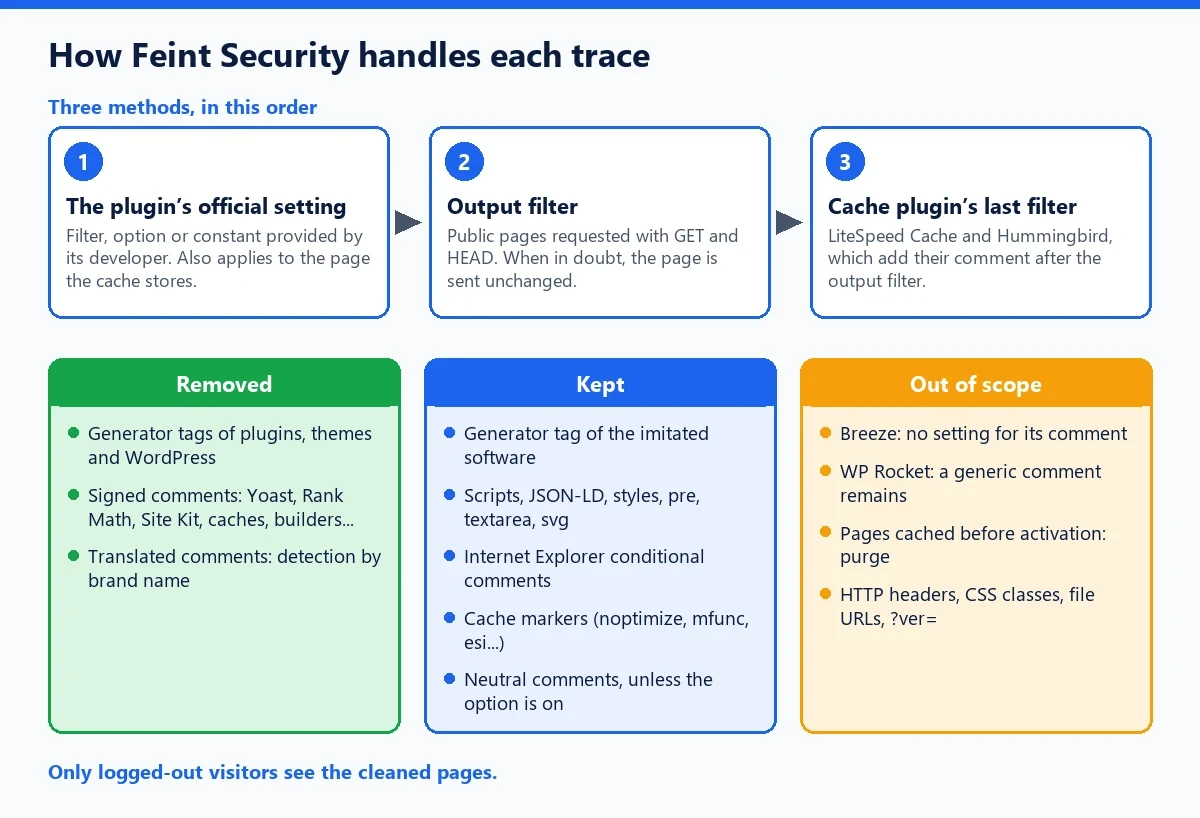
The plugin applies three methods, in this order:
- Each plugin’s official setting: a filter, option or constant provided by its developer (for example
wpseo_debug_markersfor Yoast SEO orlitespeed_commentfor LiteSpeed Cache). This is the most reliable method, and it also applies to the page the cache stores. Your saved settings do not change. - An output filter on the HTML page, for everything that has no setting. It only touches public pages requested with GET or HEAD (not the admin, AJAX, the REST API, feeds, sitemaps or robots.txt). Above 4 MB or on any error, the page is sent unchanged.
- The cache plugin’s last filter, for LiteSpeed Cache and Hummingbird, which add their comment after the output filter.
The order matters: in our tests without the official settings, the output filter alone removed the traces of Yoast SEO, Rank Math, Site Kit and Elementor, but not those of LiteSpeed Cache, which are added after it. Detection relies on brand names, not sentences, so comments translated by Rank Math, Site Kit or The SEO Framework are removed too.
What is deliberately kept
So that nothing breaks, these stay in place:
- the generator tag of the imitated software (Identity module level 2 and above), for example
Joomla! - Open Source Content Management; - the whole content of
script(JSON-LD included),style,pre,textarea,svgandtemplatetags; - Internet Explorer conditional comments (
<!--[if ...]>); - the markers cache plugins need:
noptimize,mfunc,mclude,dynamic-cached-content,esi; - your theme’s neutral comments (“.site-header”, “Main navigation”), unless you tick the option described below.
The limits to know
- Breeze writes its comment into its cache file, with no filter or setting: it stays.
- WP Rocket does not allow its comment to be removed: it becomes
<!-- Cached for great performance -->, with no plugin name and no WordPress. - Pages already cached before activation keep their comments until the cache is purged.
- Server caches and CDNs (Varnish, Cloudflare, host cache) serve the stored page: it is clean if it was stored after activation, but their HTTP headers remain.
- Anything that is neither a comment nor a generator tag is out of scope: HTTP headers (
X-LiteSpeed-Cache,cf-edge-cache: cache,platform=wordpressfrom Cloudflare APO), CSS classes (elementor-,woocommerce,yoast-schema-graph), JavaScript variables, JSON-LD content, file URLs and the?ver=parameter. - Logged-in visitors see the site without masking.
Above all, keep this in mind: as long as /wp-content/plugins/... URLs remain in the page, Wappalyzer recognizes WordPress. Removing comments mostly removes names and versions; to go further, the file URL aliases of WP Feint Pro rename those paths.
Check your own site
Run the test before and after activation, always as an anonymous visitor:
- Open a private browsing window, logged out of WordPress.
- View the source code of the home page and of a post (Ctrl+U, or Cmd+Option+U on a Mac).
- Search (Ctrl+F) for
<!--, thenname="generator", then the names of your plugins. - Reload the page: the first visit often fills the cache, the second shows the page served from the cache.
From the command line:
curl -s https://www.example.com/ | grep -n -E "<!--|name=\"generator\""Only the imitated software’s tag, conditional comments, cache markers and, without the option, your theme’s neutral comments should remain. The video below shows what a curious visitor spots.
Turn the feature on
- Open Feint Security (the mask icon in the admin menu).
- Choose a mode (Essential, Recommended or Maximum) or set the Identity module to at least level 1 (“Hide WordPress”): traces are removed from that level on.
- Turn on the “Masking on” switch and save.
- Optional: in the Identity tab, tick “Remove all HTML comments from public pages”. Off by default, this option also removes neutral comments, but keeps conditional comments, cache markers and the cover comment (level 4, Pro).
- Click Purge caches (Diagnostics tab), also clear your host or CDN cache, then check.
The built-in purge covers LiteSpeed Cache, WP Super Cache and WP Rocket; host-specific details are on the host and cache compatibility page.
Free or Pro
Removing plugin traces is part of the free version, with no limit or licence key. WP Feint Pro takes care of the other signals:
| Feature | Free | Pro |
|---|---|---|
| Plugin HTML comments and generator tags removed | Yes | Yes |
| “Remove all HTML comments” option | Yes | Yes |
| WordPress generator removed, another software’s tag | 5 profiles or a custom name | 41 profiles |
| RSD, Windows Live Writer and shortlinks removed | Yes | Yes |
| REST API announcement (tag and HTTP Link header) and oEmbed discovery removed | No | Yes |
File URL aliases (/wp-content/, /wp-includes/) | No | Yes |
| Markers recognized by Wappalyzer and cover comment of the imitated software | No | Yes |
Details on technical links, imitating another CMS and in the comparison. Download the free version or see Pro pricing, from €59 per year excl. VAT.
Key takeaways
- Yoast SEO, Site Kit, Elementor and cache plugins sign your pages, often with their version.
- The Yoast SEO comment alone lets Wappalyzer conclude WordPress, and WPScan reads HTML comments to list your plugins.
- Feint Security, free, removes them from level 1 of the Identity module: official setting first, output filter next.
- Limits: Breeze, WP Rocket (generic text), pages already cached (purge), HTTP headers, file URLs.
- Check in a private window: search the source code for
<!--andgenerator.
Sources
- WordPress Developer: get_the_generator() (external link, opens in a new tab)
- MDN: the meta name attribute, generator value (external link, opens in a new tab)
- WordPress.org: Yoast SEO (external link, opens in a new tab)
- WordPress.org: Site Kit by Google (external link, opens in a new tab)
Other sources consulted: official vendor pages.