Most exploited WordPress vulnerabilities are found in plugins, and between the publication of a vulnerability and your update, there is always a delay. Patchstack specializes in that delay: it detects vulnerable components and, in its paid plans, blocks their exploitation with virtual patches. WP Feint acts earlier, by making your site harder to spot and to inventory. Here is how Patchstack works, what the pair covers and how to split the few overlapping features.
Disclosure: this article is published by the WP Feint team. Patchstack does not pay us and we use no affiliate links. The information about Patchstack comes from its wordpress.org page, its website, its documentation and the code of plugin version 2.3.7.
Patchstack in detail
Patchstack is first and foremost a vulnerability database, fed by a community of researchers and by partnerships with plugin developers. The plugin (more than 100,000 active installations, version 2.3.7 of July 28, 2026) connects your site to this database and to the Patchstack web app, where most of the settings are made. You need to create an account and paste an API key into the plugin.
The free version: knowing before others
- Detection of known vulnerabilities in core, plugins and themes, by comparing installed versions with the database; no external scan is performed.
- Email alerts, up to 48 hours ahead of the publication of new vulnerabilities according to the vendor.
- Remote updates and, optionally, automatic updates of vulnerable plugins only.
- PDF reports on the state of the site, dashboard for 3 sites.
The FAQ is clear: the free version contains no firewall. It warns you, it blocks nothing.
Virtual patches: blocking one specific vulnerability
A virtual patch (“vPatch”) is a rule that blocks exploitation of a given vulnerability, in a given version, without changing the plugin’s code. Patchstack advertises more than 12,000 of them and deploys on a site only those that match the vulnerable components actually installed: the other rules do not run, which limits false positives and load. The rules run inside the site, on every page load. That is the big difference with a generic firewall, which looks for attack patterns without knowing which plugin is installed; our firewall comparison details these approaches.
The paid plans also add a hardening module configured from the app, two-factor authentication, a community list of malicious IP addresses and custom rules.
| Plan | Listed price | Content |
|---|---|---|
| Free | $0 | Detection and alerts, remote updates, reports, 3 sites |
| Protection for one site | $5 per site per month, as an add-on to the free plan | Virtual patches and protection modules for that site |
| Developer | $69 per month, billed yearly ($828) | Virtual patches, custom rules, scheduled reports, 3 users; additional sites $12.50 per month per batch of 5; first month free |
| Enterprise, hosts | On quote | Extended API, service level agreement |
Why Patchstack and WP Feint complement each other
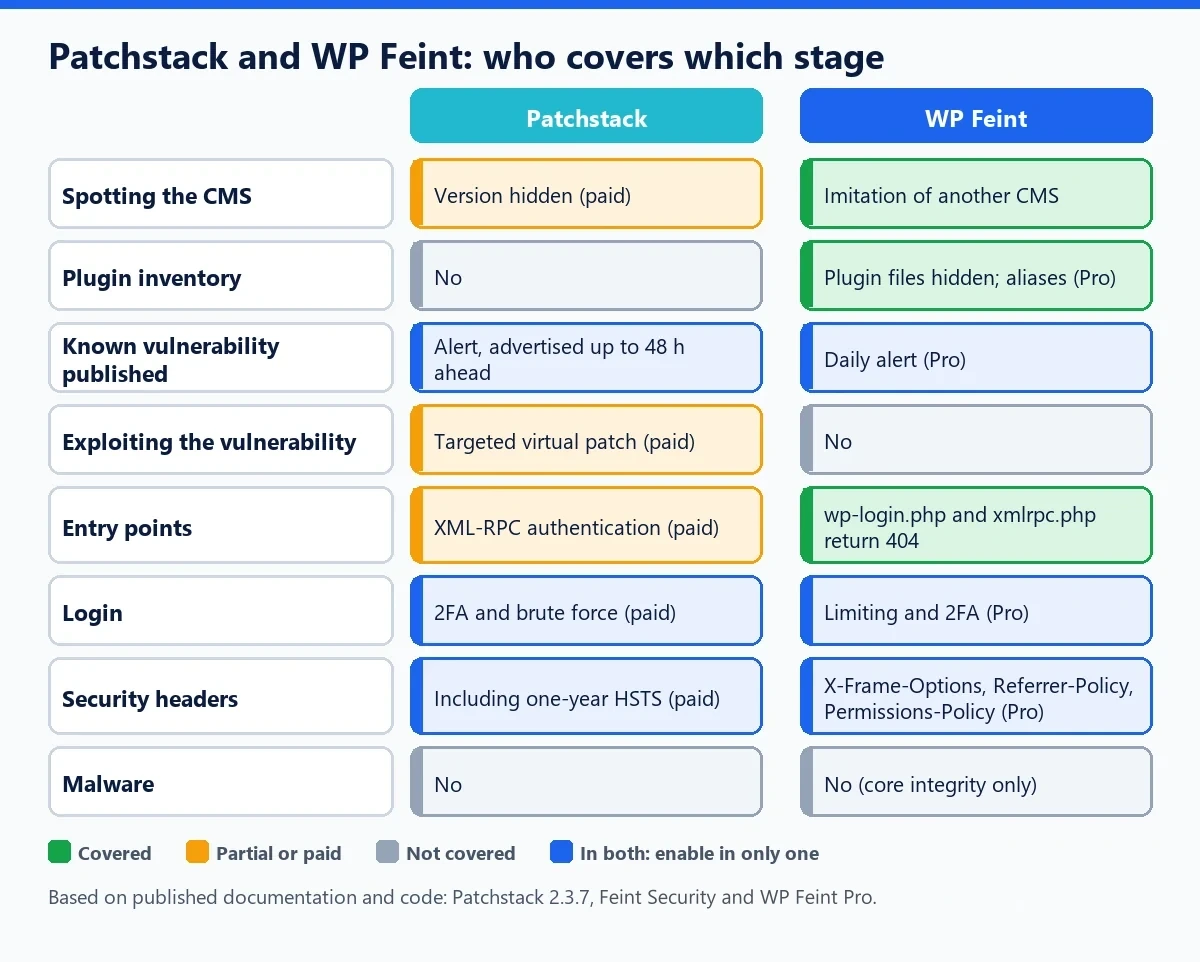
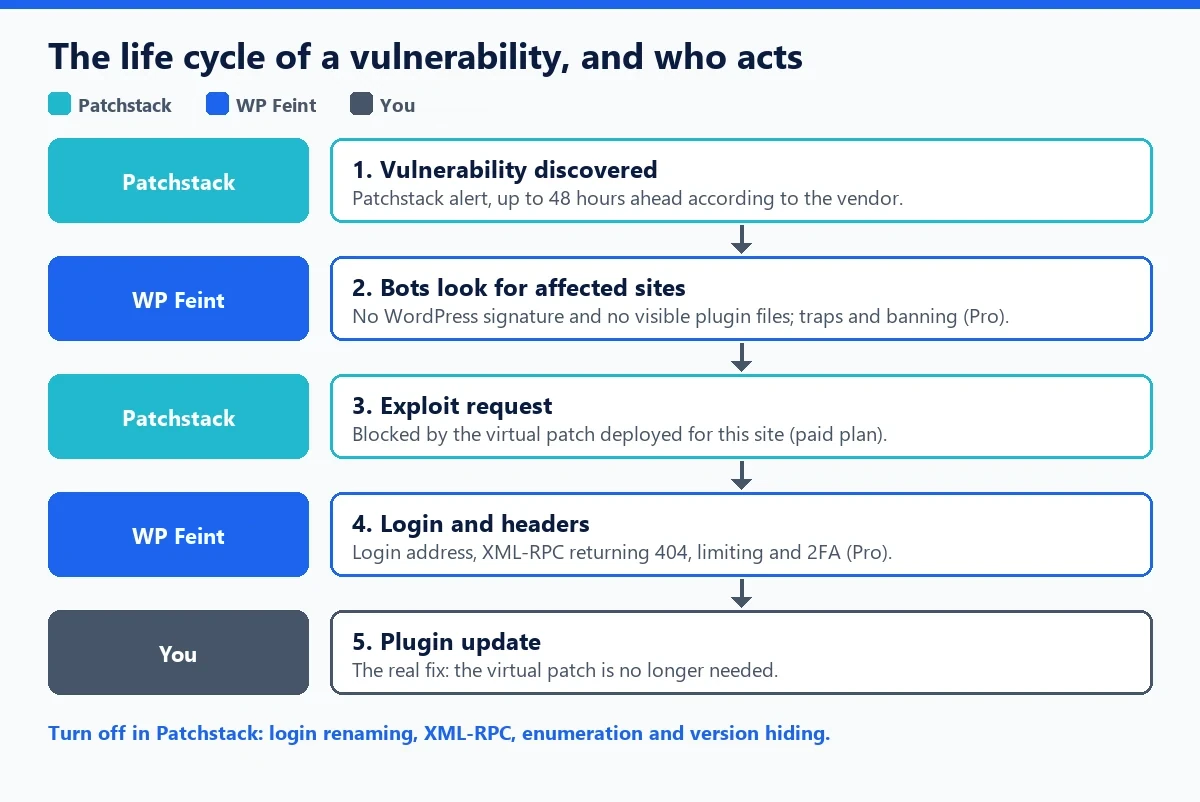
A plugin vulnerability made public almost always triggers the same sequence: bots look for WordPress sites, spot those using the affected plugin (readme.txt file, /wp-content/plugins/plugin-name/ URLs), then send the exploit request. Patchstack blocks the last stage with a virtual patch. WP Feint makes the first two harder:
- other CMS imitation removes WordPress signatures, which fools common automated detection tools, with no absolute guarantee;
- plugin files (readme, translations) become invisible to scanners on Apache and LiteSpeed, from the free version on;
- with Pro, file URL aliases replace
/wp-content/plugins/in pages, and the old addresses can be blocked; - bot traps count the ones that search anyway, and Pro bans them.
Let us be precise: hiding a plugin does not fix it. A bot that sends the exploit request to every address, without checking what is installed, will still reach the vulnerable code. That is where the virtual patch is essential, and updating remains the real fix. Hiding reduces the number of targeted attacks that find you; the virtual patch stops the ones that arrive.
Overlapping features, and one precaution
With the free version of Patchstack, the only overlap is the vulnerability alert, if you have WP Feint Pro. With a paid plan, Patchstack’s hardening module overlaps several WP Feint features. According to the plugin’s code, several options are on by default in this module: blocking XML-RPC authentication, blocking author enumeration, hiding the version, security headers and disabling application passwords.
| Feature | Enable in Patchstack | Enable in WP Feint | Turn off |
|---|---|---|---|
| Virtual patches | Yes (paid plan) | Not applicable | Nothing |
| Known vulnerability alerts | Yes (free, with advertised head start) | Optional Pro: useful for following several sites in the member area | A single email recipient to avoid duplicates |
| Login address | No (renaming option off by default) | Yes free | Do not enable Patchstack’s renaming |
| XML-RPC and pingbacks | No | Yes: “Block XML-RPC” returns 404 and turns off pingbacks | Patchstack’s XML-RPC option, which only blocks authentication |
| Author enumeration | No | Yes Pro: also covers the author sitemap and oEmbed | Patchstack’s option (it redirects before WP Feint’s traps count the bot) |
| WordPress version | No | Yes: imitation | Patchstack’s version hiding: it also removes the imitated generator from RSS and Atom feeds |
| Security headers | Your choice | Your choice Pro | The other one’s; see the note on HSTS |
| Login limiting | No (IP blocking off by default) | Yes Pro | Patchstack’s brute force blocking |
| Two-factor authentication | If you do not have WP Feint Pro | Yes if you have Pro | The one you do not use |
| Real IP behind Cloudflare | Yes: firewall IP header | Yes: Cloudflare support Pro | Nothing: both must be configured |
The note on HSTS: according to the code of version 2.3.7, Patchstack’s security headers option also sends Strict-Transport-Security with a duration of one year. Browsers that have received it then refuse to open the site without HTTPS for that duration. If your site, or one of its subdomains, is not permanently on HTTPS, turn off these headers in Patchstack and use those of WP Feint Pro, where HSTS remains an option to tick. WP Feint never overwrites a header already set by another plugin: if both are active, Patchstack’s values are the ones sent.
Step-by-step setup
- Back up the site, install Patchstack, create the account, add the site in the app and paste the API key.
- Deal with the first list of vulnerabilities: updates first, then removal of unused plugins.
- If you take the paid protection, open the hardening section in the app and turn off the options listed in the “Turn off” column; behind Cloudflare, set the IP header.
- Install WP Feint, follow the Getting started tab, choose the login address and enable it with “Test and enable the new login”.
- With Pro, enable the file aliases, then check in the Patchstack app that the site stays connected and that the list of components is complete: aliases change the public addresses, not where the files are on the server.
- Test the login, the lost password and the headers received with the “Check the home page” button of WP Feint Pro.
What the pair does not cover
- Malware scanning: neither Patchstack nor WP Feint looks for malicious code in your files or database. Patchstack says so itself: it aims to prevent infection, not to clean it up. The WP Feint Pro integrity check covers only the core. If a site may have been infected before they were installed, run a scan with a scanner, or follow our guide to cleaning up a hacked WordPress site.
- Unknown vulnerabilities: a virtual patch requires an identified vulnerability. Against a vulnerability that is still unknown, only hiding, least privilege and a small number of maintained plugins reduce the risk.
- Denial of service and generic traffic filtering are a matter for the host or an upstream firewall.
- Comment spam: see what WP Feint blocks and what it leaves to an anti-spam plugin.
To go further: our article on monitoring plugin vulnerabilities, the WP Feint Pro vulnerability alerts page and the comparison of the best WordPress security plugins.
Key takeaways
- Free Patchstack alerts you; only its paid plans block, with targeted virtual patches.
- WP Feint reduces the chances that bots spot your WordPress and its plugins; Patchstack stops the exploitation that still arrives.
- Leave the login address, XML-RPC, author enumeration and the version tag to WP Feint; choose a single header manager, keeping Patchstack’s HSTS in mind.
- Neither one scans for malware, and updating remains the fix.
Sources
- WordPress.org: Patchstack, description, FAQ and active installations (external link, opens in a new tab)
- Patchstack 2.3.7 source code (default hardening options, headers) (external link, opens in a new tab)
- WordPress Developer Resources: xmlrpc_enabled filter (external link, opens in a new tab)
- MDN: Strict-Transport-Security (external link, opens in a new tab)
Other sources consulted: official vendor pages.