What security headers do
With every page, a site sends the browser a set of invisible instructions: HTTP headers. Some tell the browser to refuse to display the site inside a frame on another site, to limit what is shared with other sites, or to block risky features. On public pages, WordPress sends almost none of them.
To learn what each header does, see our definition of HTTP security headers. To pick values and test them yourself, follow our guide how to set up HTTP security headers on WordPress.
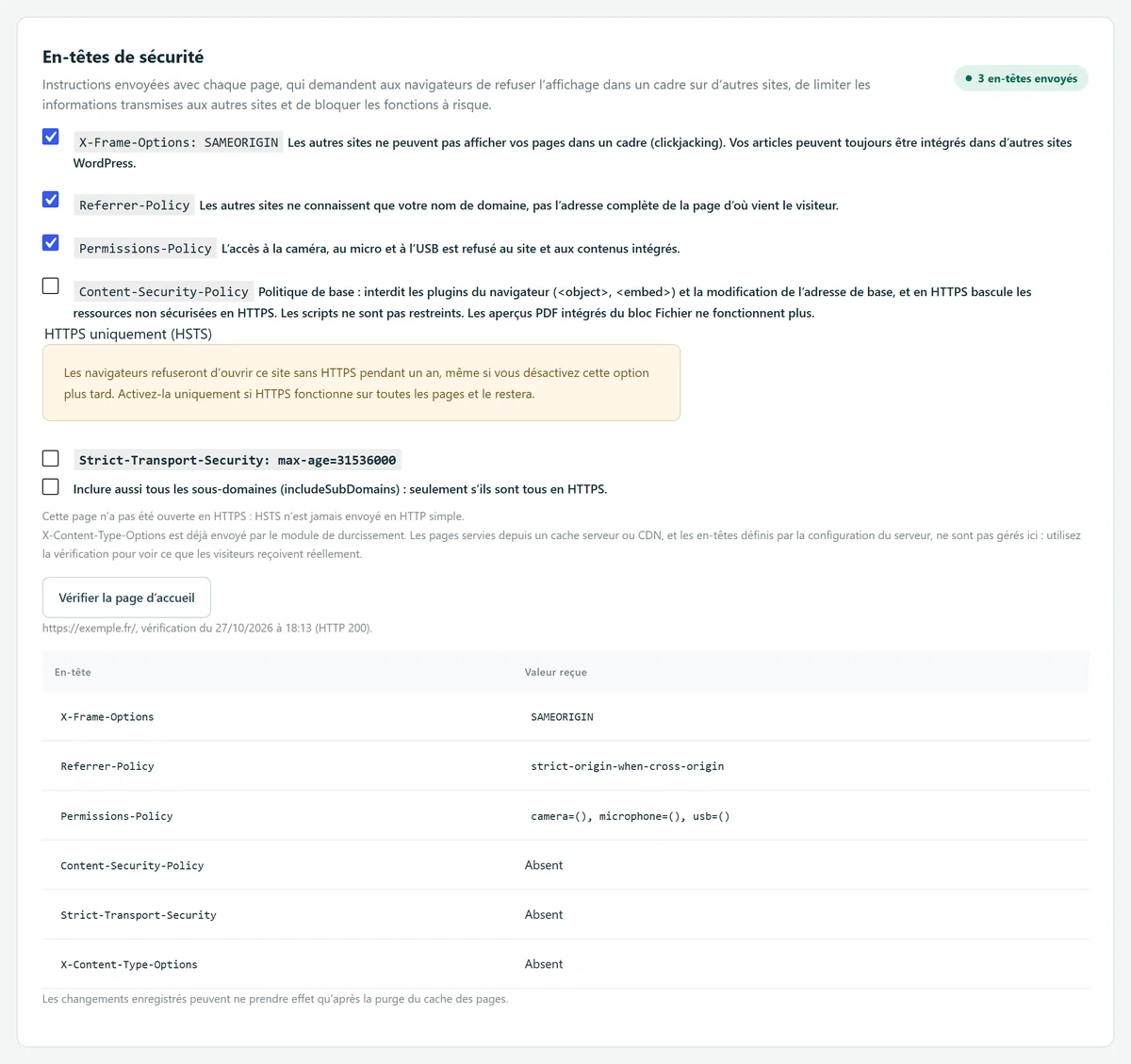
WP Feint Pro adds them to public pages, the login page and the admin area. You configure them in the Protection tab, on the “Security headers” card.
| Header | Effect |
|---|---|
X-Frame-Options: SAMEORIGINOn by default | Other sites can’t display your pages inside a frame (clickjacking protection). Your posts can still be embedded in other WordPress sites (oEmbed). |
Referrer-PolicyOn by default | Other sites only see your domain name, not the full URL of the page the visitor came from (strict-origin-when-cross-origin). |
Permissions-PolicyOn by default | Camera, microphone and USB access are denied to the site and to embedded content. Geolocation and payment stay allowed: store locators and Stripe, Apple Pay or Google Pay buttons need them. |
Content-Security-PolicyOptional | A baseline policy: blocks browser plugins (<object>, <embed>) and changes to the base URL; over HTTPS, upgrades insecure resources to HTTPS. Scripts are not restricted. |
Strict-Transport-Security (HSTS)Optional | Browsers refuse to open the site without HTTPS for one year (max-age=31536000), optionally on all subdomains too. |
Why it matters
These headers don’t make a site invulnerable. They close browser-side risks that WordPress leaves open: your page displayed without your knowledge inside a frame on another site, full page URLs passed along to external sites, sensitive features available to embedded content. Online security audit tools check them first, too.
What’s included Pro feature
- Three no-risk headers turned on out of the box: X-Frame-Options, Referrer-Policy and Permissions-Policy.
- Optional baseline CSP and HSTS, each with its own warning in the interface.
- Respects what’s already there: a header already set by WordPress, another plugin or the Customizer preview is never overwritten.
- “Check home page” button: the site requests its own home page and shows the headers actually received, whatever their source (PHP, server, CDN).
- Emergency switch:
define('WFP_DISABLE_HEADERS', true);in wp-config.php stops the headers from being sent.
How to set them up
- Go to WP Feint → Protection (the mask icon in the admin menu), “Security headers” card. The first three headers are already checked.
- Save, purge your page cache, then click Check home page: the table shows the value received for each header, or “Missing”.
- Optional: turn on the baseline CSP, then check pages that show embedded PDFs or older content.
- Optional, and only if your whole site runs on HTTPS for good: turn on HSTS. Include subdomains only if all of them use HTTPS.
Limits and precautions
- Cached pages: the headers are sent by WordPress. A page served directly by a server cache or a CDN, without going through WordPress, may not carry them. Headers set in the server configuration aren’t managed here either. The check shows what your visitors actually receive.
- HSTS is hard to undo: once a browser has received the header, it refuses to open the site without HTTPS for a year, even if you turn the option off later. HSTS is never sent over plain HTTP.
- The CSP on offer is deliberately basic: it doesn’t restrict scripts, so it doesn’t protect against script injection (XSS). It disables the embedded PDF previews of the File block.
- Stricter settings (a custom CSP, other headers) belong in your server or CDN configuration; WP Feint Pro won’t overwrite them.
Start free, upgrade to Pro when you’re ready
The free version already hides WordPress, moves the login page, blocks XML-RPC and counts bots. Pro locks down logins, renames file URLs and monitors your sites for you: known vulnerabilities, core integrity, activity log, email alerts and the update status of all your sites in your member area. From €59 per year excl. tax, far less than the cleanup offers whose prices we checked. Compare the costs.