
cPanel is the interface many site owners discover along with their first hosting plan. It is actually made up of two tools: WHM (Web Host Manager), reserved for the server administrator or resellers, which creates accounts and configures the machine, and cPanel itself, each customer's own space. The official documentation describes the cPanel interface as the hub of your user account.
What you can do in cPanel
The features you see depend on what the host has enabled in WHM. You will usually find:
- Email: accounts, forwarders, filters, autoresponders.
- Databases: creating MySQL or MariaDB databases and their users, access to phpMyAdmin.
- Domains: addon domains, subdomains and aliases.
- Security: SSL/TLS certificate status, FTP access, directory privacy.
- WordPress: the WordPress management menu relies on WP Toolkit to install, update and clone sites.
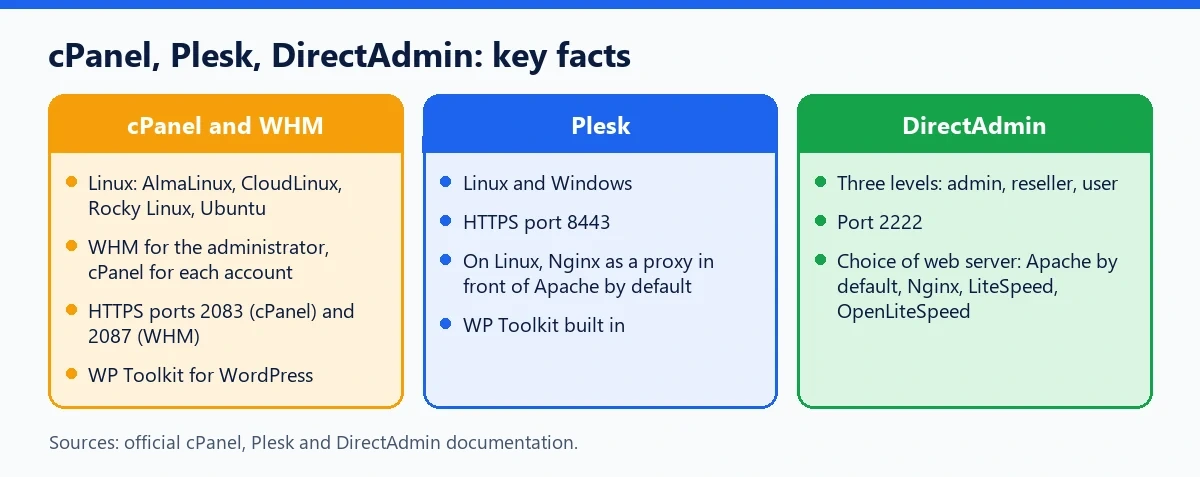
cPanel and WHM only run on Linux; the documentation lists AlmaLinux, CloudLinux, Rocky Linux and Ubuntu as supported systems. On shared plans, they are often paired with CloudLinux and CageFS to isolate accounts.
Access and ports
Over HTTPS, cPanel listens on port 2083 and WHM on port 2087; ports 2082 and 2086 are their unencrypted equivalents, and webmail uses 2095 and 2096. Hosts often provide a simpler address, such as yourdomain/cpanel, that redirects to the right port. Always use the encrypted connection.
For WordPress
- PHP version: check in the panel which version your domain uses and move to a maintained branch before it reaches end of life.
- Database: the user created for WordPress should have all privileges on its own database, and on that database only.
- File Manager: handy for troubleshooting, but don't leave .zip or .sql backups lying around in the public folder.
- Backups: the panel's backup tools (JetBackup at some hosts, as in our article on WordPress at o2switch) complement, without replacing, copies stored somewhere else.
Securing your cPanel account
The cPanel account gives access to everything: files, databases, email. Use a unique password, turn on two-factor authentication if your host offers it, and restrict FTP accounts to the directories they need. A stolen cPanel login bypasses every protection installed in WordPress, since it lets someone edit the files and the database directly.
cPanel compared with other panels
Plesk also runs on Windows and, on Linux, puts Nginx in front of Apache by default. DirectAdmin focuses on being lightweight and lets you choose the web server. For a WordPress site, the choice of panel matters less than the PHP versions offered, the quality of isolation between accounts and the backups. On shared hosting, the host makes that choice for you anyway.