DreamHost: an independent American host, in business since 1997
DreamHost is an independent American host, active since 1997, offering shared hosting, a managed WordPress offer called DreamPress, VPS and dedicated servers. This article covers its plans and prices (separating promotion and renewal), its technical stack, what DreamHost handles in terms of security, its known incidents and how to install and secure WordPress there.
To see where it stands against the others, check our comparison of WordPress hosting. Disclosure: we have no account with DreamHost and measured nothing ourselves; the information comes from the website, DreamHost’s knowledge base and the press. No link is an affiliate link.
DreamHost at a glance
- Company: DreamHost, LLC, a California company (mailing address in Brea), founded in 1997 and led by Michael Rodriguez. It presents itself as independent, unlike several large American hosts bought by groups.
- Size: more than 1.5 million hosted sites and more than 400,000 customers in more than 100 countries, according to DreamHost.
- Data centers: Ashburn (Virginia) and Hillsboro (Oregon) in the United States, Amsterdam (Netherlands), its first data center outside the United States, and Singapore since March 2026. Support can move an account to another data center; dedicated servers stay in the United States.
- Language: website, panel and support in English; prices are shown in euros to European visitors.
DreamHost’s WordPress plans and their prices
DreamHost shows two prices on each plan: a promotional price for the first period and the renewal price, which depends on the term chosen (monthly, 1 year, 3 or 4 years). Taxes are added at checkout. Public prices, excluding promotions, excl. tax, in euros as displayed: we give the renewal price for a 12-month commitment, and the promotional price in parentheses.
| Plan | Type | Starting price | Sites | Storage | Key limits |
|---|---|---|---|---|---|
| Launch, Growth, Scale (Web Hosting and WordPress Hosting) | Shared | €10.99 per month excl. tax at renewal (€2.89 the first year) | 25, 50 or 100 | 25 to 100 GB NVMe | 40,000 to 400,000 indicative visits per month, unmetered bandwidth, email as a 3-month trial then paid |
| DreamPress 1, 2, 3 (Business) and 5, 10, 20 (Agency) | Managed WordPress | €19.99 per month excl. tax at renewal (€14.99 the first year) | 1 to 20 | 15 to 200 GB NVMe | 40,000 to 700,000 visits, 14-day backups (30 days on Agency), unlimited email included |
| Managed VPS (Business to Premier) | VPS managed by DreamHost | €31.99 per month excl. tax at renewal (€13.75 the first year) | Unlimited | 60 to 360 GB | 2 to 6 cores, 2 to 12 GB of RAM, no root access |
| VPS Stack 4 to Stack 32 | Unmanaged VPS | €11.99 per month excl. tax at renewal (€6.99 the first year) | Up to you | 75 to 450 GB | Root access, Docker and KVM, all maintenance up to you |
| Standard, Enhanced dedicated server | Dedicated, managed system | €165 per month excl. tax at renewal (€119.99 the first year) | Up to you | 480 GB to 1.9 TB SSD (RAID 1) | 6 or 12 AMD EPYC cores, root and SSH access, US data centers |
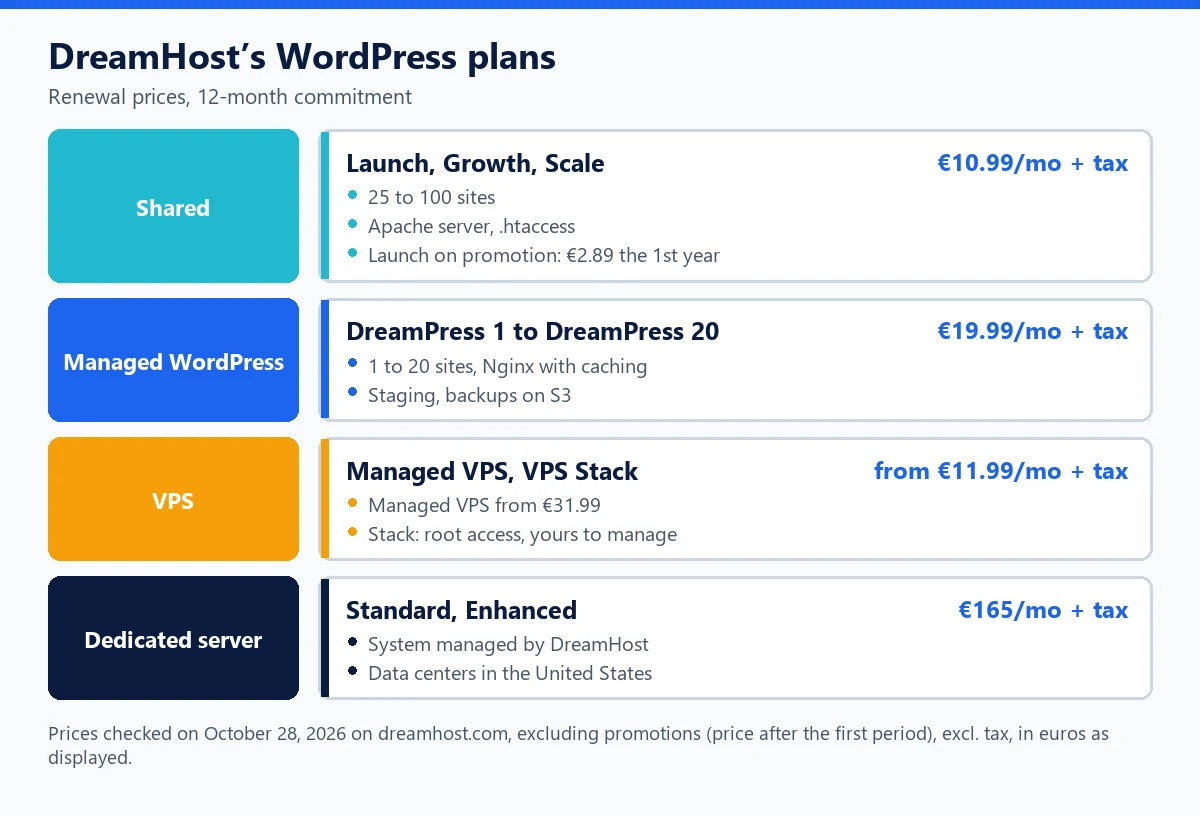
Annual and multi-year plans include a domain name for the first year and a 30-day money-back guarantee; monthly payment is possible on web hosting. The gap between promotion and renewal is large: you need to reason in terms of the second price. The difference between shared hosting and DreamPress lies mainly in the server (Apache versus Nginx with caching), staging, on-demand backups and the included Bunny content delivery network (CDN).
Technical stack, tools and support
| Item | Shared | DreamPress |
|---|---|---|
| Web server | Apache, .htaccess files | Nginx since November 2023, no .htaccess |
| Cache | Cache plugin of your choice | Nginx FastCGI cache (Nginx Helper plugin), Redis, OPcache |
| PHP | 8.2 to 8.5; 5.6 to 8.1 still offered, with an extended support surcharge | Same versions |
| Access | SFTP, SSH, WP-CLI preinstalled | SSH and WP-CLI, no root access |
| Staging | No | One click, on each site |
| CDN | Not included | Bunny CDN Essential included (500 GB per month per site) |
| Control panel | In-house panel, one-click WordPress installation | In-house panel, WordPress preinstalled |
| Support | Chat and email 24/7, in English | Same, plus scheduled phone callbacks depending on the plan |
On VPS and dedicated servers, the panel lets you switch from Apache to Nginx. With Nginx, DreamHost reads the .conf files placed in /home/username/nginx/example.com, except on DreamPress, where any change to the Nginx configuration goes through support. DreamHost advertises a 100% uptime guarantee.
Security at DreamHost
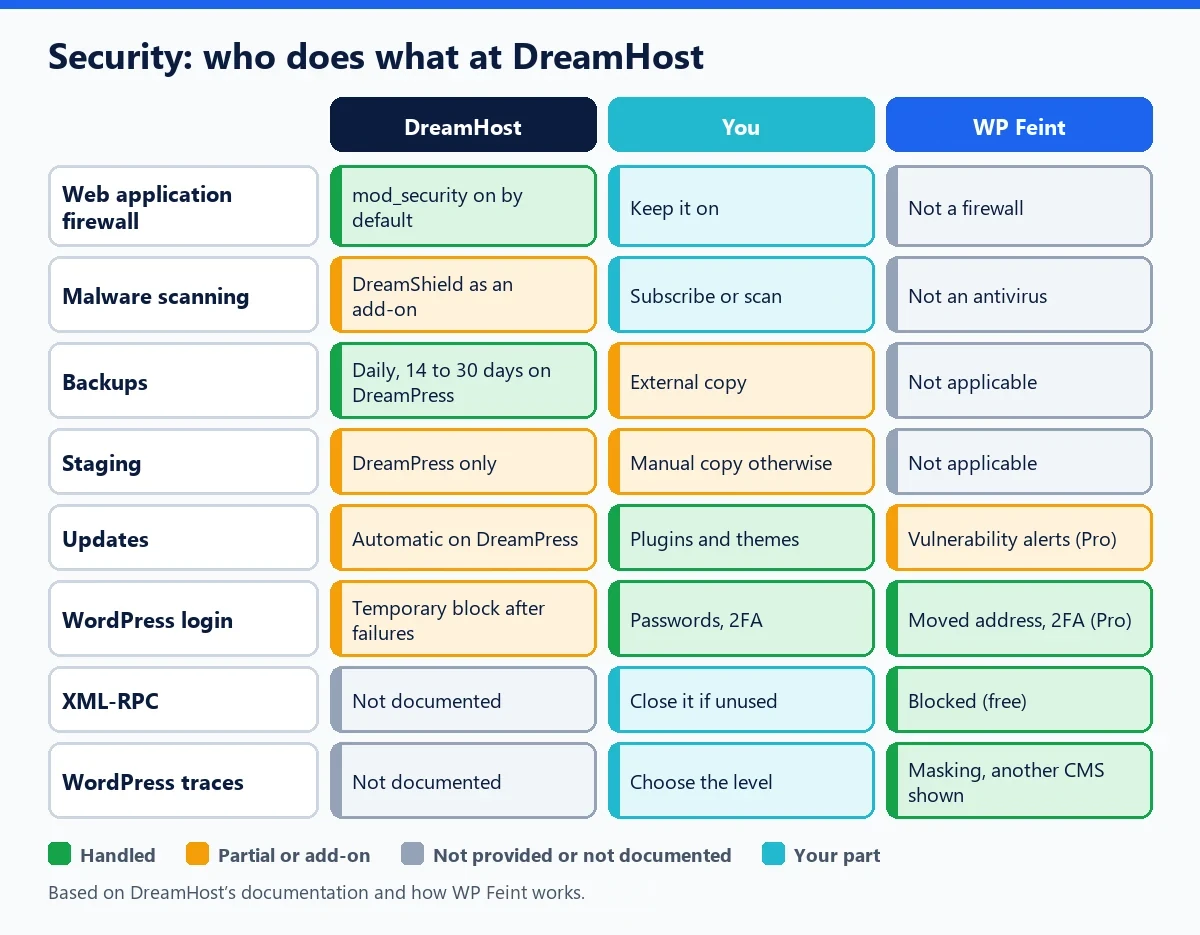
- Web application firewall: mod_security is enabled free of charge by default, with rules based on the OWASP Core Rule Set and supplemented by DreamHost; you can turn it off in the panel, but not modify its rules through .htaccess. After several failed WordPress logins, it temporarily blocks access to the login page (code 418, about 10 minutes).
- Malware: DreamShield, an add-on at €3 per month per site, scans the site every day, alerts by email and in the panel, detects suspicious logins and blocks public access to vulnerable files. Without this add-on, no scanning is documented.
- DDoS: protection mentioned on VPS and dedicated servers (with a dedicated firewall for the latter); not detailed for shared hosting.
- Backups: daily on all WordPress plans, with unspecified retention on shared hosting. On DreamPress, 14 days (30 days on Agency), on-demand and locked backups, stored off the server on Amazon S3, downloadable.
- HTTPS: free SSL certificates on all plans.
- DreamHost account: two-factor authentication (“Multifactor Authentication”) by TOTP app or YubiKey, to enable on the panel’s Security page; it is not mandatory and does not apply to email.
- Updates: automatic on DreamPress according to DreamHost; on shared hosting, the documentation we consulted does not mention updates managed by the host.
Publicly documented incidents
- January 2012: unauthorized access to one of DreamHost’s databases led the host to reset its customers’ FTP and SSH passwords. According to DreamHost, billing data was not affected; an intrusion detection system had spotted the activity.
- 2017: the US Department of Justice requested, by warrant, data on visitors to disruptj20.org, a site hosted at DreamHost, including about 1.3 million IP addresses. DreamHost challenged the request; Judge Robert Morin of the District of Columbia Superior Court sharply narrowed it and barred the handover of identifying information without a demonstrated link to a crime.
We found no other major security incident documented by an official or recognized source as of the date of this article.
To go further: our comparison of web application firewalls for WordPress and our guide to hardening PHP on a hosting account.
DreamHost’s strengths and weaknesses
| Strengths | Weaknesses |
|---|---|
| Long-established independent company that defended visitor data in court | Renewal prices much higher than introductory prices |
| Data center in Amsterdam in addition to the United States | Support, panel and documentation in English only |
| mod_security on by default, free | Malware scanning is paid (DreamShield) |
| DreamPress: staging, Nginx cache, off-server backups on S3, CDN included | DreamPress without .htaccess or self-service Nginx configuration |
| Shared hosting generous in number of sites, WP-CLI and SSH included | No staging or specified backup retention on shared hosting; email paid after 3 months |
| In-house 24/7 support | Two-factor authentication for the account not mandatory |
DreamHost is a mainstream host that is honest about its prices (the renewal price is shown on every plan), with a real difference in service between shared hosting and DreamPress. Among other American hosts, WordPress hosting at Bluehost and HostGator’s WordPress plans also rely on introductory prices, but both belong to the Newfold Digital group, whereas DreamHost remains independent.
Who is it for?
- A good fit: a blog or small site comfortable with English (shared hosting), a small business that wants managed WordPress at a moderate price with staging (DreamPress), an agency managing up to 20 sites (DreamPress Agency), a developer who wants a VPS with root access.
- A poor fit: anyone who wants support in French, hosting in France, a demanding store on shared hosting, or self-service server rules on DreamPress.
For more upscale managed WordPress, with Cloudflare built in, compare with WordPress hosting at Kinsta.
Getting started: installing and securing WordPress at DreamHost
- Enable two-factor authentication on the panel (Security page, TOTP app or YubiKey) and keep the backup codes.
- Choose the data center when ordering (Amsterdam for a European audience), or ask support to move it.
- Install WordPress with the panel’s one-click installer (preinstalled on DreamPress), or over SSH with WP-CLI.
- Choose the PHP version in the site settings: stay on 8.2 or newer, since older versions are end-of-life and billed as extended support (see end-of-life PHP versions).
- HTTPS: add the free certificate to the site from the panel, then check that the site address in Settings > General starts with https.
- Check that the firewall is active (Manage Websites, Security tab, Web Application Firewall) and, on shared hosting, consider DreamShield if you have no other scanning.
- Backups: on DreamPress, create an on-demand backup before every major change; on shared hosting, since retention is not specified, keep an external copy following the 3-2-1 backup rule.
- Staging: on DreamPress, use one-click staging (the media folder is shared with the live site); elsewhere, make a copy as explained in our guide to WordPress staging.
- Close XML-RPC if you do not use it (why disable XML-RPC), enable two-factor authentication in WordPress (our guide) and automatic updates for trusted plugins.
WP Feint on DreamHost
The plugin’s behavior depends on the server, and therefore on the plan. Here are the points to know, based on how WP Feint works and according to DreamHost’s documentation.
- Shared hosting (Apache): the plugin folders return 404 without any setting thanks to its .htaccess. For Pro’s address aliases, choose Apache 2.4 and paste the generated block at the top of the .htaccess file at the root of the domain, before “# BEGIN WordPress”, then “Check and activate”.
- DreamPress (Nginx): .htaccess has no effect and you cannot edit the Nginx configuration. Ask support to add the line that hides the folders:
location ~ ^/wp-content/plugins/feint-security(-pro)?/(?!assets/) { return 404; }, and send them the Nginx block generated by Pro for the aliases. - VPS and dedicated under Nginx: put these rules in a
.conffile in thenginx/example.comfolder, included in the server block, then reload Nginx. - DreamPress cache: WP Feint does not purge the Nginx cache. After enabling the masking, purge it with the Nginx Helper plugin and ask support to exclude your new login address from the server cache. DreamHost advises against adding another cache plugin on DreamPress. On shared hosting, if you use WP Super Cache or WP Rocket, the plugin purges them; exclude the login address there.
- Visitor addresses: DreamHost does not document any proxy placed in front of the site by default. If you add Cloudflare, Pro gets the real address from the CF-Connecting-IP header; behind another proxy or CDN that serves the pages, it is restored on the server side.
- Division of roles: mod_security and DreamShield remain useful and do not overlap with the plugin. mod_security’s temporary blocking targets the default login; once the login is moved,
wp-login.phpreturns 404, and Pro’s login limiting and two-factor authentication protect the new address. DreamHost’s two-factor authentication protects the panel, not WordPress.
The WP Feint compatibility with hosts and caches page details these cases, and the login page and file addresses pages their settings. Test first on DreamPress staging or on a copy. What the plugin adds: a smaller visible attack surface (WordPress hidden, login moved, XML-RPC closed) and, with Pro, two-factor authentication, login limiting, security headers and alerts. What it does not do: it is not a firewall, an antivirus or a backup.
Our take on DreamHost
DreamHost is an experienced, independent host, transparent about its renewal prices, with a firewall on by default and, on DreamPress, real working comfort (staging, caching, off-server backups). For a French-speaking audience, English-only support, data centers outside France and paid add-ons (DreamShield, email) weigh in the balance. See how it compares with the others in our ranking of web hosts for WordPress, and complement it with the best WordPress security plugins.
Key takeaways
- Shared hosting at €10.99 per month excl. tax at renewal (12 months) and DreamPress at €19.99 excl. tax (excluding promotions).
- Shared hosting on Apache with .htaccess; DreamPress on Nginx, server rules through support.
- mod_security on by default; malware scanning as a paid add-on.
- S3 backups and staging reserved for DreamPress; keep an external copy.
- Data centers in the United States, Amsterdam and Singapore; support in English.
Sources
- DreamHost Knowledge Base: Nginx configuration file locations (external link, opens in a new tab)
- DreamHost Knowledge Base: Managing the DreamPress cache (external link, opens in a new tab)
- DreamHost Knowledge Base: Enabling the Web Application Firewall (external link, opens in a new tab)
Other sources consulted: official pages of the hosting provider and trade press articles.