

Every response from a web server starts with headers the visitor never sees: content type, caching, cookies. Some of them exist only for security. They don't fix any vulnerability on the site, but they ask the browser to refuse risky behavior: displaying the page inside another site's frame, guessing a file's type, loading an unknown script or falling back to HTTP. The protection therefore applies to visitors and to how your pages are rendered for them.
The main security headers
| Header | Role | Typical value |
|---|---|---|
Strict-Transport-Security | Forces HTTPS on later visits | max-age=31536000 |
Content-Security-Policy | Lists allowed sources of scripts, styles and frames | Built site by site |
X-Frame-Options | Forbids display in an external frame | SAMEORIGIN or DENY |
X-Content-Type-Options | Stops the browser from guessing a file's type | nosniff |
Referrer-Policy | Limits the URL passed to linked sites | strict-origin-when-cross-origin |
Permissions-Policy | Turns off sensitive browser APIs | camera=(), microphone=(), geolocation=() |
Two of them deserve their own definition: HSTS, which locks in HTTPS, and Content Security Policy, the most effective header against cross-site scripting (XSS) but also the trickiest to configure. X-Frame-Options and the CSP frame-ancestors directive protect against clickjacking.
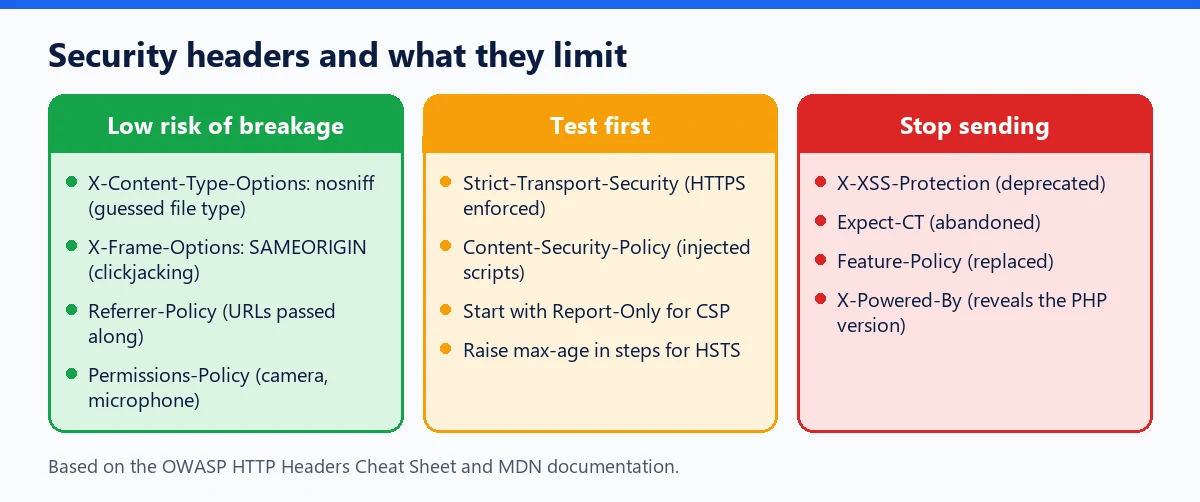
Headers to stop sending
The OWASP HTTP Headers Cheat Sheet advises against X-XSS-Protection, which can create vulnerabilities on otherwise safe sites (omit it or set it to 0), and Expect-CT, which should be removed. Feature-Policy has been replaced by Permissions-Policy. Conversely, OWASP recommends removing X-Powered-By and making Server less talkative: these headers announce the PHP or server version and make fingerprinting easier.
For WordPress
WordPress already sends X-Frame-Options: SAMEORIGIN and frame-ancestors 'self' on the admin area and the login page, through the send_frame_options_header() function. Public pages, however, get none of these headers by default. There are three places to add them:
- The server:
Header always setin an Apache or LiteSpeed.htaccessfile,add_header … alwaysin Nginx. This is the most complete solution, because it also covers static files and cached pages. - The CDN: response transform rules, handy if the site sits behind a proxy.
- PHP or a plugin: the
send_headersaction, useful without access to the configuration, but missing from responses that don't go through WordPress.
Then check the result with curl -I https://your-site.com/ or the browser's Network tab, after clearing caches. Our guide to HTTP security headers for WordPress gives starting values and configuration examples; the article on what Google takes into account covers their (small) role in SEO.
Common mistakes
- Adding a header in two places (server and plugin) with different values.
- Forgetting
always: without it, Apache and Nginx don't add the header to error pages. - Chasing a perfect grade on an audit tool by enabling a strict CSP that breaks the editor or checkout.
In WP Feint, the free version sends nosniff from the first level of the Hardening module, and the Pro version manages security headers from the admin area, with a button that shows the headers actually received. A page served by an upstream cache may not carry them, though: the server configuration remains the safest place for a strict policy.