HTTP security headers are a few lines sent with every page. They do not repair a vulnerable plugin, but they tell your visitors' browsers to refuse certain dangerous behaviors: loading over HTTP, displaying the page inside a booby-trapped frame, running a script from somewhere else. This article explains what each header does, what WordPress already sends, sensible starting values and how to test them without breaking the admin area.
Quick definition: HTTP security headers. Ready-made solution: WordPress security headers with WP Feint.
What these headers protect, and what they do not
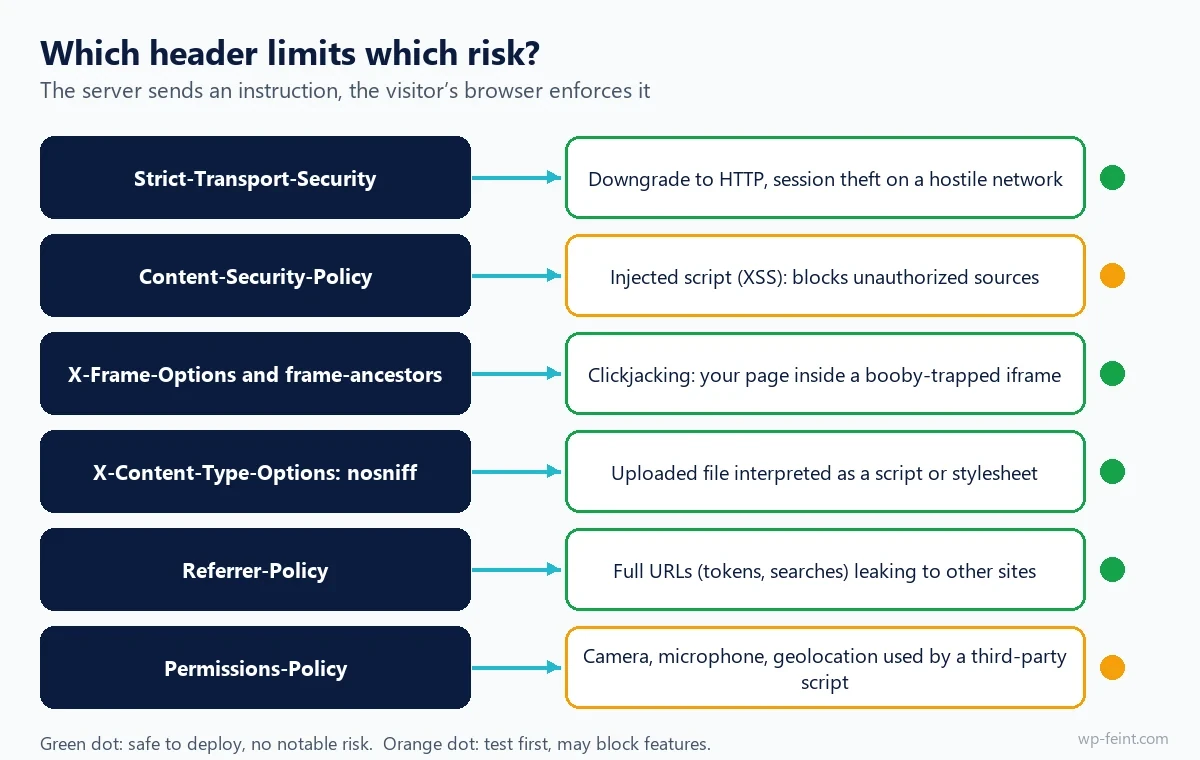
A security header is an instruction: the server sends it, the browser enforces it. The protection therefore applies to the visitor and to the way your pages are displayed. A bot attacking wp-login.php or a plugin directly ignores these instructions completely.
- They limit the impact of an XSS flaw, clickjacking or interception on public Wi-Fi.
- They do not block SQL injection, a malicious file upload or privilege escalation in a plugin: only updating fixes those flaws.
- They add to the other layers (updates, two-factor authentication, backups) without replacing them.
What WordPress already sends
WordPress sets a few headers itself, but only on certain responses. Knowing them keeps you from adding duplicates with conflicting values.
| Response | Header sent by WordPress | Since |
|---|---|---|
Admin area (admin_init) and login page (login_init) | X-Frame-Options: SAMEORIGIN | WordPress 3.1.3 |
| Admin area and login page | Content-Security-Policy: frame-ancestors 'self'; | WordPress 6.9 |
| Admin area and login page | Referrer-Policy: strict-origin-when-cross-origin | WordPress 4.9 (current value since 4.9.5) |
REST API and admin-ajax.php | X-Content-Type-Options: nosniff | Present in the current code |
| Public pages of the site | None of these headers by default |
In other words, it is your public pages that remain unprotected. That is where you need to act.
The six headers to know, with starting values
| Header | Purpose | Starting value | Risk of breakage |
|---|---|---|---|
Strict-Transport-Security | Enforces HTTPS for subsequent visits | max-age=31536000 after a short trial period | Low if the whole site is on HTTPS, high if a subdomain is not |
X-Content-Type-Options | Stops the browser from guessing a file's type | nosniff | Very low |
X-Frame-Options | Prevents display inside another site's frame | SAMEORIGIN | Low; DENY would break the Customizer preview |
Referrer-Policy | Limits the URL passed to linked sites | strict-origin-when-cross-origin | Very low |
Permissions-Policy | Turns off sensitive browser APIs | camera=(), microphone=(), geolocation=() | Medium if a plugin uses geolocation or the camera |
Content-Security-Policy | Lists allowed sources (scripts, styles, frames, and so on) | Report-only mode first | High: must be built site by site |
HSTS: powerful, but hard to undo
Strict-Transport-Security tells the browser to use only HTTPS for max-age seconds. The browser ignores this header if it arrives over HTTP, and the very first visit stays exposed until the browser has received it once. To turn HSTS off, you must send max-age=0 over HTTPS: impossible if your certificate has expired in the meantime.
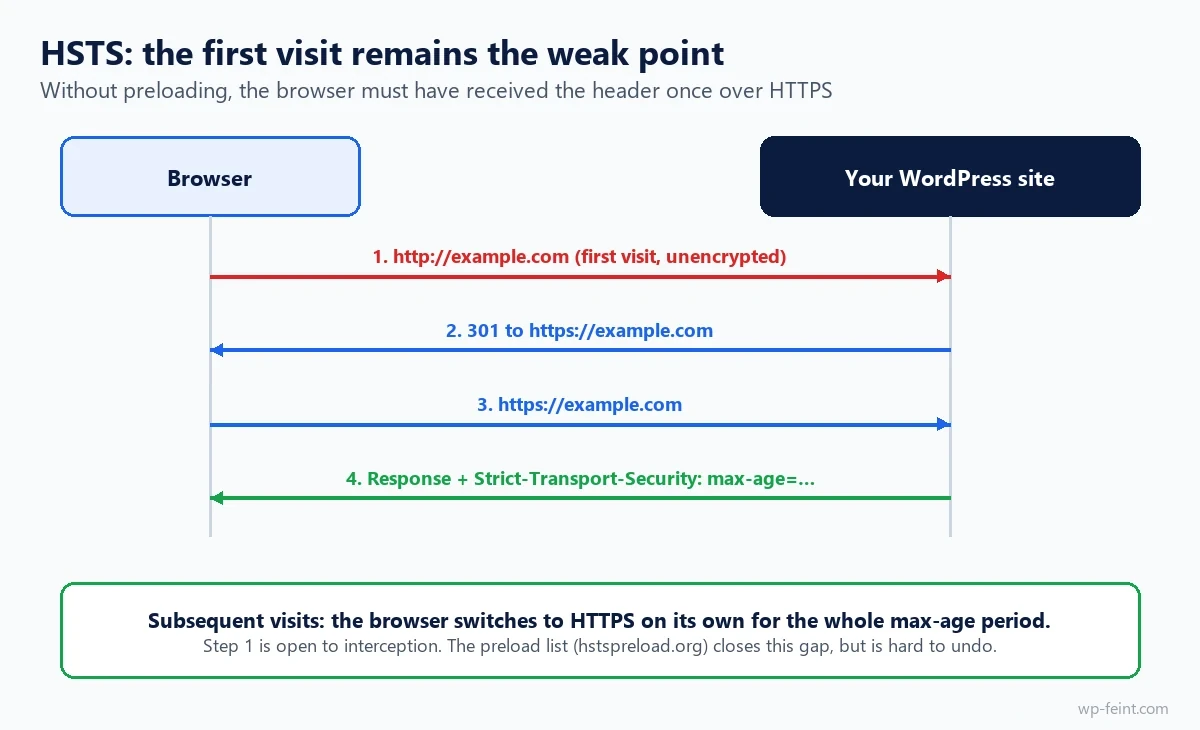
The hstspreload.org preload list removes this weak spot, under strict conditions: a valid certificate, a redirect from HTTP to HTTPS on the same host, all subdomains on HTTPS, and a header with a max-age of at least 31536000 seconds (one year), includeSubDomains and preload. The site warns that inclusion cannot easily be undone and that removal takes months to reach users. Only request preloading if all your subdomains (webmail, staging, an old extranet) will stay on HTTPS for the long term.
X-Frame-Options and frame-ancestors
Both prevent another site from displaying yours inside an invisible frame to trick you into clicking. OWASP recommends the CSP frame-ancestors directive, which supersedes X-Frame-Options in browsers that support it. Sending both, with SAMEORIGIN and 'self', mirrors what WordPress already does for the admin area since version 6.9.
Content-Security-Policy: start in report-only mode
CSP is the most effective header against injected scripts, and the trickiest on WordPress: core, themes and many plugins write inline scripts. A strict policy copied from a tutorial often blocks the editor, forms or analytics. The right method:
- Send
Content-Security-Policy-Report-Only: the browser reports violations without blocking anything. - Open the developer tools console on the home page, a post, the cart and the editor, and note every blocked source.
- To collect reports remotely, add
report-toand theReporting-Endpointsheader: without a destination, no report is sent. - Switch to
Content-Security-Policyonly once the console stays clean on every important user journey.
Since WordPress 5.7, the wp_get_script_tag() and wp_get_inline_script_tag() functions and the wp_script_attributes filter let you add a nonce attribute to properly enqueued scripts. Scripts that a theme or plugin writes directly into the HTML do not benefit: that is why many WordPress policies keep 'unsafe-inline' at first, which weakens the protection against XSS.
Content-Security-Policy-Report-Only: default-src 'self'; script-src 'self' 'unsafe-inline'; style-src 'self' 'unsafe-inline'; img-src 'self' data: https:; object-src 'none'; base-uri 'self'; form-action 'self'; frame-ancestors 'self'This starting point is deliberately permissive: it is meant for measuring, not protecting. Then tighten it source by source (font domain, analytics tool, payment gateway).
Headers you should stop adding
Many older guides and plugins still suggest abandoned headers. Adding them no longer protects anything, and one of them can even do harm.
| Header | Current status | What to do |
|---|---|---|
X-XSS-Protection | Deprecated and non-standard (MDN). Can create XSS flaws on otherwise safe sites. | Do not send it, or send it set to 0. Use a CSP. |
Expect-CT | Discouraged by OWASP, which recommends removing it. | Remove it. |
Feature-Policy | Replaced by Permissions-Policy, which uses a different syntax. | Convert it, for example camera=(). |
X-Powered-By and a detailed Server | Not security headers: they advertise the PHP or server version. | Remove them (expose_php = Off in PHP) or neutralize them. |
Where to configure them: server, PHP or plugin
The choice depends on your hosting. The general rule: the earlier the instruction is set, the more responses it covers.
- At the server level (Apache or LiteSpeed
.htaccess, Nginx configuration): also covers static files, errors and pages served by a page cache without going through PHP. - In PHP (the
send_headersaction): handy on hosting without access to the configuration, but missing from responses that do not load WordPress, such as a page served directly by a cache. - Through a plugin: same limitation as PHP, with an interface. Check that it does not add the deprecated headers listed above.
Apache or LiteSpeed (.htaccess)
With mod_headers, the always condition also adds the header to error responses and redirects, which the default condition does not.
<IfModule mod_headers.c>
  Header always set Strict-Transport-Security "max-age=31536000"
  Header always set X-Content-Type-Options "nosniff"
  Header always set X-Frame-Options "SAMEORIGIN"
  Header always set Referrer-Policy "strict-origin-when-cross-origin"
  Header always set Permissions-Policy "camera=(), microphone=(), geolocation=()"
</IfModule>
Nginx
Without the always parameter (available since Nginx 1.7.5), add_header only applies to status codes 200, 201, 204, 206, 301, 302, 303, 304, 307 and 308. Another trap: a location block that defines its own add_header no longer inherits the headers from the server level. Nginx 1.29.3 added add_header_inherit merge; to change this behavior.
add_header Strict-Transport-Security "max-age=31536000" always;
add_header X-Content-Type-Options "nosniff" always;
add_header X-Frame-Options "SAMEORIGIN" always;
add_header Referrer-Policy "strict-origin-when-cross-origin" always;
add_header Permissions-Policy "camera=(), microphone=(), geolocation=()" always;
In PHP, in a custom plugin
add_action( 'send_headers', function () {
    header( 'X-Content-Type-Options: nosniff' );
    header( 'Referrer-Policy: strict-origin-when-cross-origin' );
    header( 'Permissions-Policy: camera=(), microphone=(), geolocation=()' );
} );
Do not add HSTS in PHP if your host or CDN already sets it: two different values make troubleshooting harder.
Testing without breaking the site
- From the command line:
curl -I https://your-site.com/shows the headers actually received. Also test a 404 page, an image fromwp-content/uploadsandwp-login.php. - In the browser: the Network tab of the developer tools, then the response for the main document.
- With Mozilla's HTTP Observatory, part of MDN since July 2024, which grades the configuration and explains each point.
- Then walk through the sensitive features: block editor, Customizer, forms, checkout, video embeds.
- Clear every cache (plugin, host, CDN) before each test: a cached page can keep the old headers.
With WP Feint
The free plugin already adds X-Content-Type-Options: nosniff from level 1 of the Hardening module. WP Feint Pro manages security headers from the admin area (HSTS, X-Frame-Options, Referrer-Policy, CSP, and more) without editing server files. As with any PHP-based solution, a page served by an upstream cache may not carry these headers: check the result with curl and, if needed, see the host and cache compatibility page. The comparison details where the line falls between the free and Pro versions.
A hosted cookie consent platform loads its script from its own domain, which must then be allowed in the CSP; our comparison of cookie consent plugins shows which solutions stay on your server.
Key takeaways
- Security headers protect your visitors, not your code: they complement updates without replacing them.
- WordPress already protects the admin area and login page against framing; your public pages have nothing by default.
- Roll out nosniff, SAMEORIGIN, Referrer-Policy and Permissions-Policy first, as they rarely break anything.
- Ramp up HSTS in stages and only request preloading if all subdomains are on HTTPS.
- Build your CSP in report-only mode, page by page, before enforcing it.
- Stop sending X-XSS-Protection, Expect-CT and Feature-Policy.
Sources
- MDN: Strict-Transport-Security (opens in a new tab)
- HSTS Preload List Submission (submission requirements) (opens in a new tab)
- MDN: X-XSS-Protection (opens in a new tab)
- OWASP HTTP Headers Cheat Sheet (opens in a new tab)
Other sources consulted: official documentation.