

HSTS was standardized in November 2012 by RFC 6797. Its goal is to close a gap that a plain HTTP-to-HTTPS redirect leaves open: as long as a visitor types example.com without specifying the protocol, their browser starts with an unencrypted request. On public Wi-Fi, an attacker in the middle can intercept that request and keep the victim on HTTP, an attack known as SSL stripping. With HSTS, the browser remembers that the site requires HTTPS and no longer even tries the unencrypted version.
How HSTS works
The server adds the Strict-Transport-Security header to its HTTPS responses. There are three directives:
max-age(required): how long, in seconds, the browser remembers the instruction;includeSubDomains: applies the rule to every subdomain;preload: signals that the domain agrees to be added to the browsers' preload list.
Strict-Transport-Security: max-age=31536000; includeSubDomainsThe RFC mandates two important behaviors. First, a browser ignores the header if it arrives over HTTP, so that a middleman can neither add nor strip it. Second, on an HSTS site, any TLS certificate error cuts the connection: the user no longer gets a button to “proceed anyway.”
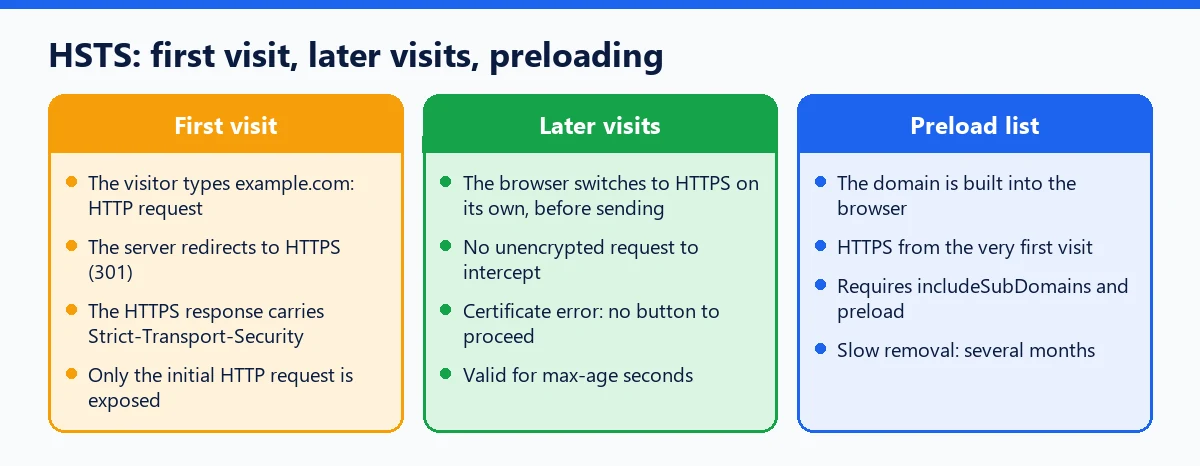
The first visit and preloading
HSTS has a weakness acknowledged by both MDN and the RFC: it only applies after a first successful secure connection. To close that gap, Chrome maintains a list of domains hard-coded into the browser, which Firefox, Safari and Edge also rely on. The hstspreload.org site requires a valid certificate, a redirect from HTTP to HTTPS, every subdomain on HTTPS and a header with a max-age of at least 31536000 seconds (one year), includeSubDomains and preload. It warns that inclusion is hard to undo and that removal takes months to reach users.
For WordPress
WordPress doesn't send HSTS by itself. Before enabling it, make sure the whole site runs on HTTPS: URLs under Settings, General, mixed content fixed, automatic certificate renewal (often handled by Let's Encrypt at your host). Our guide to HTTPS on WordPress walks through these steps.
- Start with a short
max-age(300 seconds, then one week), withoutincludeSubDomains. - Check every subdomain (webmail, staging, extranet) before adding
includeSubDomains. - Go up to one year once everything is stable; request preloading only as the very last step.
- Set the header in a single place (server, CDN or plugin) to avoid two conflicting values.
HSTS is one of the security headers that audit tools check. Its effect on SEO is indirect, as explained in the article HTTPS, HSTS and what Google actually takes into account.
Common mistakes
- Enabling a year of HSTS with
includeSubDomainswhile a subdomain is still on HTTP: it becomes unreachable for visitors who received the header. - Assuming you can roll back by turning the option off: to disable HSTS, you have to send
max-age=0over HTTPS, which requires a certificate that is still valid. - Letting the certificate expire: with HSTS, visitors can no longer click through the warning.
WP Feint Pro offers HSTS as an option in its Security headers card, with a one-year max-age, never sent over HTTP. The interface reminds you that browsers keep remembering the header even after it is disabled: only turn it on for a site that will stay on HTTPS for good.