
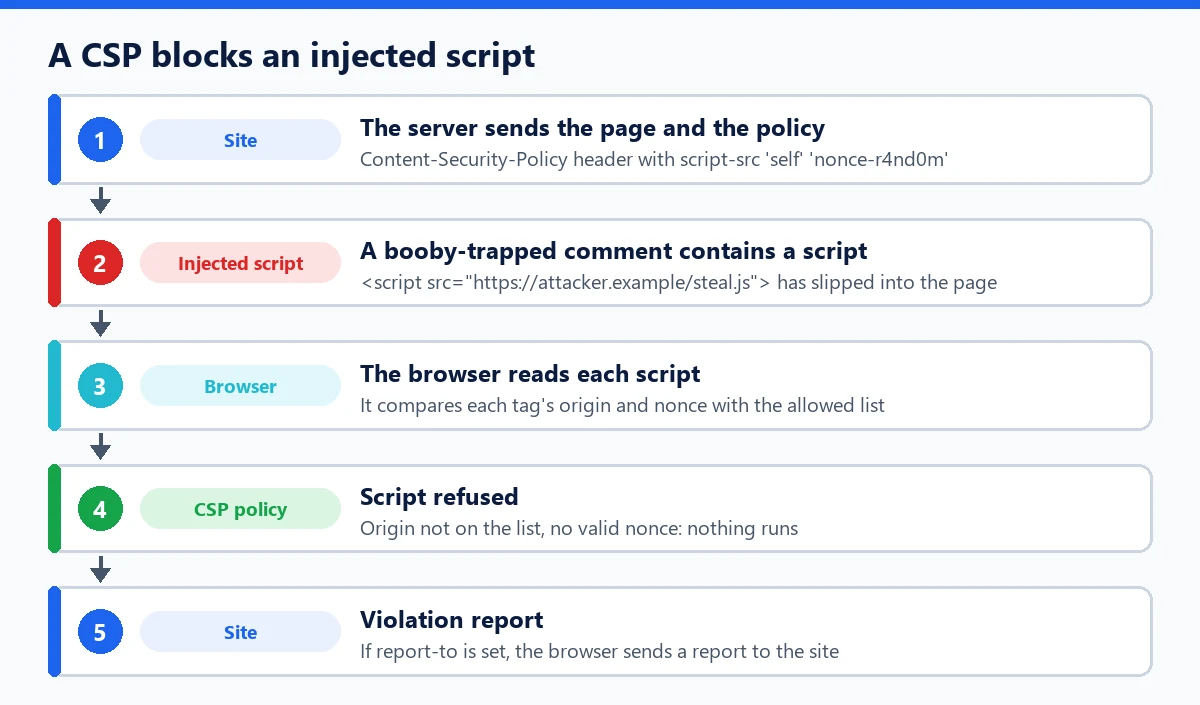
In practice, a CSP is an allowlist sent by the server with every page. The browser reads it before running anything, then refuses whatever isn't on it: a script from an unknown domain, an injected style, a frame or a form pointing elsewhere. Its main benefit is to limit the damage of a cross-site scripting (XSS) vulnerability: even if an attacker manages to slip code into a page, the browser can refuse to run it.
How a Content Security Policy works
A policy is made of directives separated by semicolons. Each directive targets a type of resource and lists the allowed sources:
default-srcserves as the fallback for every resource type that doesn't have its own directive;script-src,style-src,img-src,font-srccover scripts, styles, images and fonts;frame-ancestorssays which sites can display the page in a frame, which protects against clickjacking;object-src 'none',base-uriandform-actionclose lesser-known injection paths.
As soon as a script-src or default-src directive exists, scripts written directly in the HTML and onclick attributes are blocked. The 'unsafe-inline' keyword lifts that ban, but MDN points out that it cancels much of the benefit of CSP. The recommended method, called strict CSP, allows scripts through a nonce (a random value that changes with every response, copied into the <script> tag) or through the script's SHA-256 hash.
Header, meta tag and report-only mode
The policy is preferably sent in the Content-Security-Policy HTTP header. A <meta http-equiv> tag also works, but the W3C specification states that it ignores frame-ancestors, sandbox and report-uri, and that it can't carry a report-only policy.
Report-only mode is the key to a rollout that doesn't break anything. With Content-Security-Policy-Report-Only, the browser blocks nothing: it only reports what it would have blocked, in the console or to an address declared with report-to and the Reporting-Endpoints header. You adjust the list, then switch to enforcing mode.
Content-Security-Policy-Report-Only: default-src 'self'; script-src 'self' 'nonce-r4nd0m'; object-src 'none'; base-uri 'self'; frame-ancestors 'self'For WordPress
WordPress is tough terrain for a strict CSP: core, themes and many plugins print inline scripts. Since WordPress 5.7, the wp_get_inline_script_tag() and wp_print_inline_script_tag() functions and the wp_script_attributes filter let you add a nonce attribute to scripts that are loaded properly, but not to those a theme hard-codes. That's why many sites start with 'unsafe-inline' and then tighten things up page by page.
- Test in report-only mode the home page, a post, the block editor, forms and checkout.
- Set the policy at the server level (
.htaccess, Nginx) if a cache serves pages without going through PHP. - Inventory third-party domains: fonts, analytics, videos, payment gateway.
Our guide to security headers for WordPress details a starter policy and the testing method, and the article on XSS vulnerabilities in WordPress shows what a CSP would have limited. CSP belongs to a broader family of HTTP security headers.
Common mistakes
- Copying a strict policy from a tutorial and applying it as is: the editor or the cart stops working.
- Reusing the same nonce from page to page: it must be unpredictable and change with every response, which doesn't play well with page caching.
- Believing CSP replaces data escaping: OWASP presents it as defense in depth, not as the only protection against XSS.
WP Feint Pro offers a basic CSP that blocks browser plugins, protects the base URL and upgrades resources to HTTPS. It deliberately doesn't restrict scripts: a policy against XSS still has to be tailored, in the server or CDN configuration.