EasyHoster (Hong Kong): a small French-speaking cPanel host, with servers rented from OVHcloud in France
EasyHoster is a small French-speaking host that sells cPanel hosting designed for WordPress, with support that steps in right inside your site. Here is who is behind it, its plans and their prices, its technical setup, its protections, the incident it documented itself in 2026 and the settings to plan for WP Feint.
Disclosure: we have no account with EasyHoster and have tested nothing there. The information comes from its website, its terms and conditions and its public announcements; no independent press article about it was found. No affiliate links. To see where EasyHoster stands among the others, see our ranking of WordPress hosting.
EasyHoster at a glance
- Company: the service is provided by Kim Communication Limited, a Hong Kong company (ICRIS registration number 2114236, incorporated on June 27, 2014 according to the terms of sale). Contracts are governed by Hong Kong law. The “About” page presents a business of Belgian origin active since 2009, whose team moved to Asia in 2014. We could not consult the Hong Kong register, and the two pages give two different addresses for the head office.
- Size: “nearly 2,000 customers” according to a March 2026 announcement. It is a niche player, nothing like the large hosts.
- Data centers: EasyHoster has no infrastructure of its own. It rents servers from OVHcloud in Roubaix, Gravelines and Strasbourg, with at most about 200 accounts per server. Backups go weekly to Amazon S3 and full server images to storage in Germany.
- Interface: cPanel, with WP Toolkit and the Softaculous installer.
EasyHoster’s WordPress plans and their prices
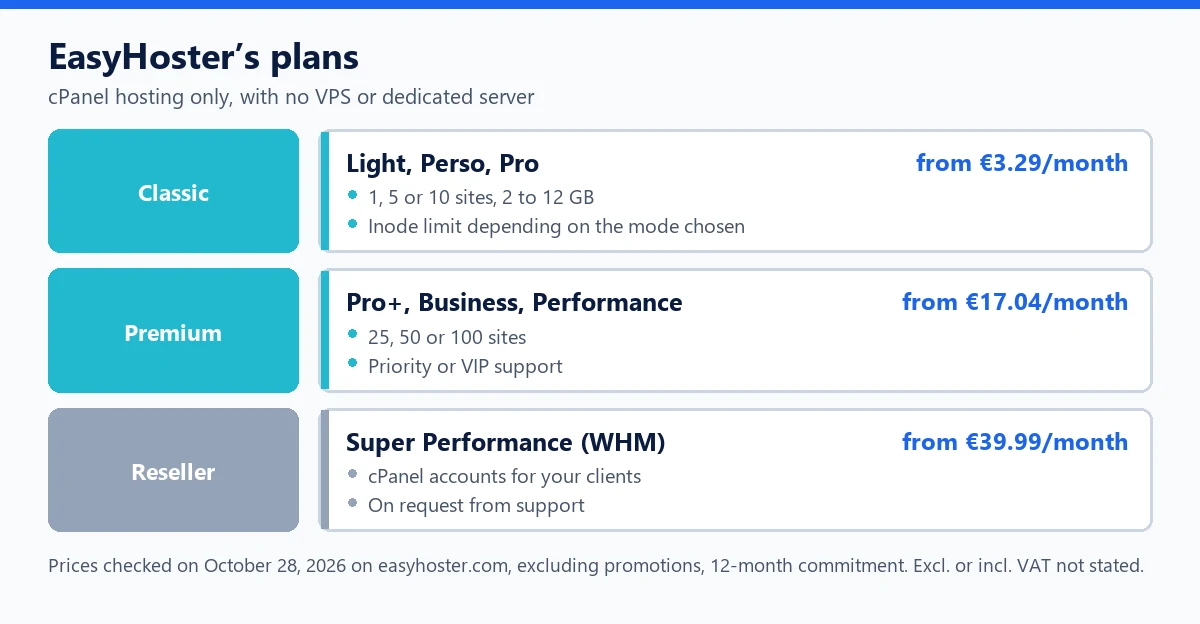
All plans are cPanel shared hosting: three “classic” ones (Light, Perso, Pro), three “premium” ones (Pro+, Business, Performance) and a reseller plan with WHM. There are no VPS or dedicated servers in the catalog. Storage comes in two modes: in gigabytes with a limited number of inodes, or with half the space and unlimited inodes.
Prices decrease with the term: the published price list, updated on March 6, 2026, ranges from monthly to 36-month payment. The table gives the 12-month price (€3.29 per month for Light); the site highlights the 36-month price (“from €2.49”). The site nowhere states whether its prices are excl. or incl. VAT.
| Plan | Type | Starting price | Sites | Storage | Key limits |
|---|---|---|---|---|---|
| Light | cPanel shared | €3.29/month (€39.47 per year) | 1 | 2 GB | 30,000 inodes, 2 databases, 2 email accounts |
| Perso | cPanel shared | €5.49/month | 5 | 6 GB | 100,000 inodes, 10 databases |
| Pro | cPanel shared | €8.79/month | 10 | 12 GB | 200,000 inodes, priority support, free domain |
| Pro+ | Premium shared | €17.04/month | 25 | 28 GB | 400,000 inodes |
| Business and Performance | Premium shared | €32.99 or €43.99/month | 50 or 100 | 56 or 84 GB | 800,000 or 1.3 million inodes, VIP support |
| Super Performance | Reseller (WHM) | from €39.99/month (best rate) | Unrestricted | Depends on the plan | On request from support |
The positioning is deliberate: EasyHoster writes that it does not try to compete on price, and highlights lightly loaded servers and support that works inside WordPress. A one-month free trial (subject to an identification form) and a 14-day money-back guarantee are offered.
Technical setup and support at EasyHoster
| Item | What EasyHoster documents |
|---|---|
| Web server | Apache with mod_lsapi, and since July 2025 an NGINX cache in front of compatible sites |
| System | CloudLinux (9.7 on the server upgraded in April 2026), CageFS, KernelCare |
| PHP | Version and extension selector; the technical page mentions PHP 8.1 and 8.2 |
| Cache | NGINX cache, Redis, Memcached, AccelerateWP |
| Backups | JetBackup5 for self-service restores, weekly copies on Amazon S3, Acronis images in Germany; retention period not specified |
| Tools | SSH, WP Toolkit Deluxe, Softaculous, HTTP/2 |
Support: tickets only, in French and English. EasyHoster advertises about one hour to respond at best, four hours on average and up to 24 hours for special requests on weekends. Troubleshooting WordPress errors, optimization and cleaning up a hacked site are advertised at no extra cost, and theme installation from the Pro+ plan up.
Security at EasyHoster
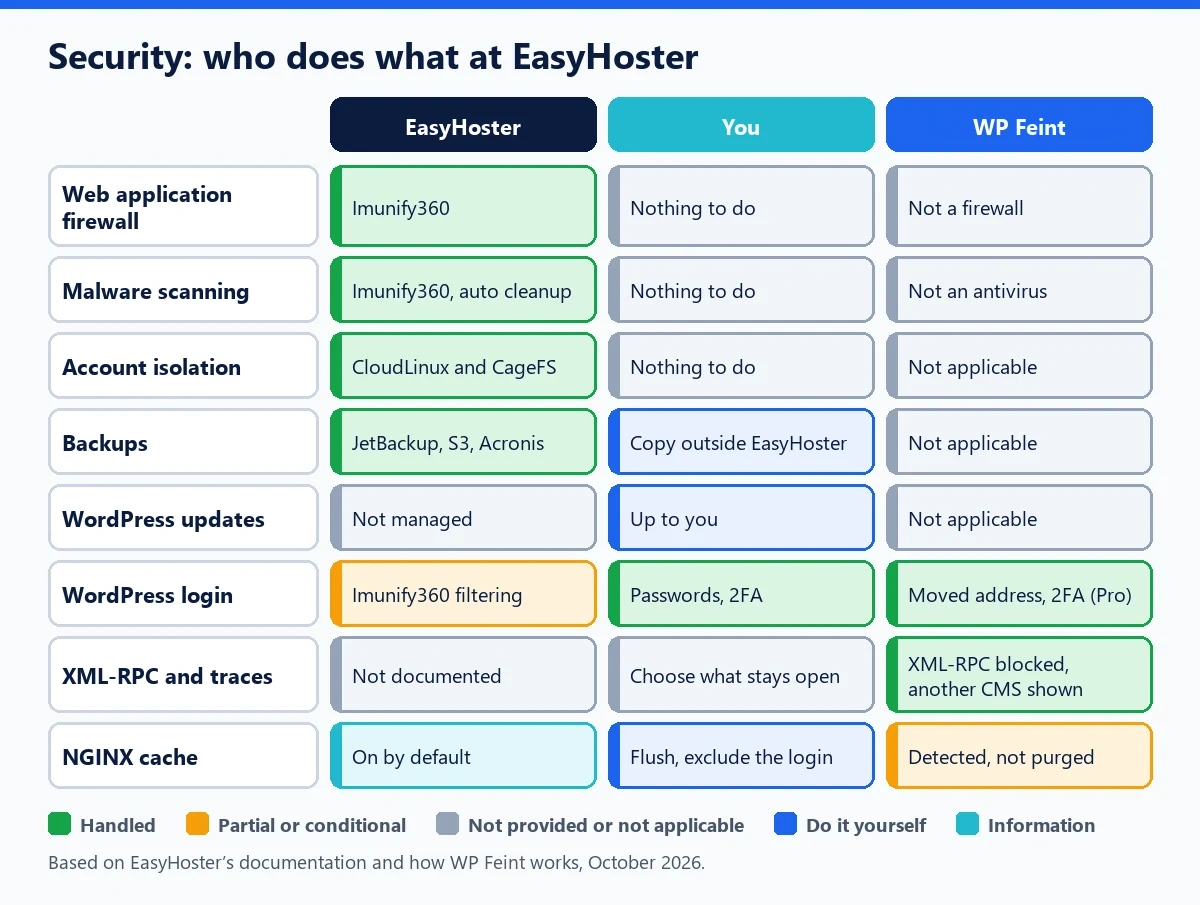
- Web application firewall and antivirus: Imunify360, with real-time scanning and automatic cleanup of malicious code (see our comparison of web application firewalls).
- Isolation: CloudLinux and CageFS separate the accounts; KernelCare applies kernel patches without rebooting.
- SSL: AutoSSL certificates (Sectigo) installed automatically.
- “Hacked = Refunded” guarantee: if the site is reinfected after EasyHoster’s three cleanup phases, the current year is refunded if you leave.
- Not documented: two-factor authentication on the customer area, DDoS protection (beyond OVHcloud’s, which is not described), backup retention period and a staging environment.
Documented incident: on April 9, 2026, the “Avocado” server was unreachable from 2:27 a.m. to 4:23 a.m., then restarting until 5:49 a.m. The report published by EasyHoster attributes the outage to a kernel crash after a patch applied automatically by KernelCare; the RAID disks had to be resynchronized, the file system checked and a surge of traffic contained at restart, before the server was moved to CloudLinux 9.7. No data leak is mentioned. More broadly, on April 28, 2026 cPanel fixed an actively exploited authentication bypass vulnerability (CVE-2026-41940), which affected all cPanel hosts; EasyHoster published no announcement about it.
To go further: our comparison of web application firewalls for WordPress and our guide to hardening PHP on a hosting account.
EasyHoster’s strengths and weaknesses
| Strengths | Weaknesses |
|---|---|
| In-depth WordPress assistance: troubleshooting, optimization, cleanup at no advertised extra cost | Very small business (nearly 2,000 customers), dependent on a few people |
| Servers in France (OVHcloud), lightly loaded | Company in Hong Kong, contract under Hong Kong law, inconsistent head office addresses |
| Imunify360, CloudLinux, CageFS, KernelCare | Support by tickets only |
| Complete, dated price list, one-month trial | Prices without stating excl. or incl. VAT; EasyHoster does not try to be the cheapest |
| Incidents explained in detail in announcements | Backup retention, staging and customer area 2FA not documented |
| Several sites from Perso up (5 sites) | No VPS or dedicated server to grow into |
EasyHoster mainly sells hands-on assistance. If you want a comparable cPanel stack from a larger French host, compare with WordPress hosting at o2switch; for other French-speaking cPanel hosts, see LWS’s WordPress plans and PlanetHoster’s WordPress hosting.
Who is it for?
- A good fit: a non-technical freelancer or small business that wants help with WordPress itself, not just the hosting; a blog or brochure site that prefers servers in France.
- Can work: a freelancer with several client sites (Pro+, Business) or a small agency on the reseller plan.
- A poor fit: a business that requires a contract under French or European law, phone support, or the option to grow into a VPS with the same provider; a project that needs a detailed contractual uptime commitment.
Getting started: installing and securing WordPress at EasyHoster
- Install WordPress with Softaculous or WP Toolkit from cPanel, or ask support for a free migration.
- Choose the PHP version in cPanel’s PHP selector (CloudLinux): the most recent one compatible with your plugins.
- Check HTTPS: AutoSSL installs the certificate; then force the redirect to HTTPS.
- Backups: JetBackup5 lets you restore yourself; also keep a copy outside EasyHoster, following our 3-2-1 backups method.
- Updates: turn on automatic updates for reliable plugins and test major updates on a copy of the site (WordPress staging).
- Check file permissions after a migration (our permissions guide), then close XML-RPC if you have no use for it (why disable it).
- Enable two-factor authentication for WordPress administrators (our guide) and use a unique password for cPanel.
WP Feint on EasyHoster: what changes
These remarks combine how WP Feint works with EasyHoster’s documentation; we have not checked them on site. Test on a copy first and read the WP Feint compatibility with hosts and caches page.
- Apache and .htaccess: based on how WP Feint works, on Apache the plugin folder returns 404 without any setting thanks to its
.htaccess. EasyHoster states that its NGINX cache remains compatible with.htaccessfiles. For Pro’s aliases (file addresses), paste the generated block at the top of the root.htaccess, before “# BEGIN WordPress”, then run “Check and activate”. - NGINX cache and AccelerateWP: these are host caches that WP Feint does not purge. After enabling the masking, clear the NGINX cache from the cPanel home page and the AccelerateWP cache if it is active, then have your login address excluded from these caches; the procedure is not described, so ask support.
- Visitor addresses: with an NGINX relay in front of Apache, the real address must be passed on by the server. WP Feint Pro only restores it itself behind Cloudflare or the Sucuri firewall. If the addresses recorded by Pro (login limiting, activity log) are all the server’s, ask EasyHoster to fix how they are passed on.
- Overlaps: Imunify360 already filters attacks and protects the login at server level; keep it, and use only one login limiting in WordPress. Do not add a second firewall plugin without a reason.
What WP Feint adds: WordPress presented as another CMS, a moved login address, wp-login.php and xmlrpc.php returning 404, bot traps, and with Pro two-factor authentication, login limiting and alerts. It is not a firewall, an antivirus or a backup, and it does not fix any vulnerability.
Our take on EasyHoster
EasyHoster offers a solid technical stack for shared hosting (cPanel, CloudLinux, Imunify360, OVHcloud servers in France) and a rare level of WordPress assistance, documented in detail on its website. The trade-offs are real: a very small business, a company and contract in Hong Kong, support by tickets only, prices without stating excl. or incl. VAT and several undocumented security points. Best kept for sites that value human help more than the size of the provider; otherwise, compare with the other hosts in our comparison of web hosts for WordPress, and complete the protection with the best WordPress security plugins.
Key takeaways
- cPanel hosting from €3.29 to €43.99 per month over 12 months, without stating excl. or incl. VAT.
- Hong Kong company (Kim Communication Limited), servers rented from OVHcloud in France, nearly 2,000 customers.
- Imunify360, CloudLinux, CageFS, JetBackup backups; in-depth WordPress support, by tickets only.
- Documented outage on April 9, 2026 on one server, about two hours of downtime.
- WP Feint: .htaccess supported (Apache); clear the NGINX cache after enabling.
Sources
- EasyHoster: data centers and network (external link, opens in a new tab)
- EasyHoster: Hébergement optimisé par l’IA et NGINX Cache (July 16, 2025) (external link, opens in a new tab)
Other sources consulted: official pages of the hosting provider and software vendors.