File inclusion is one of the oldest families of PHP vulnerabilities, yet it is still very much alive, driven by modern techniques that turn a simple file read into code execution. This article explains what LFI and RFI are, how the php://filter and phar:// wrappers come into play, and above all how to protect yourself on WordPress hosting.
LFI and RFI: two close relatives
The problem starts with an inclusion function (include, require and their variants) whose path depends on user-supplied data, with no validation. Code such as include($_GET['page'] . '.php'); opens the door, depending on what the attacker slips into the parameter.
- LFI (Local File Inclusion): the attacker gets the application to include a file that already exists on the server. At best, they read files they should not see; at worst, they manage to get code executed.
- RFI (Remote File Inclusion): the attacker gets the application to include a remote file hosted on their own server. This is the most direct form, because the file then contains their code.
Good news about RFI: it depends on a configuration option that is disabled by default. The allow_url_include directive is set to 0 on a standard installation, and it has even been deprecated since PHP 7.4. Without it, including a remote URL fails. That is why attention has shifted to techniques that work even with the default configuration.
PHP wrappers, or how a read becomes an execution
PHP exposes special streams, called wrappers, that can be used anywhere a file name is expected. Some are harmless, others can be abused. Two deserve particular attention.
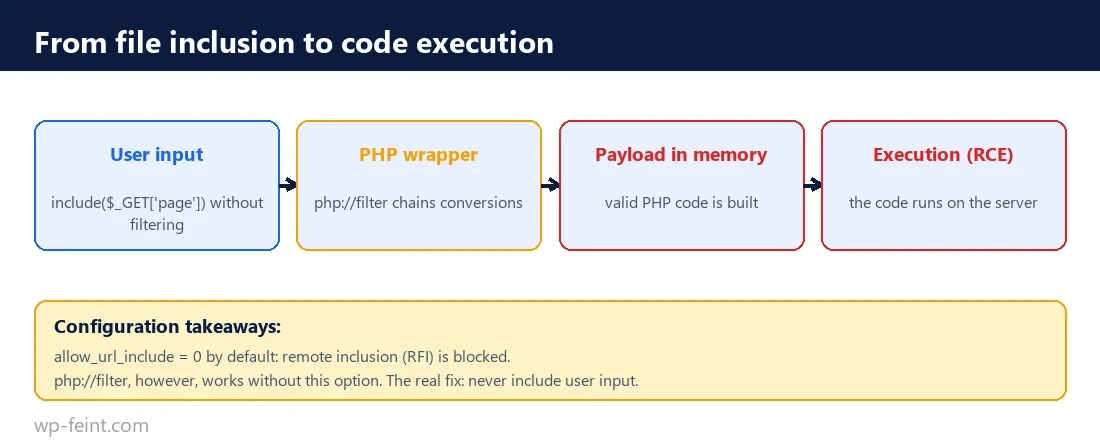
The php://filter wrapper applies transformations to a stream. By chaining character set conversions, an attacker can build a valid piece of PHP code, character by character, directly in memory, without ever needing a writable file or an upload. Key point: this technique does not depend on allow_url_include and works on a default configuration. That is what has made it so dangerous in recent years.
The phar:// wrapper raises a different problem. When a file operation receives a path starting with phar://, PHP reads the archive's metadata and, under certain conditions, deserializes it. If the application code contains an exploitable "gadget chain" (the same mechanism as object injection), this deserialization can trigger code. The attacker must first drop a booby-trapped archive, then get the application to open it through this wrapper.
| Wrapper | Abuse | Condition |
|---|---|---|
| php://filter | Building code through conversions | Works by default, no special option needed |
| phar:// | Triggering object deserialization | Accessible booby-trapped archive + gadget present |
| data:// | Supplying content to include directly | Requires allow_url_include to be enabled |
| http:// and ftp:// | Remote inclusion (RFI) | Requires allow_url_include to be enabled |
Why WordPress is affected
WordPress core does not include files from user input in this way. The risk almost always comes from a poorly written plugin or theme that builds an inclusion path from a URL parameter, a form field or a header. That is why inclusion flaws keep showing up in plugin vulnerability reports, year after year.
It is also worth keeping things in perspective: not every inclusion flaw leads to code execution. Many are limited to reading files, which is still serious when those files contain secrets (for example wp-config.php), but does not directly hand over control of the server. Severity depends on context and configuration.
How to protect yourself
Defense happens at two levels: the code and the server configuration.
- Never include user input. This is the real fix. A developer should use an allowlist of permitted files rather than concatenating a parameter into a path. For a site owner, this translates into: choose quality plugins and keep them up to date.
- Keep allow_url_include and allow_url_fopen disabled if your plugins do not need them, to shut down RFI and the
data://wrapper. - Restrict PHP with open_basedir, which limits accessible files to a given directory tree, and with
disable_functionsfor dangerous functions you do not use. - Block PHP execution in upload folders, to cut off the route by which an attacker drops an archive or a script.
- Monitor your plugins' vulnerabilities and apply fixes quickly, because an inclusion flaw is often exploited at scale as soon as it is published.
What a masking tool does not do
Let's be precise about the limits. WP Feint changes public signatures and offers access restrictions, but it does not fix vulnerabilities in code. Its guide says so explicitly: rewriting file addresses is not protection against the exploitation of a vulnerable plugin, and the highest level does not block all of a plugin's PHP files. Hiding a path can make automated recognition of a target harder, but an inclusion flaw in an installed plugin remains exploitable once the request has been crafted.
The right approach is therefore defense in depth. Hardening and access restrictions reduce the attack surface and the noise; keeping plugins up to date and properly configured PHP hosting address the root cause. None of these replaces the others. To go further on server configuration, our article on PHP hardening covers disable_functions, open_basedir and the other useful settings.
Spotting an attempt in your logs
Inclusion attempts often leave recognizable traces in access logs. URL parameters containing php://filter, phar://, sequences of ../ or references to wp-config.php are signals to take seriously. They do not prove a compromise, and most of them fail, but they show that your site is being probed for this type of flaw.
A useful habit is to watch for requests to plugin entry points followed by these patterns, especially right after a vulnerability has been published. The response is the same as for other families of flaws: check that the plugin in question is up to date, and deactivate it if no fix exists. On the server side, logging and blocking these patterns with a web application firewall reduces the noise, without replacing a fix in the code.
A family of flaws that will not go away
Why do these flaws persist when the principle has been known for years? Because they stem from a simple and tempting mistake: using user data directly to build a path. Every new plugin, every feature that dynamically loads a template or a page, can reintroduce the defect. And exploitation techniques keep advancing: the php://filter conversion chain in particular has revived interest in flaws once considered harmless, by turning them into code execution with no file to drop.
For a site owner, the practical takeaway is reassuring: you do not need to master these techniques to protect yourself. Choosing quality plugins, keeping them up to date, hardening the PHP configuration and monitoring your logs cover most of the risk. The rest is up to plugin developers, who must stop including unchecked input.
Key takeaways
- RFI requires allow_url_include, which is disabled by default and deprecated since PHP 7.4.
- The php://filter wrapper can build code without a writable file, even with a default configuration.
- phar:// can trigger object deserialization if a gadget exists in the code.
- The real fix is to never include user input; masking does not fix a flaw in the code.