

The robots.txt file is the first thing a well-behaved crawler reads before crawling a site. It goes at the root of the domain (https://example.com/robots.txt) and only applies to the host, protocol and port that serve it: a subdomain needs its own file. Its syntax fits in a few lines, but a single mistake can make an entire site vanish from search engines.
The syntax
User-agent: *
Disallow: /wp-admin/
Allow: /wp-admin/admin-ajax.php

User-agent: GPTBot
Disallow: /

Sitemap: https://example.com/wp-sitemap.xmlUser-agentnames the crawler concerned (*for all of them). Google applies the most specific group that matches its crawler.DisallowandAllowblock or allow paths. When rules conflict, the longest rule wins, and in a tie, the least restrictive one.Sitemapgives the full URL of the XML sitemap.
Google only supports these four fields: Crawl-delay, for example, is ignored by Googlebot. Paths are case-sensitive, the file is limited to 500 KiB and Google generally caches it for up to 24 hours. If the file returns a 404 error, Google assumes there are no restrictions; if it returns a server error (5xx), Google stops crawling at first, then falls back on the last known version.
What robots.txt doesn't do
This is the most widespread confusion: robots.txt controls crawling, not indexing. Google says it clearly: it is not a way to keep a page out of its results. A blocked URL can still appear in the results, without a description, if other pages link to it. Worse, a blocked page can't pass on its noindex tag, since the crawler never reads it.
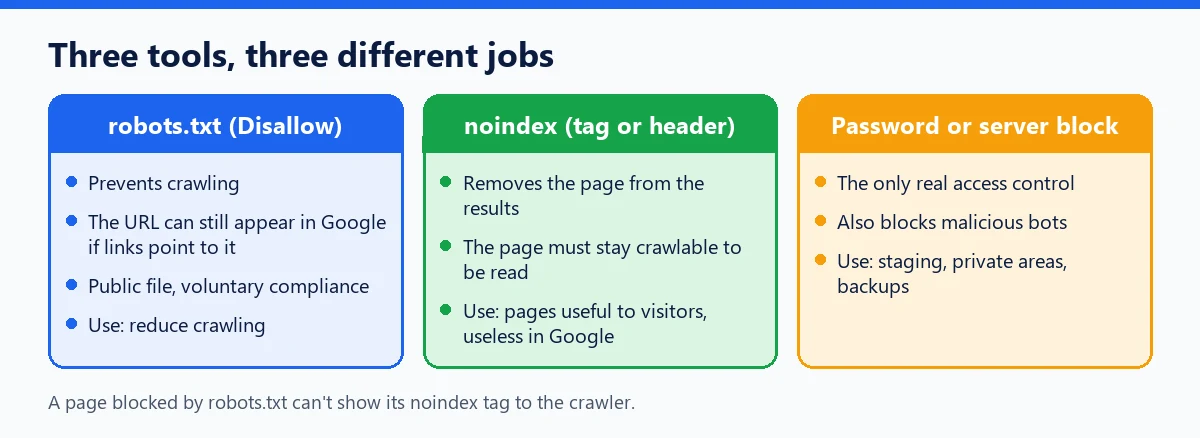
Nor is it a security tool. Compliance is voluntary: Googlebot and reputable crawlers follow the rules, malicious scanners ignore them, and some read the file precisely to find interesting paths. Never list a backup folder or a staging site in it: protect them on the server side, as explained in our article on exposed sensitive files.
robots.txt and AI crawlers
The file is also used to set a policy toward artificial intelligence crawlers: allowing assistants' search crawlers while refusing those that collect training data, for example. The bot-by-bot choice is discussed in our article on GPTBot, ClaudeBot and PerplexityBot, and how it fits with llms.txt in our guide to GEO for a secure WordPress site.
For WordPress
- A virtual file: without a physical file, WordPress generates a robots.txt that blocks
/wp-admin/while allowingadmin-ajax.php, and since version 5.5 adds the/wp-sitemap.xmlsitemap URL to it. A robots.txt file uploaded to the root replaces this virtual file. - SEO plugins often include a robots.txt editor in the Dashboard; check the result by opening the URL in a browser.
- The “Discourage search engines from indexing this site” checkbox (Settings > Reading) has no longer written
Disallow: /since WordPress 5.3: it adds anoindexrobots tag instead, which is more effective at keeping the site out of the results. - What not to block: theme and plugin folders that contain the CSS and scripts needed to display the page, otherwise Google sees a broken page.
Bots that ignore robots.txt and probe nonexistent URLs can be detected with bot traps: WP Feint counts these visits and, in the Pro version, can keep the most persistent ones out, without replacing a firewall.