
A site hosted in Chicago takes longer to answer a visitor in Sydney or Singapore than one in Detroit: distance adds latency to every round trip. A CDN places so-called edge servers in many cities and hands them copies of your files. Each visitor is routed to the nearest one, most often through DNS: the site's domain points to the CDN's network rather than directly to your server.
How a CDN works
A CDN acts as a shared cache sitting between visitors and your server, which is then called the origin. On each request, the edge server checks whether it has a valid copy. If it does, it sends it back without contacting the origin; if not, it fetches the file, passes it on and keeps it for the next visitors.
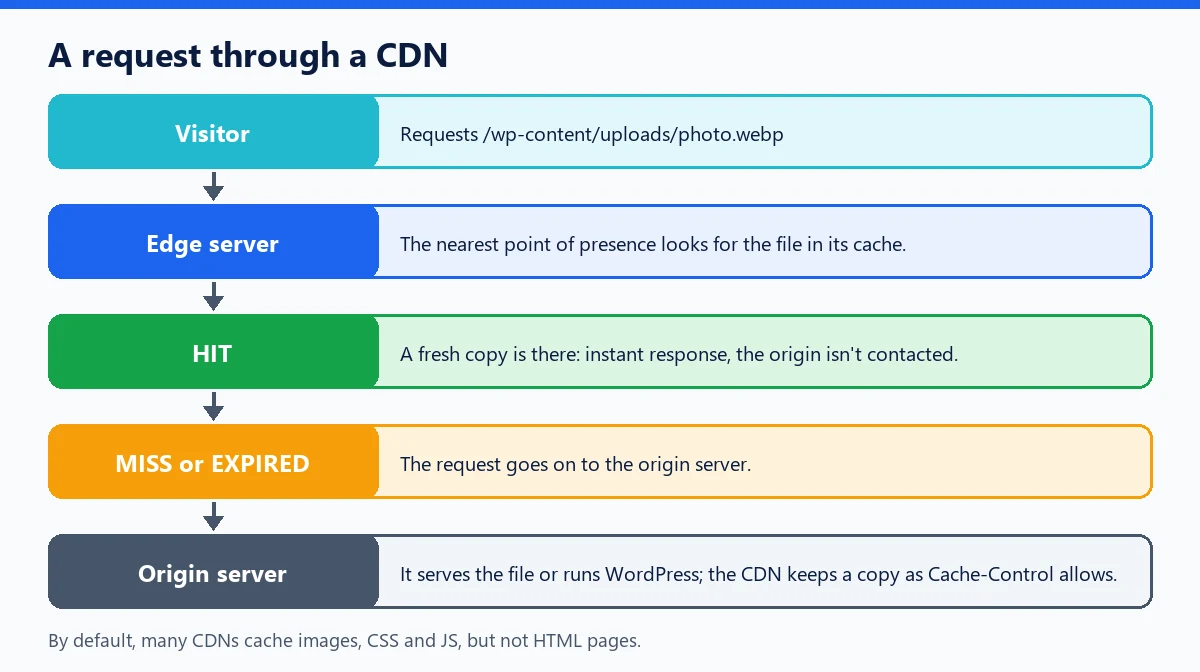
How long a copy is kept depends on the HTTP headers sent by the origin. MDN classifies CDNs as shared caches, which store a single response and serve it to many users: Cache-Control: public, max-age=… allows that caching, s-maxage sets a lifetime specific to shared caches, and private and no-store forbid it. Cloudflare, for example, reports the outcome of each request in the cf-cache-status header: HIT (served from cache), MISS (not cached, fetched from the origin), EXPIRED (stale copy), BYPASS or DYNAMIC (not cached).
What a CDN actually caches
One point often comes as a surprise: Cloudflare's documentation states that its CDN doesn't cache HTML or JSON by default. It keeps static files recognized by their extension (images, CSS, JavaScript, fonts, PDFs, videos), while WordPress pages are still generated by your server on every visit. Caching pages as well is possible with dedicated rules, as long as you exclude everything personalized: the admin area, cart, customer account and login pages.
Benefits and limitations
- Speed: heavy files travel a shorter distance, and recent protocols such as HTTP/2 and HTTP/3 are often enabled at the edge.
- Lower load: every file served from cache is one less request for your hosting.
- Protection: a CDN running as a proxy absorbs part of volumetric attacks and often offers a web application firewall, as an add-on or included.
- Limitations: a stale cache shows old versions after a change, so you need to know how to purge it; and your server no longer sees visitors' IP addresses, only the CDN's.
For WordPress
- Two families: the proxy CDN (Cloudflare, for example), which sits in front of the whole site after you change nameservers, and the file CDN, where a plugin rewrites media URLs to a CDN subdomain.
- Restore visitors' real IP addresses, otherwise login limiting, logs and bans end up targeting the CDN's servers. Our guide Cloudflare in front of WordPress covers the server-side settings; WP Feint Pro also reads Cloudflare's header, but only when the connection comes from an official Cloudflare IP range, as explained on the Cloudflare support page.
- Purge after every update of your theme or plugins, and make sure your caching plugin and the CDN don't contradict each other.
- Protect the origin: if your server can still be reached directly by its IP address, an attacker can bypass the CDN and its firewall.
Images served from the CDN's cache never reach your server: protection against hotlinking then has to be configured in the CDN itself.