
Without a certificate, an encrypted connection wouldn't be worth much: you could be encrypting your traffic with an impostor's server. The certificate answers the question “am I really on the right site?” It binds a domain name to a public key, and that binding is signed by a certificate authority (CA) the browser already knows. During the TLS handshake, the server presents its certificate and then proves it holds the matching private key.
What a certificate contains
- the domain name or names covered (
example.com,www.example.com, or*.example.comfor a wildcard certificate); - the server's public key;
- the start and end dates of validity;
- the authority that issued it and its signature.
The chain of trust
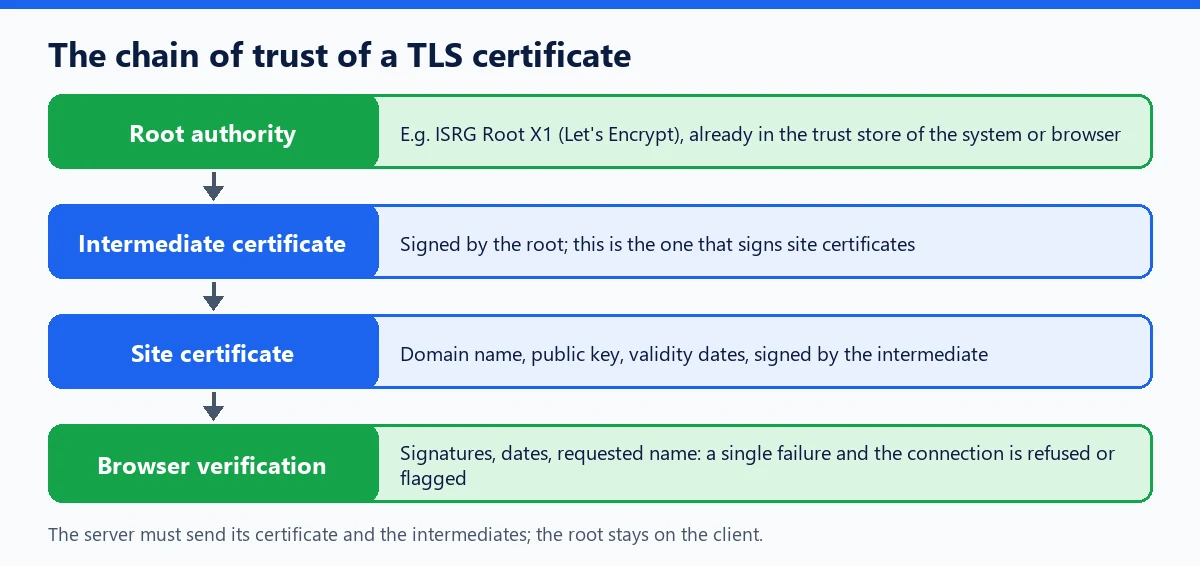
Browsers and operating systems ship with a list of trusted root authorities. These roots rarely sign site certificates directly: they sign intermediate certificates, which in turn sign site certificates. The browser walks up this chain to a root it knows. At Let's Encrypt, the most widely compatible root, ISRG Root X1, is declared trusted until 2030.
Types of certificates
There are three validation levels. A DV (domain validation) certificate only proves that the requester controls the domain, for example by publishing a file at an agreed URL or a DNS record. OV and EV certificates add a check of the organization. For encryption, they are equivalent: the difference lies in the verified identity, not in the strength of the connection. Let's Encrypt, which is free, only issues DV certificates, including wildcards (with DNS validation).
Certificates keep getting shorter
In April 2025, the CA/Browser Forum, which sets the rules for certificate authorities, adopted a gradual reduction of the maximum certificate lifetime, from 398 days to 47 days, between March 2026 and March 2029. Let's Encrypt, which issues 90-day certificates, has announced a move to 64 days on February 10, 2027, then to 45 days on February 16, 2028. The practical consequence: renewal must be fully automated (ACME protocol, a client such as Certbot or your host's tool).
For WordPress
WordPress doesn't manage the certificate: that is the job of the host, the server or the CDN. Most hosts offer a one-click Let's Encrypt certificate in their control panel (cPanel, Plesk or an in-house tool). After installation, switch the site's URLs to HTTPS under Settings, General, fix mixed content and check that automatic renewal works. Our guide to HTTPS on WordPress covers all these steps.
Common mistakes
- Expired certificate: automatic renewal failed (DNS record changed, validation file blocked by a security rule). With HSTS, visitors can't even click through the warning.
- Name not covered: the certificate covers
example.combut notwww.example.com, or the other way around. - Incomplete chain: the server doesn't send the intermediate certificate. The site may seem to work in your browser while other clients (apps, command-line tools, third-party services) refuse the connection.
- Exposed private key: a key file left in a public folder means revoking the certificate and getting a new one. Our article on exposed sensitive files shows where to look.