
The name starts with a dot, which hides it by default in many FTP clients and file managers. The .htaccess file belongs to the Apache world: LiteSpeed reads it too, but Nginx, Caddy and IIS ignore it. It's the basic tool of shared hosting, where you have no access to the server configuration.
How Apache reads .htaccess
The Apache documentation presents it as a way to change the configuration on a per-directory basis for users who don't have root access. Everything depends on the AllowOverride directive in the main configuration: its default value is None, in which case .htaccess files are completely ignored. Hosts enable it to allow permalinks, redirects and access restrictions.
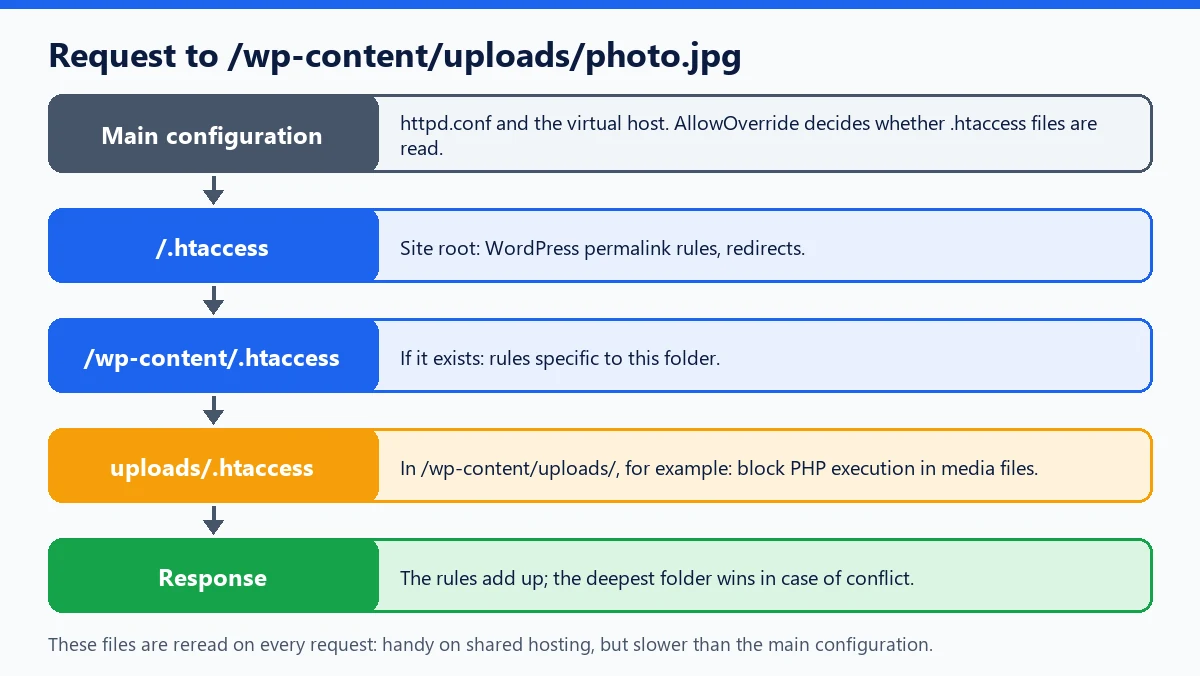
When they're allowed, Apache looks for an .htaccess in every directory along the requested path and rereads these files on every request. A change therefore takes effect immediately, without a restart, but at the cost of extra file reads. Hence the documentation's advice: if you have access to the main configuration, put your rules there rather than in .htaccess files.
The WordPress block
WordPress writes the rewrite rules that make permalinks work into the root .htaccess:
# BEGIN WordPress
RewriteEngine On
RewriteRule .* - [E=HTTP_AUTHORIZATION:%{HTTP:Authorization}]
RewriteBase /
RewriteRule ^index\.php$ - [L]
RewriteCond %{REQUEST_FILENAME} !-f
RewriteCond %{REQUEST_FILENAME} !-d
RewriteRule . /index.php [L]
# END WordPress
Anything between the # BEGIN WordPress and # END WordPress markers can be rewritten by WordPress, for example when you save the permalink settings. Put your own rules outside these markers, and the same goes for plugins, which add their own blocks.
Useful protections
- Block direct access to wp-config.php and to forgotten sensitive files, such as .sql backups, the .git folder or debug.log, which we cover in our article on exposed sensitive files.
- Prevent PHP execution in
wp-content/uploadswith an .htaccess dedicated to that folder. - Restrict
wp-adminby IP address or with an HTTP password, as in our guide to protecting wp-admin at the server level. - Limit hotlinking of your images based on the Referer header.
A syntax error immediately triggers a 500 error for the whole directory: keep a copy of the file before every change.
For WordPress
On an Nginx server, an .htaccess file has no effect at all: its rules have to be translated into the nginx.conf file, which often requires help from the host. Yet many cache and security plugins assume .htaccess is there. WP Feint relies on it only for the file aliases of the Pro version, for which it generates rules for each server, and to hide its own folder: the compatible servers and caches page explains where to put these rules, including on o2switch, where they must come before the LiteSpeed Cache block.