

When a site's address starts with https://, TLS is doing the work: HTTPS is nothing more than HTTP carried over a TLS connection. The same protocol also protects email (SMTP, IMAP), many APIs and database connections. According to MDN, TLS provides three guarantees: encryption (a third party can't read the traffic), integrity (they can't modify it without being detected) and authentication (the server proves its identity with its certificate).
From SSL to TLS: the versions
SSL is the predecessor of TLS. The name has stuck in everyday use (people still say “SSL certificate”), but all of its versions were abandoned long ago:
| Version | Status | Reference document |
|---|---|---|
| SSL 2.0 | Prohibited | RFC 6176 (March 2011) |
| SSL 3.0 | Deprecated | RFC 7568 (June 2015) |
| TLS 1.0 and 1.1 | Deprecated | RFC 8996 (March 2021) |
| TLS 1.2 | Still in use, acceptable when well configured | RFC 5246 |
| TLS 1.3 | Current and most widely used version | RFC 8446 (August 2018), revised by RFC 9846 (July 2026) |
RFC 9846 updates the TLS 1.3 specification without changing the version number: it remains compatible with existing implementations.
How a TLS 1.3 connection works
Before exchanging a single page, the browser and the server go through a “handshake.” They agree on the version and algorithms, exchange what they need to compute a shared session key, and the server proves it holds the private key associated with its certificate.
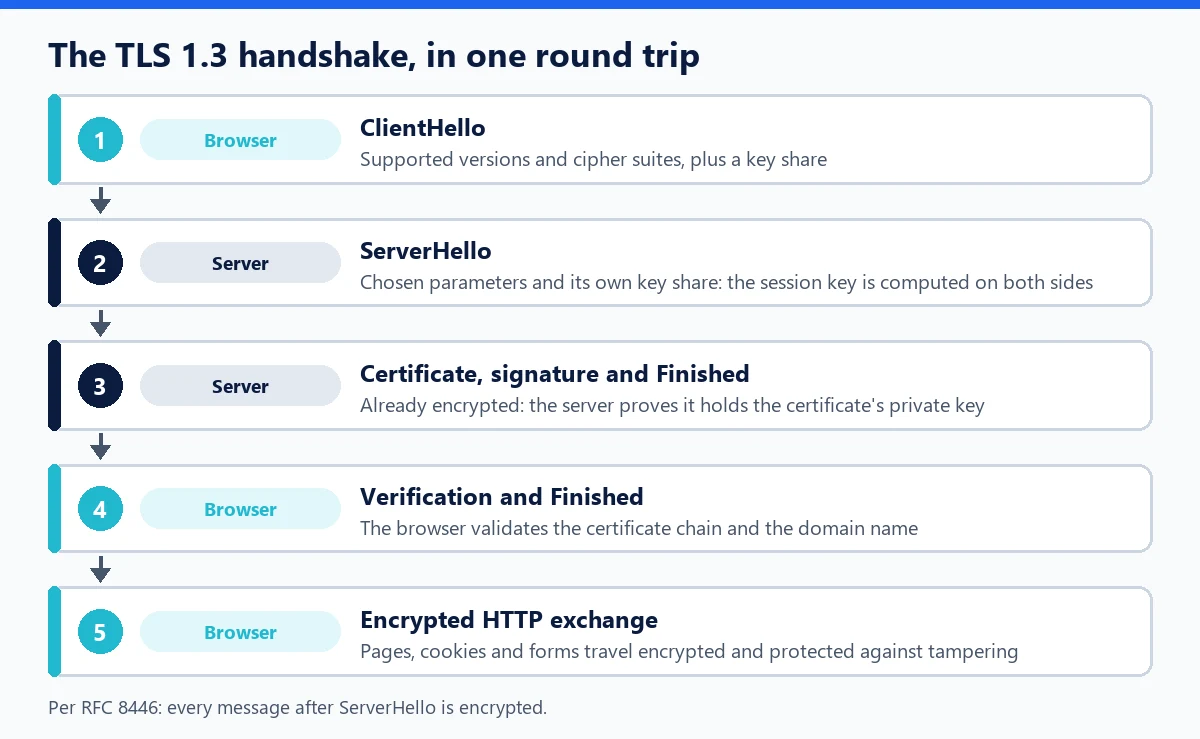
TLS 1.3 cleaned house. Static RSA and Diffie-Hellman key exchanges are gone: all remaining methods provide forward secrecy, so stealing the server's private key later doesn't make it possible to decrypt recorded sessions. Compression and renegotiation were removed as well. 0-RTT mode lets a returning client send data in its very first message, at the cost of weaker protection against replay.
For WordPress
TLS is configured at the web server or CDN level, not in WordPress. On shared hosting, the host handles it, often with a Let's Encrypt certificate renewed automatically. On the WordPress side, you still need to:
- switch the WordPress Address and Site Address to
https://under Settings, General; - add
define( 'FORCE_SSL_ADMIN', true );towp-config.phpto enforce HTTPS for logins and the admin area; - behind a reverse proxy, make WordPress recognize the
X-Forwarded-Protoheader, or a redirect loop can occur; - redirect HTTP to HTTPS (301 redirect), then consider HSTS.
If you manage your own server, disable TLS 1.0 and 1.1 and rely on Mozilla's SSL Configuration Generator, which MDN recommends. Our guide to HTTPS on WordPress covers migration, mixed content and certificates; the article on HTTPS, HSTS and Google explains the effect of HTTPS on SEO.
What TLS doesn't protect
The padlock guarantees that the connection is encrypted and that the server holds a valid certificate for that domain name. It says nothing about the site's honesty: a phishing page can perfectly well be served over HTTPS. Nor does TLS protect the site itself against a vulnerable plugin or a stolen password.