
Before Let's Encrypt, a certificate cost money and had to be installed by hand, which left many sites on plain HTTP. The certificate authority, opened to the public in 2015, made the TLS certificate free and, above all, automatic: most hosts enable it in one click, and renewal happens without any intervention.
How Let's Encrypt works
Let's Encrypt only issues domain-validated certificates: it checks that you control the name, not your company's identity. The exchange runs over the ACME protocol, standardized by the IETF, which Certbot and many other clients implement, as do hosting control panels. The client creates a key, requests a certificate, completes a challenge that proves control of the domain, then installs the certificate in the web server.
The three challenges
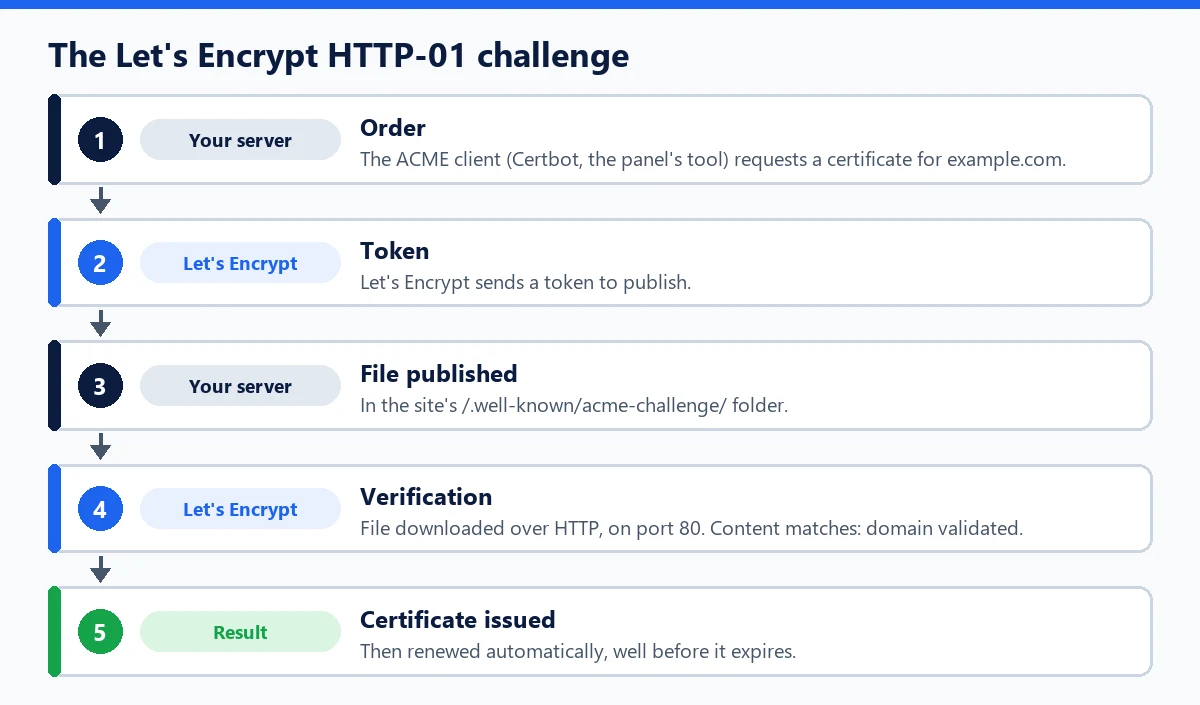
- HTTP-01: the client publishes a file under
/.well-known/acme-challenge/, which Let's Encrypt downloads on port 80 only. Redirects are followed, up to ten of them. It's the most common challenge, but it can't be used for wildcard certificates. - DNS-01: the client creates an
_acme-challengeTXT record in the DNS zone. It's mandatory for a wildcard certificate (*.example.com) and works even if the server can't be reached, at the cost of storing DNS API credentials on the server. - TLS-ALPN-01: a check on port 443, designed for proxies and large hosting providers, which Let's Encrypt considers unsuitable for most users.
A shrinking lifetime
Default certificates are valid for 90 days, and an optional profile issues six-day certificates. Let's Encrypt has announced a gradual reduction, in line with CA/Browser Forum requirements: since May 13, 2026, the optional tlsserver profile issues 45-day certificates; on February 10, 2027, the default profile will move to 64 days; on February 16, 2028, it will move to 45 days. A renewal hard-coded to every 60 days will therefore no longer be enough: the authority recommends ACME Renewal Information (ARI), or failing that, renewing at two-thirds of the certificate's lifetime.
For WordPress
- Let the host or the ACME client handle renewal: manual renewal becomes unmanageable with shorter lifetimes. On a server you administer, the client runs from a scheduled task or a cron job; monitor expiration dates so you're warned if a renewal fails.
- Don't block /.well-known/: an overly broad security rule, a redirect to a login page or an access restriction on this folder makes HTTP-01 fail.
- After installation, switch the site URLs to https, fix mixed content and consider HSTS: our guide to HTTPS on WordPress covers each step, and the article on what Google takes into account measures its effect on SEO.
The certificate encrypts the connection; it doesn't protect WordPress itself: a site on HTTPS can be hacked like any other.