"Security headers improve SEO", "HSTS gets you higher rankings": these claims are everywhere, rarely with a source. Yet Google documents fairly precisely what it takes into account. This article separates the official signals (HTTPS, Core Web Vitals) from the indirect effects (canonical URL, browser warnings) and from what has no documented effect on rankings, then lists the configuration mistakes that really do cost traffic.
HTTPS: an official signal, but a light one
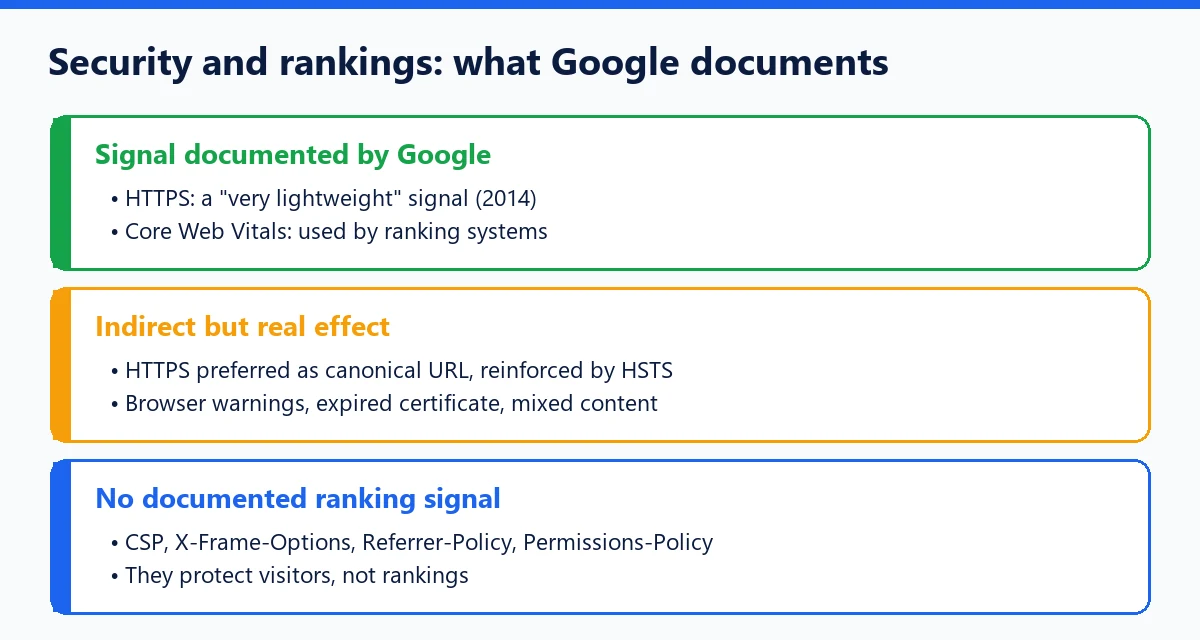
On August 7, 2014, Google announced that it was using HTTPS as a ranking signal. The post called it a "very lightweight" signal, affecting fewer than 1% of global queries and carrying less weight than signals such as content quality, while leaving the door open to strengthening it in the future. Since December 2015, Google has indexed the HTTPS version of a page by default when one exists.
Today, HTTPS appears in the page experience documentation (updated September 22, 2026) as a self-assessment question: are your pages served securely? The same page states that there is no single "page experience" signal: ranking systems take several signals into account, and Google adds that good scores in the reports do not guarantee good rankings. Moving to HTTPS remains essential, but for security and visitor trust far more than for any measurable ranking gain.
The most tangible indirect effect: the canonical URL
When a page exists over both HTTP and HTTPS, Google has to choose which one to show. Its canonicalization documentation (updated July 10, 2026) states that it prefers the HTTPS version unless there is a problem: an invalid certificate, insecure resources other than images, an HTTPS page that redirects to HTTP, or a rel="canonical" tag pointing to HTTP. Redirects from HTTP to HTTPS, a canonical tag pointing to HTTPS and HSTS reinforce that preference.
In other words, an unfinished HTTPS migration produces duplicates and conflicting signals. For a WordPress site, check that the site address in Settings, General starts with https://, that internal links and old media have been updated in the database, and that your SEO plugin does not generate HTTP canonicals.
HSTS: security, and one round trip fewer
The Strict-Transport-Security header tells the browser to access the site only over HTTPS: any HTTP attempt is converted before it is even sent. The web.dev guide on enabling HTTPS highlights two benefits: it defeats "SSL stripping" attacks and avoids the cost of the round trip for the 301 redirect. That second point slightly improves load time for returning visitors.
- Ignored over HTTP: the browser only takes the header into account if it receives it over HTTPS.
- First-visit weakness: until the browser has received the header, the very first HTTP request remains exposed. The preload list fixes this.
- Demanding preloading: hstspreload.org requires a
max-ageof at least 31,536,000 seconds (one year),includeSubDomains,preloadand a redirect from HTTP to HTTPS on the same host. - Hard to undo: the site warns that inclusion cannot easily be undone and that a removal takes months to reach users through Chrome updates.
- Gradual ramp-up: web.dev advises starting with a low
max-ageand raising it once HTTPS works reliably, because a browser that knows the site as HSTS will refuse any certificate error.
The step-by-step setup, certificate included, is detailed in our article on HTTPS, certificates and HSTS.
Chrome and HTTPS by default
On October 28, 2025, Google announced that Chrome 154, scheduled for October 2026, would turn on the "Always Use Secure Connections" setting by default for public sites: Chrome will then ask for the user's permission before opening a public site that does not offer HTTPS. A first step was announced for Chrome 147, in April 2026, for the more than one billion users of Safe Browsing's Enhanced Protection. Google specified that the warning only appears when visiting a site that is new or has not been visited recently.
For a site still partly on HTTP (a forgotten subdomain, an old payment page, an email link), that is one more warning screen between your visitors and your content. The effect on traffic does not go through rankings, but through visitors who give up.
The other security headers: no documented effect on rankings
Content-Security-Policy, X-Frame-Options, Referrer-Policy, Permissions-Policy and X-Content-Type-Options appear in no Google documentation as a ranking signal. They limit script injection, clickjacking, address leaks and improper interpretation of files. Their value lies in protecting visitors, as detailed in our guide to HTTP security headers. Indirectly, a site that resists injection better is less exposed to SEO spam or a Safe Browsing warning, which do cost traffic.
Core Web Vitals: where security and performance meet
Google states that Core Web Vitals are used by its ranking systems. They measure three aspects of real-world experience, at the 75th percentile of page loads, separately on mobile and desktop. INP replaced FID as the responsiveness metric on March 12, 2024.
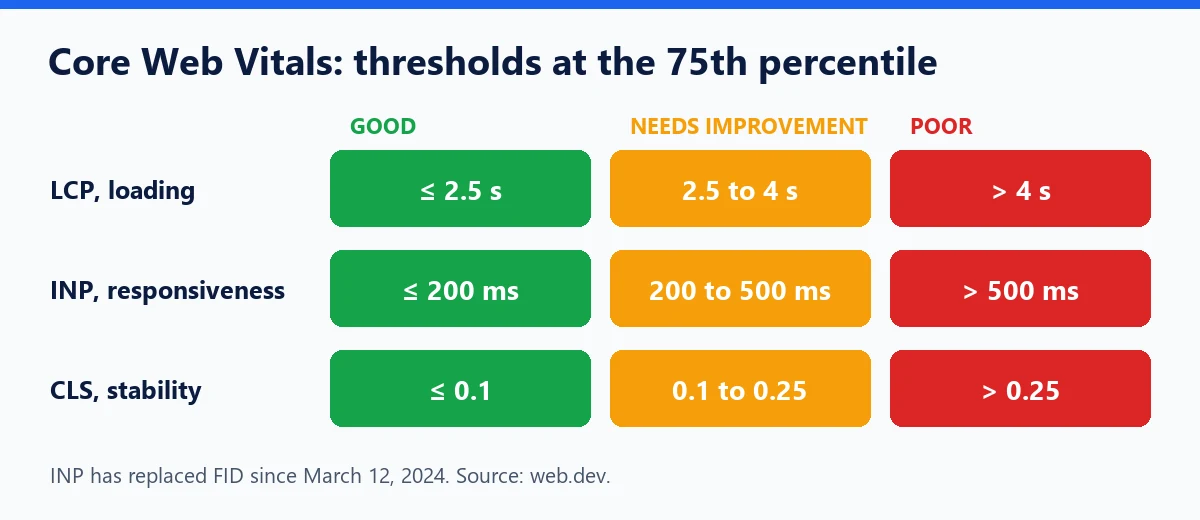
Security measures can push these metrics either way. A chain of redirects from http:// to https:// and then to www delays rendering; Google's migration guide recommends redirecting straight to the final destination. A heavy protection script loaded on every public page can degrade INP. A full-page anti-bot challenge shown to legitimate visitors looks like an intrusive interstitial, which the page experience documentation advises avoiding. Conversely, HSTS saves a round trip, and a well-tuned page cache absorbs crawlers and visitors alike.
The mistakes that really cost traffic
| Mistake | Consequence | Fix |
|---|---|---|
| Expired or invalid certificate | Error page in the browser; Google may stop preferring the HTTPS version | Automatic renewal and expiration monitoring |
| Mixed content | HTTP scripts blocked by most browsers; images upgraded or not loaded | Replace HTTP addresses in the database, the theme and widgets |
| Canonical or sitemap on HTTP | Conflicting signals, duplicates | Check the site address and the SEO plugin |
| Redirect chain | Latency, slower crawling | A single redirect to the final URL |
X-Robots-Tag: noindex added by mistake | Pages removed from the index | Check headers with URL inspection |
| CSP too strict | Broken analytics, consent or forms | Start in Content-Security-Policy-Report-Only mode |
HSTS includeSubDomains with a subdomain lacking HTTPS | Subdomain unreachable for visitors who have already been on the site | Move every subdomain to HTTPS before enabling the option |
The X-Robots-Tag case deserves emphasis: this header accepts every rule of the robots meta tag, including noindex. A configuration block copied from a staging environment to production is enough to deindex an entire site without anything changing on screen.
Setting up headers with WP Feint
The free version adds the X-Content-Type-Options: nosniff header from the first hardening level. The Pro version manages security headers (HSTS, X-Frame-Options, Referrer-Policy, CSP and more) from the admin area, without editing server files. Two precautions apply whatever the tool: a header set by WordPress may be missing from a response served by an upstream cache, and HSTS should only be enabled once the whole site, subdomains included, is served over HTTPS. The version comparison details what the free and Pro editions cover.
The other SEO levers of a WordPress site are gathered in our guide to optimising WordPress SEO.
Key takeaways
- HTTPS has been an official but very lightweight signal since 2014; its real weight lies in trust and the canonical URL.
- Core Web Vitals are used by ranking systems, with no guaranteed position.
- CSP, X-Frame-Options and Referrer-Policy have no documented effect on rankings: they protect visitors.
- Chrome 154 is due to warn before opening public sites over HTTP.
- Mistakes (certificate, mixed content, noindex in a header) cost far more than a missing header.
Sources
- Google Search Central Blog, HTTPS as a ranking signal (August 7, 2014) (opens in a new tab)
- Google Search Central Blog, Indexing HTTPS pages by default (December 2015) (opens in a new tab)
- web.dev, Web Vitals (opens in a new tab)
- web.dev, Largest Contentful Paint (opens in a new tab)
Other sources consulted: official documentation and official vendor pages.