Over the weekend of October 17 and 18, 2026, an attacker broke into the website of TeamUpdraft, the developer of UpdraftPlus, and obtained the keys that let the UpdraftCentral Cloud service control WordPress sites remotely. The attacker used them to install backdoored plugins, which an update does not remove. If you use UpdraftPlus Premium, UpdraftCentral or a teamupdraft.com account, here is how to tell whether your site is affected, delete the key and look for the published traces.
What happened
On October 19, TeamUpdraft confirmed unauthorized access to teamupdraft.com over the weekend. According to the developer, the customer database was probably accessed: names, email and billing addresses, orders, hashed passwords, two-factor authentication settings and connection keys for UpdraftCentral, UpdraftVault and UpdraftClone. No card data was stored there. The plugin and its downloads were not modified: this is not a trojanized release, unlike the classic supply chain pattern.
The attacks started before the announcement. Patchstack's telemetry recorded backdoor installations between October 18 at 3:32 p.m. and October 19 at 9:23 a.m. (time zone not specified; BleepingComputer says 3:32 p.m. UTC). The company Nethemba was alerted on October 19 at 4:14 a.m. Paris time, when an unknown plugin, "Load Stack 35C", took one of its sites down with a 500 error. It published the first analysis the same day, supplemented by Patchstack, which identified 99 plugin names.
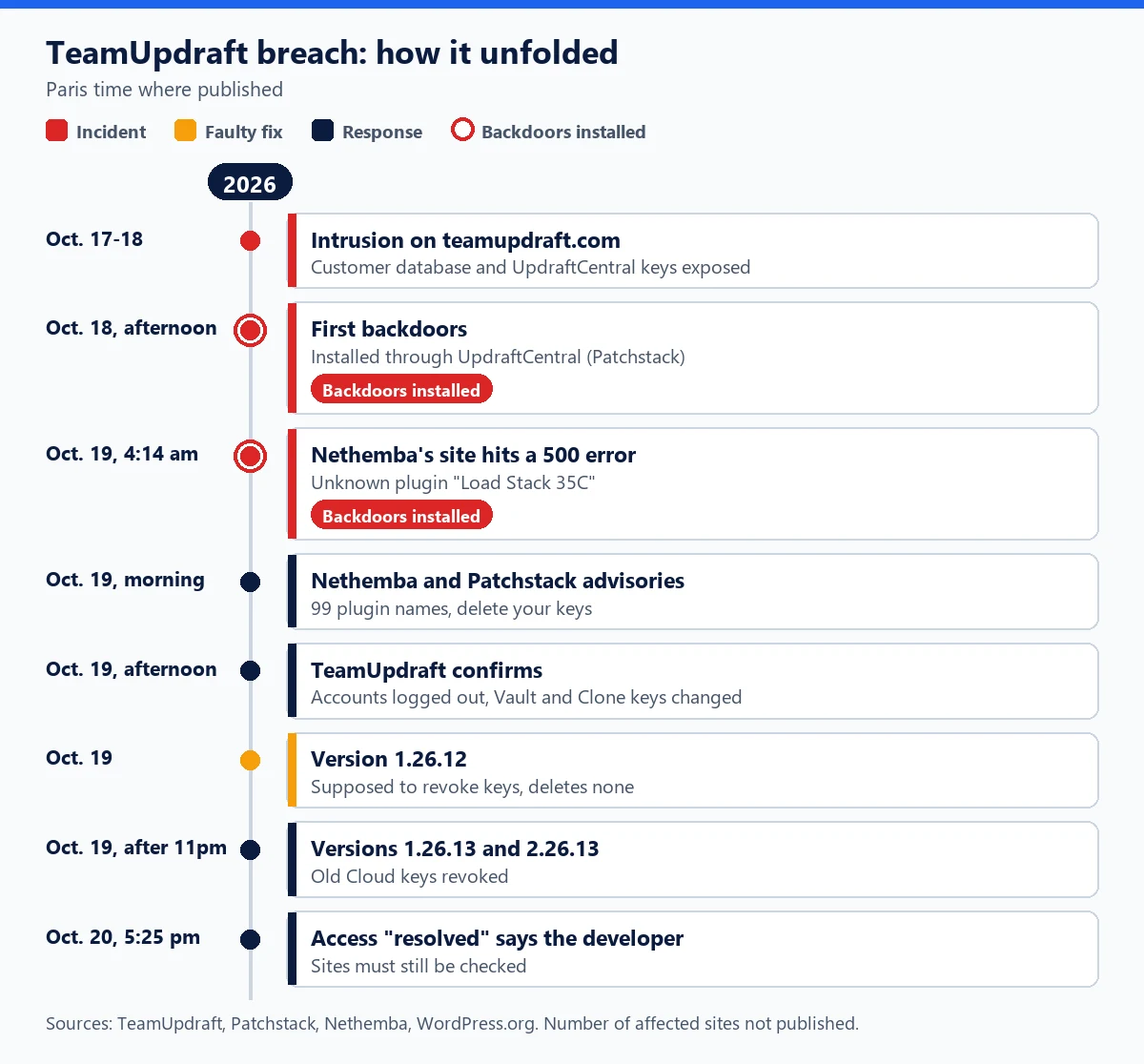
On October 19, the developer released version 1.26.12, meant to revoke UpdraftCentral Cloud keys created before the incident. According to Nethemba, a bug prevented it from deleting a single one; 1.26.13 (2.26.13 for Premium), released around 11 p.m. Paris time, fixes that. On October 20, TeamUpdraft declared the access "resolved" while asking users to check every site. Yet Nethemba received new commands from the attacker until October 19 at 8:27 p.m.: a stolen key remains usable as long as it has not been deleted from the site.
Who is affected
UpdraftPlus has more than 4 million active installations (wordpress.org), but not all of these sites are exposed. The risk concerns sites holding a key created by UpdraftCentral Cloud, whatever the version, free or Premium: 1.26.11 was affected like the earlier versions, because the commands were correctly signed. This is not a code vulnerability, so there is no CVE.
- Exposed: sites connected to UpdraftCentral Cloud, including without deliberate use. When connecting a teamupdraft.com account (for example to activate the Premium license), the "Add this website to UpdraftCentral" box is checked by default, according to Patchstack and Nethemba. Keys do not expire: keys from November 2025 still worked.
- Not affected according to the developer: self-hosted UpdraftCentral and users of the free version without a teamupdraft.com account.
- Doubly exposed: sites on 1.26.4 or 2.26.4 or earlier, also vulnerable to CVE-2026-10795 (CVSS 8.1), which in June made it possible to forge commands without any key.
TeamUpdraft has not said how many sites received a backdoor. BleepingComputer estimates that about 10% of UpdraftPlus sites have an UpdraftCentral or Migrator key, or about 400,000 potentially exposed sites, without specifying the basis of the calculation.
| Version | Released | Effect on the incident |
|---|---|---|
| 1.26.4 / 2.26.4 and earlier | before June 2026 | Stolen keys usable, and commands forgeable without a key (CVE-2026-10795, fixed in 1.26.5) |
| 1.26.7 | August 21, 2026 | Fixes CVE-2026-76549 (forged restore request, 5.9): unrelated |
| 1.26.8 | September 17, 2026 | Fixes CVE-2026-82841 (storage credentials readable by a subscriber after migration, 5.3): unrelated |
| 1.26.11 / 2.26.11 | October 16, 2026 | Affected: commands signed with the real keys go through |
| 1.26.12 / 2.26.12 | October 19, 2026 | Supposed to revoke Cloud keys; according to Nethemba, deletes none |
| 1.26.13 / 2.26.13 | October 19, 2026, evening | Deletes Cloud keys created before October 18 at 2:07 p.m. Paris time (Nethemba); removes neither plugins nor accounts |
Watch out: TeamUpdraft announced the revocation of connections created before 11 p.m. Paris time on October 18. Nethemba read the 1.26.13 code: a key created that day between 2:07 p.m. and 11 p.m. stays on the site. Delete it manually.
How a stolen key opens up a site
UpdraftCentral is TeamUpdraft's remote management service. Its client is built into every copy of UpdraftPlus and stays dormant as long as the site has no key. Once connected, the site runs any command signed with the dashboard's private key, with the permissions of the user who created the connection, without confirmation. These private keys are kept by the cloud service, never on your server: that is what the attacker obtained.
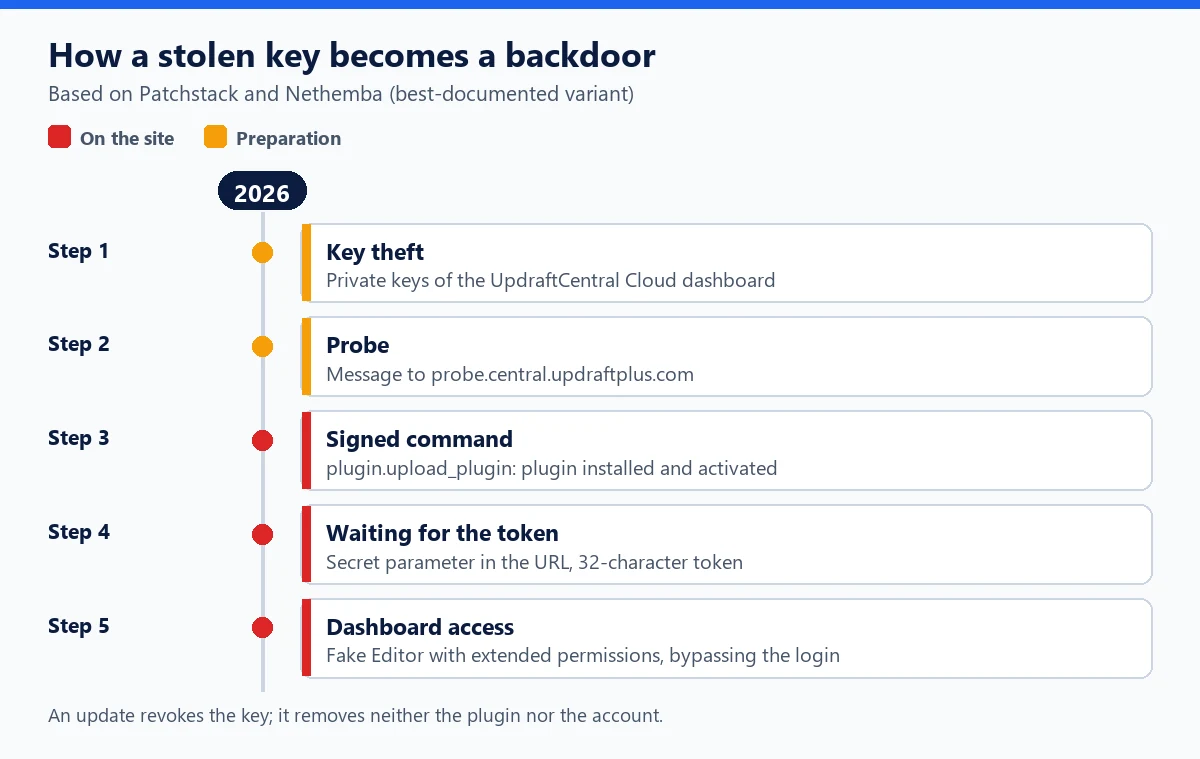
The attacker first sends a probe, probe.central.updraftplus.com, then a signed plugin.upload_plugin command: WordPress installs and activates the plugin through its normal installer. In the best-documented variant, the plugin waits for a secret parameter in the URL, followed by a 32-character token. It then creates an Editor account that is also granted manage_options and install_plugins, and logs the visitor in with a cookie set directly: neither two-factor authentication nor login attempt limiting applies. The account escapes a review limited to administrators and survives the removal of the plugin.
The first samples contained a coding error that caused a 500 error. Nethemba also describes a working variant, which creates an administrator or logs the attacker in as an existing administrator, and a minimal variant, including "Site Health Cache", which hides itself from the plugin list. Never repair such a plugin: fixing it would activate the backdoor.
Indicators of compromise and checks
Start by finding out whether the site holds a key; a non-empty answer means an UpdraftCentral connection exists. The --skip-plugins option, recommended by Nethemba, keeps a broken backdoor from crashing WP-CLI.
wp option get updraft_central_localkeys --skip-plugins --skip-themesThen look for the traces published by Patchstack and Nethemba:
- Plugins: the description
Small maintenance toolkit: keeps option storage tidy.(first variant), the name "Site Health Cache", two-word names sometimes followed by hexadecimal characters ("Load Stack 35C"). Some variants hide themselves: search on disk, including inwp-content/upgrade/. - Accounts:
data-ops43andmedia-staff96, more generally two words and two digits, an @example.org address (@example.com for the second variant), the display name "Site Tools", an Editor grantedmanage_options. - Options: a name ending in
_sync_token, or_uid,_installed,_verfor the other variants. - Network:
43.250.53.42and2a09:bac5:4e21:2e3c::49b:9, an exact User-AgentWordPress/6.4; class-udrpc.php(the real dashboard adds/2.0; https://teamupdraft.com). The attacker changes addresses: blocking them is not enough.
grep -rl "Small maintenance toolkit: keeps option storage tidy\." wp-content/plugins/ wp-content/upgrade/
wp user list --role=administrator --fields=ID,user_login,user_email,user_registered --skip-plugins
wp db query "SELECT u.user_login,u.user_email FROM wp_users u JOIN wp_usermeta m ON m.user_id=u.ID WHERE m.meta_key='wp_capabilities' AND m.meta_value LIKE '%editor%' AND m.meta_value LIKE '%manage_options%'"
wp option list --search="*_sync_token" --skip-plugins
grep 'class-udrpc\.php"' /var/log/apache2/*access*
zgrep -E '[?&](_[0-9a-f]{6}|[0-9a-f]{12})=[^&" ]{32}[& ]' /var/log/apache2/*access*
Adjust the wp_ prefix and the log path. Without a command line, open Settings, UpdraftPlus Backups, "Advanced Tools" tab, UpdraftCentral section, then the event log: a Command received: plugin.upload_plugin line is a strong signal. This log only keeps 50 events, hence the value of the server logs, where a trigger followed by a 302 status code most likely indicates a successful login.
What to do now
- Log in directly to each site, not through UpdraftCentral, and update to 1.26.13 or 2.26.13 at minimum (not 1.26.12).
- Delete every key: Advanced Tools, UpdraftCentral, "Manage existing keys", or
wp option delete updraft_central_localkeys. Removing the site from the dashboard is not enough. Backups keep working. - If you find a backdoor: delete the key first, otherwise the attacker can push a fixed version back. Deactivate the plugin and move its folder out of the web root rather than deleting it from the admin, because uninstalling it erases its traces. Then delete its options and the account it created.
- If the account exists or the trigger shows up in the logs, the site is fully compromised: restore a backup from before October 17, compare the files with a clean installation and follow our guide to cleaning up a hacked site.
- Change your secrets: the teamupdraft.com password (typing the address yourself) and everywhere it was reused, the account's two-factor authentication, administrator passwords, sessions, the keys in
wp-config.php, application passwords. If the site was managed through UpdraftCentral, reauthorize remote storage and change its access keys. UpdraftVault must be reconnected. - Do not reconnect UpdraftCentral unless you really need it. Otherwise, create the key with an account that lacks the permission to install plugins: on one of Nethemba's sites, that detail made the attack fail.
Reducing exposure next time
No patch would have prevented this incident: the trusted service itself was hijacked. Take an inventory of your remote management connections.
- Turn on automatic security updates, here so you receive the revocation without delay.
- Apply least privilege: a remote service does not necessarily need to install plugins.
- Monitor new plugins and new accounts, keep off-site backups and a web application firewall, without illusions: on an affected site, validly signed commands got through despite Wordfence, Patchstack and Cloudflare, according to Nethemba.
WP Feint Pro would not have blocked this attack: it alerts, it does not fix anything and it is not a firewall. Its activity log records plugin installation and activation and account creation: a plugin installed through the WordPress installer, as here, should show up in it if Pro was active before the incident, but adding capabilities to an Editor is not a role change. The vulnerability alerts by email compare installed versions with WPVulnerability.net every day, but UpdraftPlus Premium is not distributed on wordpress.org and a key theft is not a listed vulnerability. The integrity check only covers core. The member area shows pending updates and vulnerable sites. See also the full history of UpdraftPlus vulnerabilities.
Key takeaways
- UpdraftCentral Cloud keys stolen from TeamUpdraft on October 17 and 18, 2026 were used to install backdoors starting October 18.
- Every site holding an UpdraftCentral Cloud key is affected, even without deliberate use: check
updraft_central_localkeys. - Update to 1.26.13 or 2.26.13, then delete the keys: the update removes neither plugins nor accounts.
- Look for the "Small maintenance toolkit" description, an Editor granted
manage_optionsand an option ending in_sync_token. - If there are signs of use, restore a backup from before October 17 and change every secret.
Sources
- WordPress.org: UpdraftPlus, changelog for 1.26.12 and 1.26.13 (October 19, 2026) (external link, opens in a new tab)
- WordPress.org: UpdraftPlus, WP Backup & Migration Plugin, plugin page and active installations (external link, opens in a new tab)
- NVD: CVE-2026-10795 (June 11, 2026) (external link, opens in a new tab)
- NVD: CVE-2026-76549 (August 27, 2026) (external link, opens in a new tab)
Other sources consulted: further CVE records, official vendor pages, security research publications, trade press articles and Patchstack database.