A plugin that has stopped evolving is not just a maintenance detail. As soon as a vulnerability is found in it, nobody fixes it, and the site that uses it stays vulnerable forever. Worse, a plugin can disappear from the official directory without you noticing. This article explains how to spot abandoned or closed plugins, assess the risk and replace them cleanly.
Abandoned or closed: two different situations
On WordPress.org, two distinct states are often confused, even though they do not call for the same response.
- An abandoned plugin can still be downloaded, but its author no longer maintains it. The directory shows a warning stating that it has not been tested with the last three major releases of WordPress. It may still work, but nobody is watching over it anymore.
- A closed plugin has been removed from download by the WordPress.org team. Its page then displays a notice saying it is no longer available and, for closures after January 2018, the closure date.
An important point: the reason for a closure is generally not made public. It is shared only with the WordPress.org security team and the authors, barring exceptional circumstances. Some pages do display a label such as "Security Issue" or "Guideline Violation". In the absence of an explanation, caution dictates treating a closure as a serious signal: a plugin is not removed without a reason.
How to spot a risky plugin
A few checks are enough to sort your plugins. You can do them from the plugin's page on WordPress.org and from your dashboard.
- The date of the last update. A common rule of thumb, used by Wordfence among others, treats a plugin with no update for at least two years as potentially abandoned.
- The compatibility warning. The "not tested with recent versions" notice means maintenance has stopped.
- Support responsiveness. A support forum where questions have gone unanswered for months is a bad sign.
- The download page. If it displays a closure notice, the plugin must be dealt with as a priority.
- The trend in active installations. A sharp drop often goes hand in hand with a known problem.
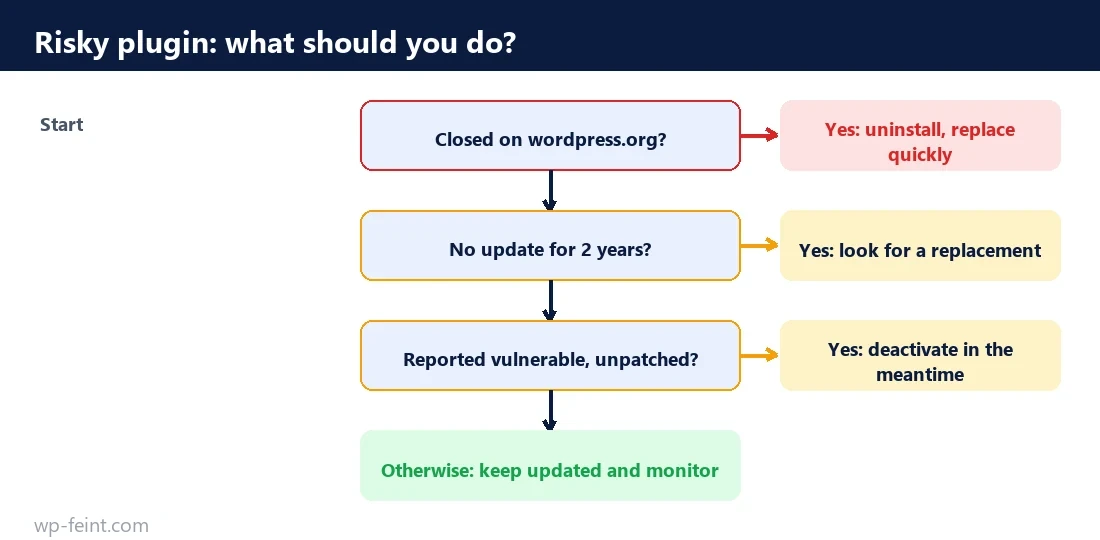
Why the risk is real
The danger of an abandoned plugin is not that it "gets old". It is that the normal fix cycle stops. In a maintained project, a reported vulnerability is fixed, a patch is released and sites are updated. In an abandoned project, the vulnerability is reported and published in vulnerability databases, but never fixed. The information is then public and permanent, and the bots that exploit the flaw keep crawling the web looking for it.
The most dangerous case is a plugin closed for security reasons: it disappears from the directory, so it no longer receives any automatic update, but it remains installed and active on your site. You will not even see an update offered, since there are none anymore.
| Signal | Severity | Recommended action |
|---|---|---|
| Closed for security reasons | Critical | Uninstall and replace immediately |
| Closed with no reason shown | High | Look for a replacement, deactivate in the meantime |
| Known unpatched vulnerability | High | Deactivate until an alternative is found |
| No update for more than 2 years | Medium | Plan a replacement |
| Not tested with recent versions | Watch | Check regularly, test on staging |
Replacing a plugin cleanly
Replacing a plugin is not just a matter of deactivating it and installing something else. A sloppy migration breaks features or leaves data in a mess.
- Back up first the entire site, so you can roll back.
- Find a maintained replacement that is active, compatible with your version of WordPress and well rated. Favor projects maintained by a team rather than a single person.
- Export the data if the plugin manages any (forms, settings, content) before removing it.
- Test the switch to the new plugin on staging, then repeat the operation in production.
- Delete the old plugin completely, not just deactivate it, to remove its code from the server. Check that it does not leave orphaned tables or files behind.
If no alternative exists for a feature that has become essential, it is sometimes better to commission a small custom development than to keep abandoned code exposed on the Internet.
Get alerted instead of checking by hand
Manually checking every plugin on every site is tedious and quickly forgotten. Ideally, you should be notified. WP Feint Pro works toward this: its signature and update feed keeps the plugin supplied with up-to-date information, and the project is adding alerts about vulnerable installed plugins, with details of the vulnerability involved. Combined with email alerts, these notifications let you know that one of your plugins has been flagged, without you having to check vulnerability databases yourself.
The principle is the same as for the rest of security: shorten the time between the moment a problem becomes public and the moment you act. An abandoned plugin spotted early can be replaced calmly; discovered after an intrusion, it costs far more.
A plugin's life cycle, and where it goes wrong
Understanding how a plugin goes from "reliable" to "dangerous" helps you anticipate. In a healthy project, the author publishes regular releases, fixes reported vulnerabilities and tests compatibility with new versions of WordPress. The trouble starts when that rhythm breaks: the author leaves, loses interest, or the plugin is bought by a dubious party. The plugin keeps working, which lulls vigilance, but nobody is watching over it anymore.
One particular case deserves attention: a popular plugin bought by a malicious third party. The plugin is already installed on thousands of sites, enjoys their trust, and a single update is enough to slip unwanted code into it. A large user base is an asset, and not every buyer has good intentions. That is one more reason to keep an eye on who actually maintains your site's critical plugins.
Finding a good replacement
Choosing an alternative is not a matter of chance. A few criteria reduce the risk of swapping one problem for another.
- Active maintenance: recent and regular updates, ideally by a team rather than a single person.
- A sizable user base, which helps ensure problems are spotted and reported quickly.
- A clean security track record: check whether the plugin has had vulnerabilities before and how they were handled.
- A limited scope: a plugin that does one thing well is better than a bloated one that does twenty, each of which is an attack surface.
After the migration, remember to clean up. A deleted plugin can leave tables in the database, files in wp-content or scheduled tasks. These leftovers no longer serve any purpose but, if they contain code, may remain exploitable. An integrity check after the replacement helps confirm that nothing abnormal remains.
To gauge the risk through real cases (Kaswara, Display Widgets, EssentialPlugin), read the danger of abandoned WordPress plugins.
Read also: WordPress site audit: the 12 key checks.
Key takeaways
- Abandoned (no longer maintained) and closed (removed from the directory) are two distinct states, the second being more serious.
- The reason for a closure is rarely public: treat it as a serious signal.
- A vulnerability in an abandoned plugin will never be fixed and remains exploitable.
- Replace a plugin after a backup, a test on staging and the complete removal of the old code.