In September 2020, a plugin installed on more than 700,000 WordPress sites let anyone, without an account, drop a PHP file on the server and then run it. The WP File Manager vulnerability, tracked as CVE-2020-25213, was exploited before the patch was even released. This article explains the mechanism, shows how to check that a site was not hit and gives the rules to apply to any file management plugin.
What the vulnerability allowed
WP File Manager bundles elFinder, an open source library that displays a file explorer in the browser. elFinder ships with example files, including connector.minimal.php.dist, a "connector" that receives the explorer's commands (list, create, upload a file). The plugin did not use this connector, but had renamed it to .php: the server could therefore execute it, at a public address, with no access control at all.
According to the official CVE description, an attacker could send this file the elFinder commands upload, or mkfile and put, to write PHP code into the wp-content/plugins/wp-file-manager/lib/files/ folder. All they then had to do was request that file in their browser to run it. elFinder's protection against directory traversal limited writes to that folder, but a single executable PHP file is enough to take over the site.
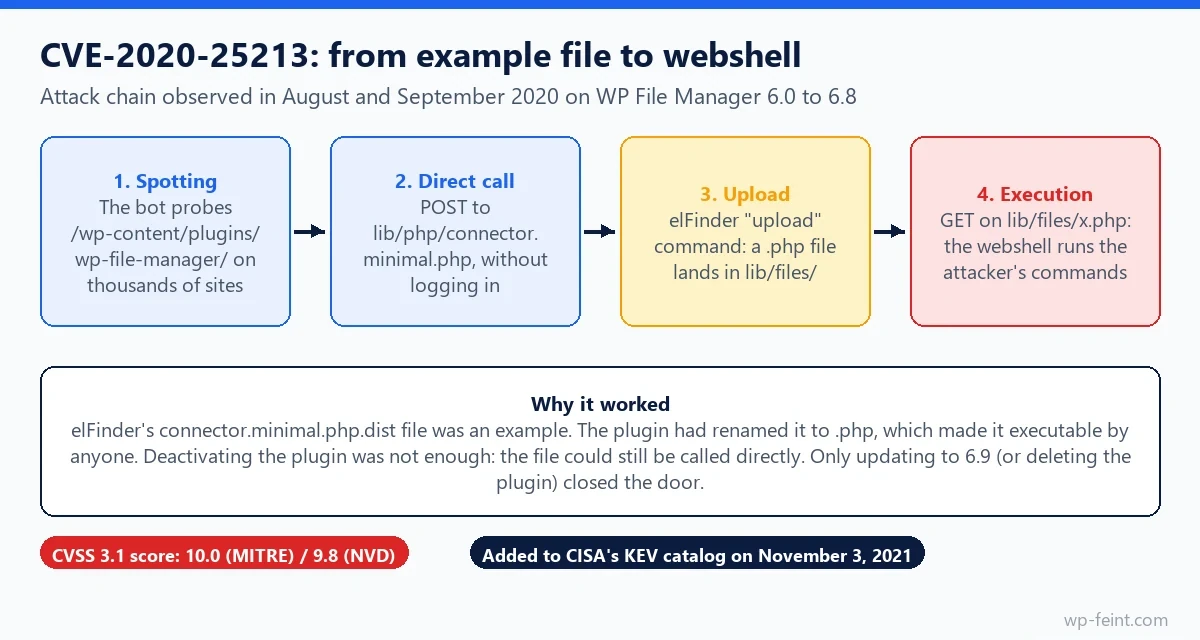
A frequently misunderstood point: deactivating the plugin did not protect you. The connector was a standalone PHP file that could be called directly even when WordPress no longer loaded the plugin. Seravo, the Finnish hosting company that discovered the attack, stated this explicitly: you had to update to 6.9 or delete the plugin.
| Item | Verified detail |
|---|---|
| Plugin | WP File Manager (slug wp-file-manager) |
| Affected versions | Before 6.9 (Wordfence specifies: 6.0 to 6.8) |
| Fixed version | 6.9, released on September 1, 2020 |
| Type | Arbitrary file upload leading to code execution, without authentication |
| CVSS 3.1 score | 10.0 (MITRE); 9.8 (NVD) |
| Exploitation | Observed in August and September 2020; added to CISA's KEV catalog on November 3, 2021 |
Mass exploitation, then a war between attackers
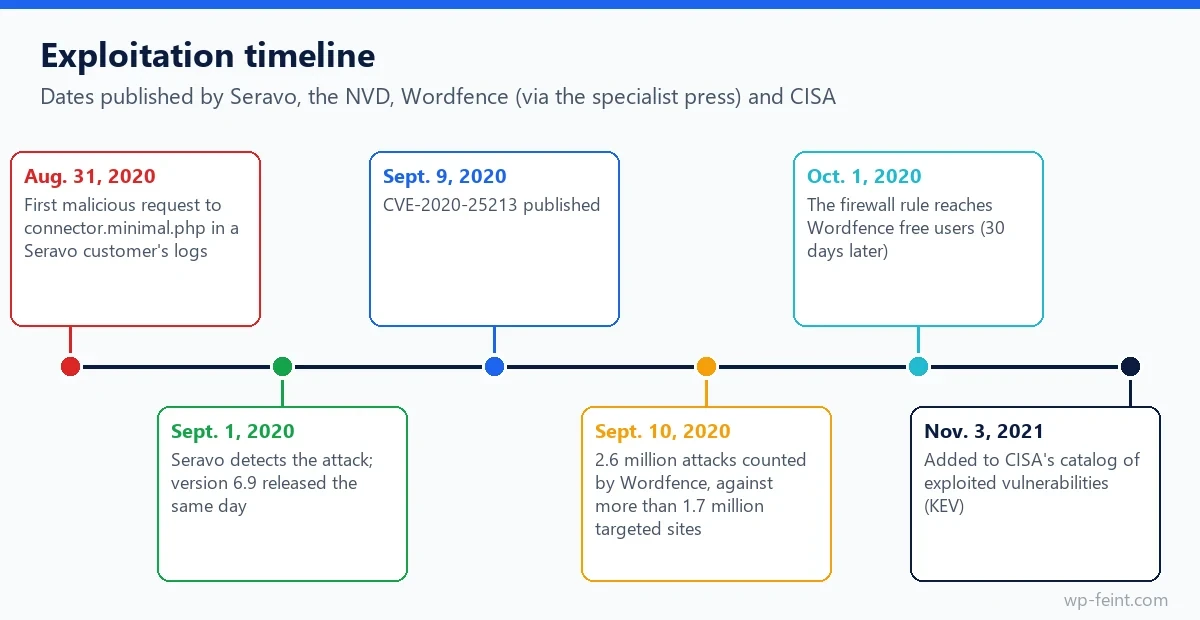
Seravo spotted abnormal activity at several customers in the early morning of September 1, 2020; the first suspicious request to connector.minimal.php dated from the evening of August 31. The developer released version 6.9 the same day. The figures Wordfence published in the following days show the scale of the attack:
- more than 450,000 exploitation attempts blocked within a few days;
- more than 1.7 million sites targeted, and 2.6 million attacks counted as of September 10;
- more than 370,000 different IP addresses behind the requests;
- dropped files with recognizable names, such as
hardfork.php,hardfind.phporx.php.
Wordfence also observed a phenomenon typical of easy vulnerabilities: the two most active groups password-protected the vulnerable connector once the site was compromised, to keep competitors out. One of them injected code into a core file (user.php) to steal the credentials of users who logged in and send them through the Telegram API. The other installed backdoors with random names, then added cryptocurrency miners and SEO spam.
Why file managers are prime targets
A file management plugin does, by design, exactly what an attacker wants: read and write files on the server, including PHP files. A vulnerability in this kind of tool therefore almost always leads straight to code execution. Several factors make the risk worse:
- heavy third-party libraries (elFinder and its connectors), with example files that have no business being in production;
- delegable permissions: many of these plugins let you open the explorer to lower roles, or even to visitors, which turns an admin-only vulnerability into one anyone can reach;
- a large installed base, so scanning for it pays off: wordpress.org reports more than one million active installations for WP File Manager, and more than 100,000 each for Filester and Advanced File Manager;
- often one-off use: the plugin is installed to fix a problem, then forgotten and rarely updated.
Recent vulnerabilities show the problem did not stop in 2020:
| Plugin | CVE | Affected versions | Exploitation condition | Severity (CVSS 3.1) | Fix |
|---|---|---|---|---|---|
| WP File Manager | CVE-2020-25213 | before 6.9 | None: anonymous visitor | 10.0 / 9.8 | 6.9 (Sept. 1, 2020) |
| Bit File Manager | CVE-2024-7627 | 6.0 to 6.5.5 | Anonymous visitor, if the administrator allowed read access for guests | 8.1 | 6.5.6 (August 21, 2024) |
| File Manager Pro (Filester) | CVE-2025-3234 | up to 1.8.8 | Administrator, or any role that was granted access | 7.2 | 1.8.9 |
The Bit File Manager case is instructive: the checkSyntax function wrote a temporary file to a public folder before validating it. The Filester case is a reminder that an "admin-only" vulnerability becomes serious as soon as the tool is handed to subscribers.
Checking that a site was not compromised
If a vulnerable version of WP File Manager was installed at any point, even deactivated, assume the site may have been visited. The following checks are done over SSH or from your host's file manager:
- Check the version under Plugins, then update the plugin, or delete it if you do not use it.
- Look for PHP files in
wp-content/plugins/wp-file-manager/lib/files/: this folder should only contain your working files. - Search the access logs for
POSTrequests toconnector.minimal.php, followed byGETrequests tolib/files/. - Check the integrity of the core and of the plugins published on wordpress.org: a modified file such as
user.phpis a strong sign. - Review administrator accounts and recently created application passwords.
# PHP files dropped in elFinder's working folder
find wp-content/plugins/wp-file-manager/lib/files -name "*.php"

# Requests to the connector in the logs (adjust the path)
grep "connector.minimal.php" /var/log/apache2/access.log*

# Core and plugin integrity (WP-CLI)
wp core verify-checksums
wp plugin verify-checksums --all
If any of these checks reveals a compromise, a simple update is no longer enough: backdoors survive the patch. You need to isolate the site, change every secret and clean up from a known good backup.
Rules to follow with a file manager
The safest option is still not to leave a file explorer inside WordPress. Compare the options:
| Method | Authentication | Surface exposed on the site | Impact of a vulnerability |
|---|---|---|---|
| SFTP / SSH | System account, key or password | None in WordPress | Independent of WordPress |
| Host's file manager (cPanel, Plesk, etc.) | Hosting control panel account | None in WordPress | The host's responsibility, since it maintains the tool |
| File management plugin | WordPress session (depending on settings) | Public PHP files of the plugin and its libraries | Often code execution on the whole site |
If you really cannot do without a plugin:
- delete it after use rather than deactivating it, since its files can still be called;
- restrict access to administrators only and never open read or write access to guests;
- limit the explorer's root folder to the bare minimum;
- enable automatic updates for that specific plugin;
- do not rely on
DISALLOW_FILE_EDIT: this constant disables WordPress's built-in theme and plugin editors, not file management plugins.
What WP Feint does, and what it does not do
Let's be clear: no masking plugin fixes a vulnerability in another plugin's code. The only defense against CVE-2020-25213 was updating or deleting. WP Feint works around the edges:
- the bot traps count requests from scanners looking for sensitive files or closed addresses, which makes the pressure on your site visible; the Pro version automatically bans an address after several traps (3 by default);
- the WordPress integrity check (Pro) flags modified core files, such as the
user.phpaltered during this campaign; - email alerts (Pro) warn you without waiting for you to open the dashboard.
With the Pro version, vulnerable plugin alerts flag a plugin like WP File Manager as soon as a known vulnerability affects the installed version, with the nature of the flaw and the version to install. The comparison details what is in the free version and what is in the Pro version.
Key takeaways
- CVE-2020-25213 came from an elFinder example file made executable: an anonymous visitor could upload and run PHP.
- Deactivating the plugin did not protect you; you needed version 6.9 or to delete it.
- A vulnerability in a file manager almost always leads to code execution: prefer SFTP or your host's tool.
- After any exposure, check lib/files, the logs and core integrity before concluding that everything is fine.
Sources
- NVD: CVE-2020-25213 (opens in a new tab)
- CISA: Known Exploited Vulnerabilities Catalog (opens in a new tab)
- NVD: CVE-2024-7627 (Bit File Manager) (opens in a new tab)
- WordPress Developer Resources: wp-config.php, disabling the file editor (opens in a new tab)
Other sources consulted: further CVE records, official documentation, official vendor pages, security research publications, trade press articles and Wordfence database.