

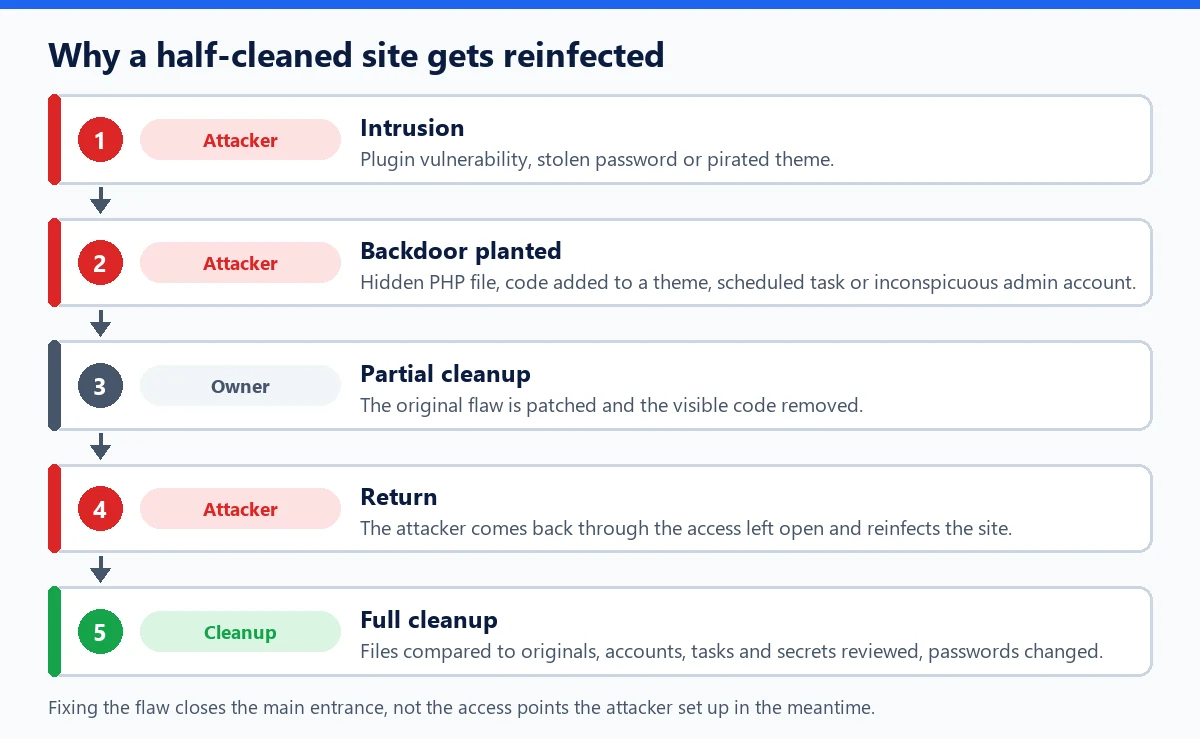
The term covers two situations. In the first, the backdoor is present in the software from the start: an undocumented feature added by the author or by someone who compromised its distribution chain. MITRE files it under hidden functionality (CWE-912). In the second, the most common on websites, the attacker installs the backdoor after an intrusion, to keep access even once the original vulnerability is fixed. The MITRE ATT&CK framework describes this persistence mechanism with web shells (T1505.003).
How a backdoor works
A backdoor waits for a request from its author: a request to a specific file, a secret parameter, a particular cookie. It then runs whatever it is sent, or opens a full interface to browse files, query the database and send emails. Above all, it tries not to be seen: a file name that mimics a WordPress file, encrypted or encoded code, triggering only with the right password.
Common forms on WordPress
- a standalone PHP file, often in
wp-content/uploadsor hidden among the core files; - a few lines added to the theme's
functions.php, to a plugin or to a file inwp-content/mu-plugins, a folder whose plugins load automatically; - an inconspicuous administrator account, sometimes hidden from the user list;
- a WP-Cron scheduled task that reinstalls the code if it disappears;
- a plugin booby-trapped at the source: pirated copies (see our article on “nulled” themes and plugins) or, more rarely, a compromised official release, such as Rank Math PRO 3.0.123 in October 2026.
That last case is a supply chain attack: the site did nothing wrong, it simply installed an update.
For WordPress: detecting a backdoor
Comparing files with their originals is the most reliable method. With WP-CLI:
wp core verify-checksums
wp plugin verify-checksums --all
wp user list --role=administrator --fields=ID,user_login,user_registered
wp cron event list
find wp-content/uploads -name "*.php"
Plugin verification only works for plugins from the official directory; reinstall premium plugins from their vendor. A PHP file in the media folder is almost always suspicious.
How to protect against it
- Restrict write permissions on the site's folders, as MITRE recommends, and disable the file editor with
DISALLOW_FILE_EDIT. - Never install a plugin from a dubious source.
- After a hack, assume backdoors have been planted: reinstall core and plugins, review accounts and scheduled tasks, change every password and the keys in
wp-config.php.
WP Feint Pro helps you spot traces, without replacing a cleanup: its core integrity check flags modified files and unknown PHP files in wp-admin and wp-includes, and the activity log records account creation and plugin installs. It doesn't detect a compromised plugin and is not an anti-malware tool.