On October 16, 2026, Wordfence announced that attackers were probing the CVE-2026-19949 vulnerability in All-in-One WP Migration and Backup: 1,440 requests against 881 WordPress sites, the first on September 10. Every site still on version 7.109 or earlier is affected, and the trap springs when an administrator restores an archive. Here is what is established, what is not, how to check your site and what to do before your next migration.
What happened
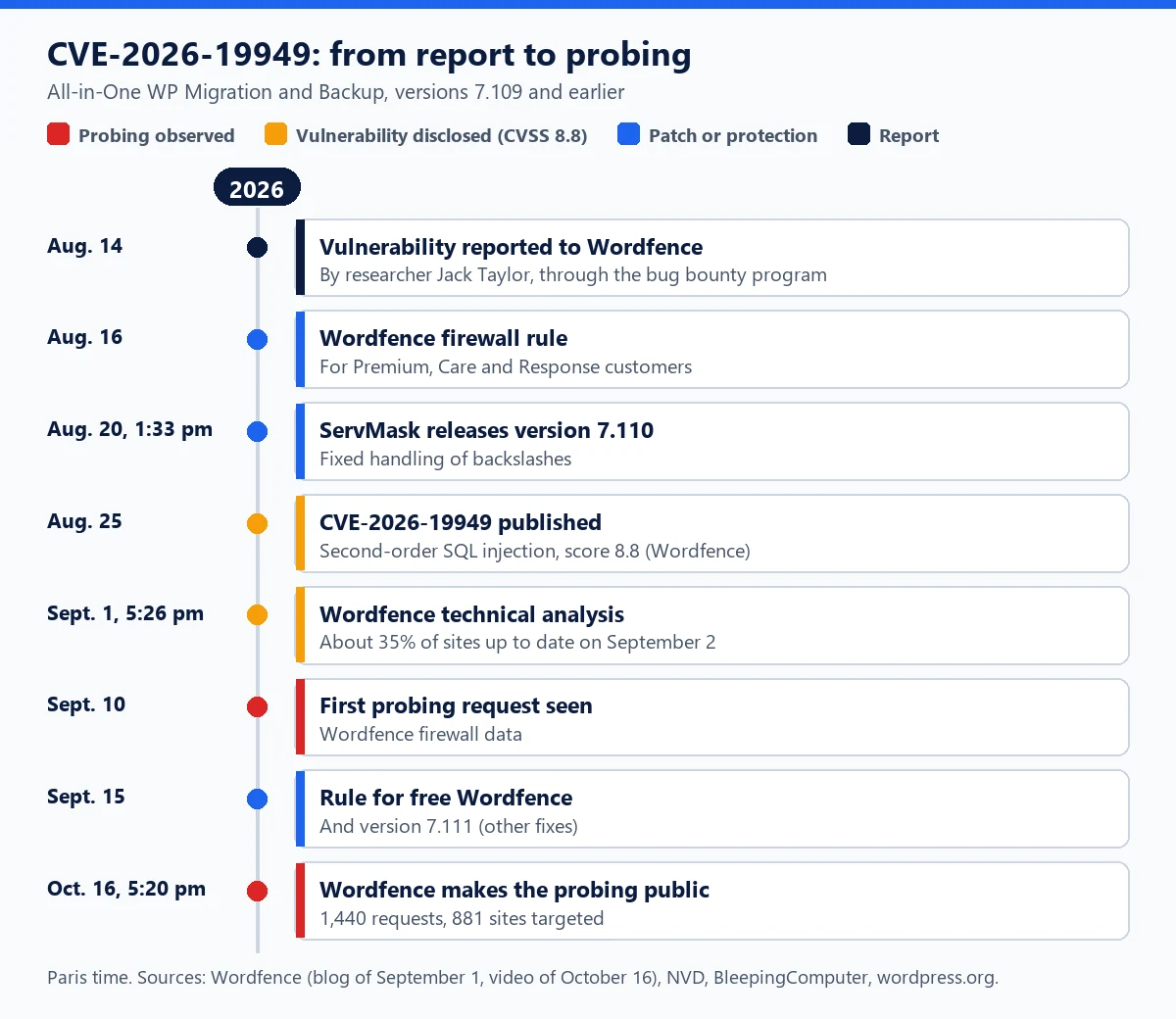
The vulnerability was reported on August 14, 2026 by researcher Jack Taylor through Wordfence's bug bounty program, which passed it on to the developer ServMask the next day. Wordfence Premium, Care and Response customers received a firewall rule on August 16, ServMask released the fixed version 7.110 on August 20 and the CVE was published on August 25 with a CVSS score of 8.8 (high). Wordfence detailed the mechanism on its blog on September 1 at 5:26 p.m. (Paris time). The next day, BleepingComputer noted that only about 35% of installations were up to date, leaving nearly 3.25 million sites still vulnerable.
In early September, no attack had been reported: heise wrote on September 3 that there was no indication attackers had taken an interest in the vulnerability, and SecurityWeek mentioned no exploitation. Tech Times reported the same day that SOCRadar had found a public proof-of-concept repository, with no confirmed exploitation.
On October 16 at 5:20 p.m., Wordfence published a short video, picked up that evening in its weekly roundup. According to its firewall data, requests targeting this vulnerability hit 881 distinct sites. The first dates from September 10, and traffic was still arriving eleven days later. Of 1,440 requests, 1,422 carried a payload designed specifically for this plugin. Most tried to retrieve the plugin's secret key, a few the administrator's password hash.
Probing does not mean hacked
Wordfence speaks of "probing", meaning observed exploitation attempts, not confirmed compromises. As of October 21, neither Wordfence nor the developer has published a number of sites hacked through this vulnerability, and CVE-2026-19949 is not in CISA's Known Exploited Vulnerabilities (KEV) catalog. These figures come from the Wordfence firewall: they only describe the sites it protects, not the web as a whole.
The distinction matters for a specific reason: the planted payload does nothing until an administrator runs an export followed by an import. A site targeted in September while running a vulnerable version may therefore keep booby-trapped data in its database, harmless today, that would fire during a restore performed with version 7.109 or earlier.
Who is affected
The free All-in-One WP Migration and Backup plugin has more than 5 million active installations (wordpress.org). Wordfence's advisory only covers this plugin; it does not mention ServMask's paid extensions (Unlimited, Google Drive, Dropbox...). The attacker needs no account, but two conditions must be met: a public post that accepts trackbacks, and an administrator who exports and then imports the site with a vulnerable version.
| Item | Details |
|---|---|
| Affected versions | 7.109 and all earlier versions |
| Fixed version | 7.110 (August 20, 2026); latest version as of October 21: 7.112 (October 7, 2026) |
| Identifier | CVE-2026-19949, second-order SQL injection (CWE-89) |
| CVSS score | 8.8, high (Wordfence, CNA) |
| Account required | None to plant the payload; an export then an import by an administrator to trigger it |
| Wordfence protection | Firewall rule on August 16 (paid plans), on September 15 (free version) |
| Observed activity | Probing of 881 sites, 1,440 requests, from September 10 (Wordfence) |
| CISA KEV catalog | Not listed |
A detail for careful readers: the CVSS vector published by Wordfence indicates low privileges (PR:L), while the description speaks of an unauthenticated attacker. The 8.8 score follows from that choice. BleepingComputer also points out that a deactivated vulnerable version poses less risk, but becomes exploitable again as soon as it is reactivated for a migration.
How the attack works
All-in-One WP Migration packs the site into a .wpress archive, database included. On import, the plugin rewrites URLs and table prefixes in every SQL query in the archive. To find text strings, it uses a regular expression that only looks at the character just before a quote. A string ending in a backslash (\) fools it: it thinks the string continues, splits it incorrectly, then rewrites it unbalanced. Part of the stored text then turns from data into an executed SQL command.
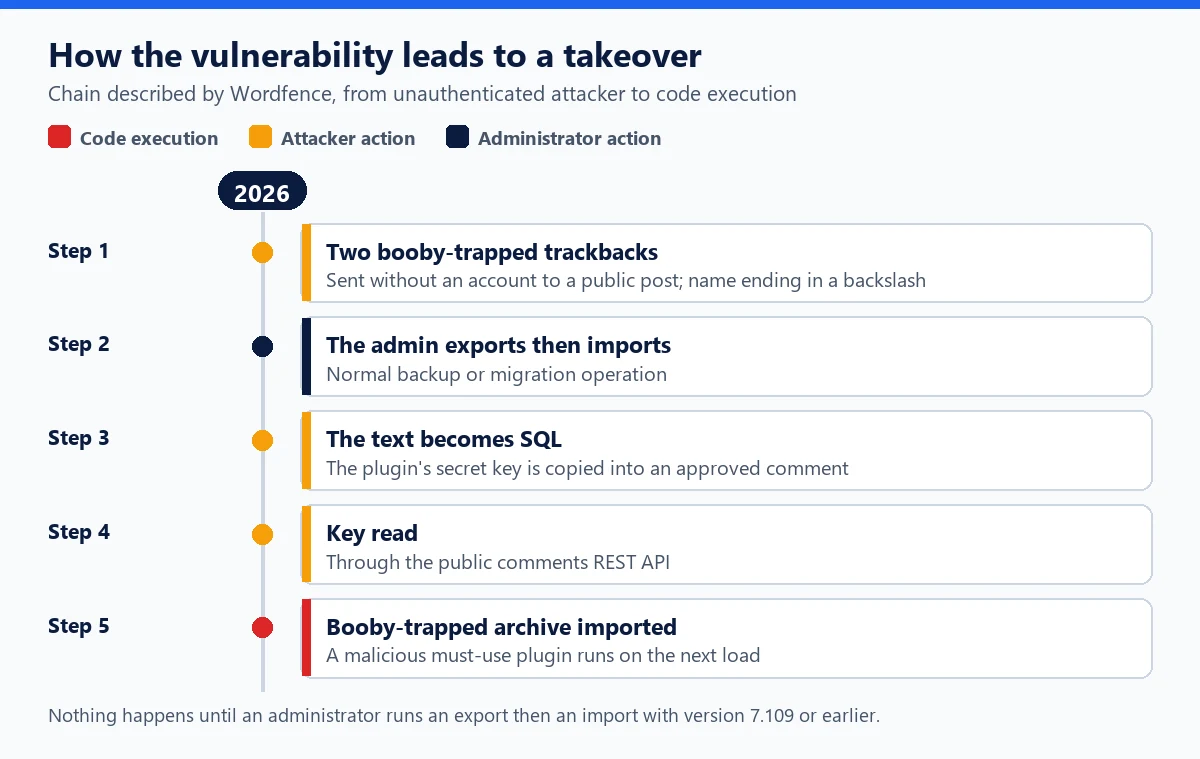
To plant that text, the attacker needs no account: they send two trackbacks to a public post, with a blog name ending in a backslash and a URL containing the payload. WordPress stores them in the comments table. The first is used to exceed the time allotted to an import step, which forces a pause; at that moment, the plugin writes the real secret key (ai1wm_secret_key) back into the database. The second copies that key into the comment and approves it, which makes it readable through the public comments REST API.
Yet that key is the only lock on the import action, which is reachable without logging in. With it, the attacker gets a booby-trapped archive imported that contains a malicious must-use plugin, executed on the next page load: that is remote code execution and full site takeover. Version 7.110 fixes the handling of values that end in a backslash.
Checking your site
Wordfence has not published IP addresses or file names. The points below follow from the attack chain it describes. With WP-CLI, start with the installed version:
wp plugin list --name=all-in-one-wp-migration --fields=name,version,status
wp plugin verify-checksums all-in-one-wp-migration
If the version is 7.110 or later and no restore was performed with an earlier version, the vulnerability cannot have fired through this path. Otherwise, continue:
- Trackbacks: list them with
wp comment list --type=trackback --fields=comment_ID,comment_date,comment_author,comment_author_url,comment_approved. Be wary of a name ending in\or a URL riddled with SQL fragments. - A key published in a comment:
wp comment list --search="$(wp option get ai1wm_secret_key)" --fields=comment_ID,comment_date,comment_approvedshould return nothing. - Must-use plugins:
wp plugin list --status=must-useand the contents ofwp-content/mu-plugins/. Any file you do not recognize is suspicious. - Administrators:
wp user list --role=administrator --fields=ID,user_login,user_email,user_registered. - Recent PHP files:
find wp-content -name "*.php" -newermt "2026-09-10" -type f, thenwp core verify-checksumsfor core. - Server logs: calls to
admin-ajax.phpwithaction=ai1wm_importwhen you have not started any import (this parameter only shows up if it is passed in the URL), and trackbacks sent in bulk.
To find out whether your site accepts trackbacks on new posts, wp option get default_ping_status returns open or closed; each post keeps its own setting.
What to do now
- Update to 7.110 at minimum, ideally the latest version (7.112 as of October 21), before any new import. That is Wordfence's advice.
- Deactivate the plugin between migrations on sites that only use it occasionally, and delete any
.wpressarchives left lying around on the server. - Clean up suspicious trackbacks and turn them off if you do not use them (Settings, Discussion).
- If in doubt about the key: in the version 7.112 code, the plugin generates a new random key when the option is missing, so
wp option delete ai1wm_secret_keyforces a renewal. ServMask has not published an official procedure on this point. - If a restore took place with a vulnerable version and one of the signs above shows up: change administrator passwords (some payloads targeted their hash), revoke application passwords, renew the salts in
wp-config.php(wp config shuffle-salts), scan the site and restore a clean backup. Our guide to cleaning up a hacked WordPress site details each step.
Reducing exposure next time
The patch had existed since August 20, three weeks before the first probing request. The targeted sites that were vulnerable stayed that way for lack of an update. A few habits shrink that window:
- turn on automatic plugin updates, at least for security releases;
- get vulnerability alerts and track pending updates across all your sites, not just the main one;
- limit the number of administrators, since importing is restricted to that role (principle of least privilege);
- keep off-server, tested backups;
- add a web application firewall capable of virtual patching: the Wordfence rule existed as early as August 16 (WAF comparison).
WP Feint Pro can help with the monitoring side, without replacing the update. The vulnerability alerts compare the installed versions of wordpress.org plugins with the public WPVulnerability.net database every day and notify you by email: All-in-One WP Migration 7.109 is flagged as soon as the database lists the vulnerability. The activity log records, from the moment it is activated, the creation of an administrator or the activation of a plugin, but it does not see a file dropped directly into mu-plugins. The integrity check covers WordPress core files only. The member area brings together the pending updates and vulnerable sites of all your sites. It alerts, it does not fix and it is not a firewall. For context, here is the full history of All-in-One WP Migration vulnerabilities.
Key takeaways
- CVE-2026-19949 (8.8) affects All-in-One WP Migration up to 7.109; fixed in 7.110 on August 20, 2026.
- Wordfence observed 1,440 probing requests against 881 sites starting September 10; no number of hacked sites had been made public as of October 21.
- The payload, planted without an account through a trackback, only runs when an administrator imports an archive.
- Update before any restore, and check trackbacks, approved comments and the
mu-pluginsfolder.
Sources
- NVD: CVE-2026-19949 (August 25, 2026) (external link, opens in a new tab)
- CISA: Known Exploited Vulnerabilities Catalog (continuously updated) (external link, opens in a new tab)
- wordpress.org: All-in-One WP Migration and Backup, changelog (version 7.110 of August 20, 2026) (external link, opens in a new tab)
Other sources consulted: trade press articles and Wordfence database.