Being read and cited by generative engines (GEO, for Generative Engine Optimization) pushes many site owners to open everything up: APIs, special files, exception rules for crawlers. Yet a WordPress site that AI can read does not need to expose more attack surface. This article reviews, with sources, what actually helps (robots.txt, crawlable content, structured data), the real status of llms.txt, and what you should definitely not open along the way.
What Google says about GEO
On May 15, 2026, Google published a guide on optimizing for its generative AI features (updated July 10, 2026). Its central message is unambiguous: optimizing for generative search means optimizing for the search experience, in other words doing SEO. The guide lists several "AEO/GEO" practices among common misconceptions:
- No special file: no machine-readable file, AI text file, markup or Markdown is needed to appear in Google Search.
- No chunking: there is no need to split content into small pieces, and there is no ideal page length.
- No AI-specific writing style.
- No specific schema.org markup: structured data is not required for generative search, although Google advises continuing to use it for SEO.
- No third-party tool has access to Google's internal ranking or AI systems.
On the technical side, the guide stresses a single point: the content must be crawlable, because Search's models use public, crawlable content. The page on AI features adds that there are no additional requirements to appear in AI Overviews or AI Mode: the page must be indexed and eligible to be shown with a snippet. Finally, since May 2026, Google has made it clear that its spam policies also apply to generative answers. For the other assistants (ChatGPT, Claude, Perplexity), everything goes through their search crawlers, detailed in our article on AI crawlers.
The principle: everything public readable, everything else closed
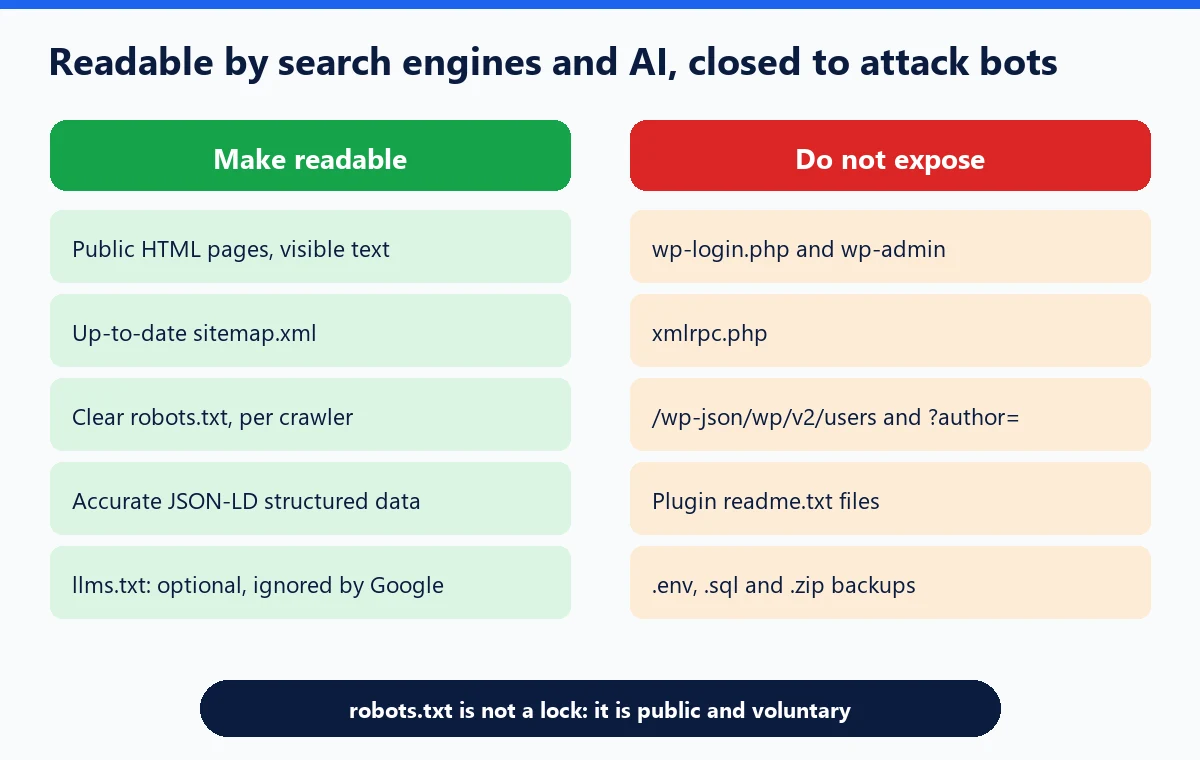
A generative engine needs the same things as a traditional search engine: public pages that respond quickly, HTML that contains the text, internal links and a sitemap. It needs neither your login page, nor the list of your accounts, nor XML-RPC. The two goals therefore do not conflict, as long as you do not mix up the zones.
robots.txt: a policy tool, not a security tool
WordPress's virtual robots.txt disallows /wp-admin/ while allowing admin-ajax.php, and since version 5.5 it announces the /wp-sitemap.xml sitemap. That is a good baseline. For GEO, its role is to state which crawlers may explore what: allow assistants' search crawlers, and possibly refuse those that train models.
Two security mistakes come up often:
- Listing sensitive paths (
Disallow: /backups/,Disallow: /staging/): the file is public, and you are pointing out exactly where to look. Google reminds you that robots.txt does not stop a page from appearing in its results and recommends password protection for private content. - Relying on robots.txt to block: compliance is voluntary. Attack bots ignore it, and some read it precisely to find targets. A private folder is protected on the server side, as explained in our article on exposed sensitive files.
If, on the contrary, you want to opt out of AI Overviews and AI Mode without leaving Search, Google has offered a dedicated setting in Search Console since August 31, 2026 ("Search generative AI control"), in addition to the nosnippet and max-snippet rules. At Bing, the NOCACHE and NOARCHIVE tags have limited the use of content in Bing Chat answers since September 2023, without removing pages from search results.
llms.txt: the real status of the proposal
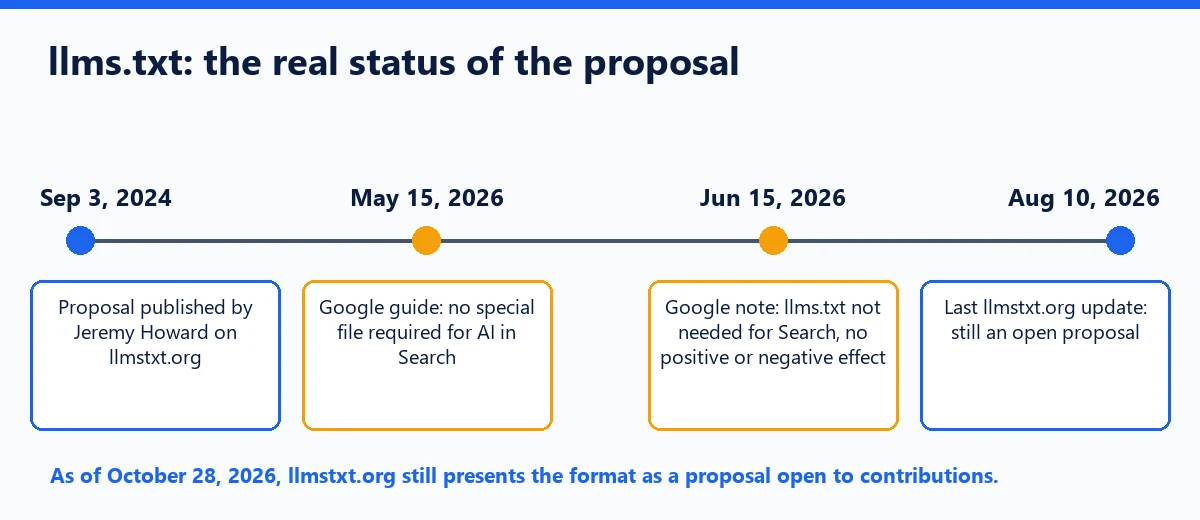
The /llms.txt file was proposed on September 3, 2024 by Jeremy Howard on llmstxt.org. It is a Markdown file that introduces the site to a language model: an H1 title (the only required section), a summary as a blockquote, then H2 sections containing lists of links, including an "Optional" section that the agent can skip. The proposal also suggests publishing a Markdown version of each page, at the same address followed by .md. The site describes itself as a proposal open to community input, not as a standard.
| Player | Documented position as of October 28, 2026 |
|---|---|
| Google Search | Note of June 15, 2026: these files are not needed for Search and have neither a positive nor a negative effect on visibility or rankings; you can keep them for other services. |
| Chrome Lighthouse | An "Agentic browsing" audit flags a server error on /llms.txt; a missing file (404) is marked "not applicable". |
| OpenAI, Anthropic, Perplexity | Their crawler pages do not say that these crawlers read llms.txt. OpenAI and Perplexity do, however, publish an llms.txt for their own documentation. |
| llmstxt.org | Open proposal, last updated on August 10, 2026. |
Should you create one? The cost is low, the proven benefit is zero for Google and undocumented elsewhere. If you do, treat it as one more public file:
- List only pages that are already public and indexable, never a staging site, a customer area or an internal document.
- Do not mention the WordPress version, the plugins or the login address: that would be a map handed to attack bots.
- If you publish
.mdversions of your pages, check that they do not expose members-only content or drafts. - Be wary of plugins that generate these files automatically: check what they list, and apply the same vigilance as with any plugin (updates, active developer).
Structured data: useful, accurate, leak-free
Structured data helps search engines understand who publishes what. Google recommends the JSON-LD format and sets a simple rule: do not mark up content that is invisible to readers. Misleading markup can lead to a manual action that removes eligibility for rich results, and Google never guarantees that a rich result will be shown. Some are disappearing anyway: Google stopped showing FAQ rich results from May 7, 2026.
The security issue lies in the authors' Person type. Some SEO plugins put the author archive address there, whose final segment uses the user's login name by default. If you close author archives to block account enumeration, point the author to an "About" page or a public profile, and give them a display name different from their username. You keep the information useful to search engines without revealing half of the login credentials.
Pages AI can read, without opening any doors
| Item | For visibility | For security |
|---|---|---|
| Content | Text present in the served HTML, clear headings, original information | No risk |
| Sitemap | Up to date, limited to indexable pages | Remove the author sitemap if archives are closed |
| robots.txt | Explicit policy per crawler | No sensitive path listed |
| REST API | Not needed by search engines to read your pages | Close the public users route |
| Firewall | Do not block Googlebot, Bingbot, Applebot or the AI search crawlers you want | Never exempt a crawler based on its user agent alone; verify its IP addresses |
| Anti-bot challenges | Avoid them on public pages for verified crawlers | Keep them for forms and login |
| llms.txt | Optional, no effect on Google | Public pages only |
One point bears repeating: a firewall rule that lets through any visitor claiming to be "GPTBot" or "Googlebot" is a vulnerability, because any script can borrow that name. Google documents how to verify its crawlers via reverse DNS and publishes its IP ranges; OpenAI and Perplexity publish theirs in JSON.
Where WP Feint fits in
WP Feint works on the right-hand column without touching the left-hand one. It removes or replaces WordPress signatures, moves the login page and blocks XML-RPC in its free version; the Pro version closes author enumeration (archives, the API users route, the author sitemap) and removes the REST and oEmbed announcements. It changes neither your content, nor your permalinks, nor your robots.txt, nor your content sitemap. On Apache and LiteSpeed, the plugin's own files (readme, translations) return 404 to scanners. The effects of these settings on search rankings are detailed in our article on hiding WordPress and SEO, and the features on the hardening and technical links pages.
Before optimising for generative engines, a WordPress SEO audit checks that your pages are crawled and indexed.
Fast pages also serve generative engines: start with images using the best plugins to optimise them.
Key takeaways
- For Google, GEO is still SEO: original content, crawlable pages, a good experience.
- llms.txt is a 2024 proposal; Google has ignored it for Search since its note of June 15, 2026.
- robots.txt expresses a policy, protects nothing and should list no sensitive path.
- Structured data must reflect visible content, without exposing login names.
- Being readable by AI requires opening neither the login, nor the users API, nor XML-RPC.
Sources
- Google Search Central, optimizing for generative AI features (updated July 10, 2026) (opens in a new tab)
- Google Search Central, documentation updates log (May 15 and June 15, 2026) (opens in a new tab)
- Search Console Help, Search generative AI control (opens in a new tab)
- llmstxt.org, The /llms.txt file (opens in a new tab)
Other sources consulted: official documentation and official vendor pages.