

Almost every dynamic site, WordPress included, stores its content in a database queried with SQL. When code builds a query by pasting in a value received from the visitor, it mixes two things that should stay separate: instructions and data. The attacker takes advantage of this to write instructions where data was expected. MITRE classifies this weakness as CWE-89.
How SQL injection works
Take code that looks up a post by name by assembling the query by hand:
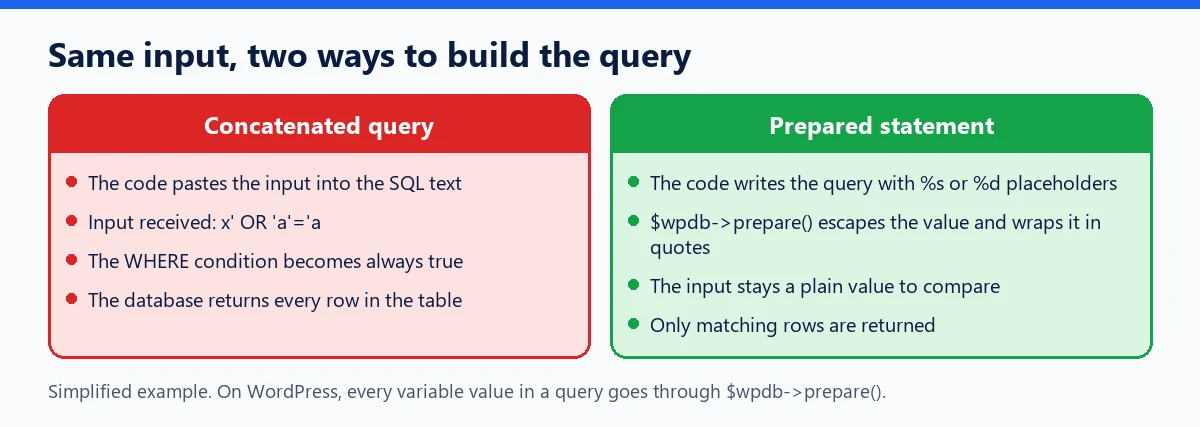
$sql = "SELECT * FROM articles WHERE name = '" . $_GET['name'] . "'";If the visitor sends x' OR 'a'='a, the quote closes the string the developer intended and the rest becomes SQL. The condition is always true: the database returns the whole table. With other payloads, the attacker can extract data from other tables, modify it or delete it.
What an attacker can get
OWASP sums up the possible consequences of a successful injection:
- reading sensitive data: email addresses, orders, password hashes;
- inserting, modifying or deleting records, for example giving an account the administrator role, which makes it a path to privilege escalation;
- bypassing authentication;
- in some cases, reading files on the server or sending commands to the operating system, all the way to remote code execution.
Not every injection displays its result on screen. In so-called “blind” variants, the attacker infers the data piece by piece from differences in responses or timing. It is slower, but just as effective with an automated tool. The vulnerabilities found in WooCommerce since 2020 include several SQL injections, and the All-in-One WP Migration alert shows that such a flaw gets probed as soon as it is disclosed.
For WordPress: $wpdb->prepare()
High-level functions (WP_Query, get_posts(), update_option()…) build their queries themselves. As soon as a plugin writes its own query with the $wpdb object, every variable value must go through $wpdb->prepare(). Its placeholders are %s (string), %d (integer), %f (float) and, since WordPress 6.2, %i for a table or column name.
$ids = $wpdb->get_col( $wpdb->prepare(
    "SELECT ID FROM {$wpdb->posts} WHERE post_author = %d AND post_status = %s",
    $author_id,
    'publish'
) );- Don't put quotes around
%s: the function adds them. - For a search with
LIKE, pass the full string as an argument, after running it through$wpdb->esc_like(). - Casting IDs with
absint()before use is an extra safeguard, not a substitute for a prepared statement.
How to protect your site as an owner
- Apply plugin security updates quickly: you won't be fixing their code yourself.
- Give the database user only the privileges WordPress needs, to limit the damage of a hijacked query.
- Put a web application firewall in front of the site: its rules spot the best-known injection payloads and can cover a flaw until it is patched.
WP Feint neither detects nor blocks SQL injection: it is not a web application firewall. Hiding WordPress makes it harder to identify installed plugins, which gets in the way of some bots, but it never replaces updating the vulnerable plugin.
Common mistakes
- Escaping “by hand” with
addslashes()or character replacements instead of using a prepared statement. - Preparing the values but inserting a column name or sort order taken from the request as is: use
%ior an allowlist. - Believing that data safely stored in the database is safe everywhere: on output, it is cross-site scripting you need to prevent, with escaping.