In late June 2023, a registration plugin installed on more than 200,000 sites let any visitor create an administrator account. The flaw, CVE-2023-3460, was already being exploited when it was made public, and it took four releases to close it. Here is what happened, how to check that a site was not hit, and what this case teaches about every plugin that manages accounts.
What Ultimate Member is and why the flaw was critical
Ultimate Member adds registration and login forms, public profiles, a member directory and content restrictions to WordPress. Its registration form is therefore, by design, open to anonymous visitors: it is one of the few parts of a site that writes to the users table without prior authentication.
The vulnerability let a logged-out visitor set certain metadata of their future account themselves, including wp_capabilities, the metadata where WordPress stores a user's role. By putting the administrator role there, the attacker gained full control of the site.
| Item | Details |
|---|---|
| Identifier | CVE-2023-3460 (WPScan, assigning authority) |
| Type | Unauthenticated privilege escalation |
| CVSS 3.1 score | 9.8 out of 10 (critical), vector AV:N/AC:L/PR:N/UI:N |
| Affected versions | All versions before 2.6.7 (2.6.4 to 2.6.6: partial fixes) |
| Fixed version | 2.6.7, released July 1, 2023 |
| Active installations | More than 200,000 according to Wordfence and WPScan (June 2023) |
| Exploitation | Active before the advisory was published, according to WPScan and Wordfence |
The mechanism: a metadata blocklist
Ultimate Member's registration form saves the submitted fields as user metadata. To stop a visitor from changing sensitive keys, the plugin relied on a list of forbidden keys. Wordfence explained that this filter could be bypassed trivially by playing with letter case, slashes or character encoding in the key name: the filter no longer recognized the forbidden key, while WordPress still ended up writing to the right metadata.
WPScan sums up the root cause as a mismatch between the plugin's blocklist logic and the way WordPress handles metadata keys. According to WP Tavern, WPScan researcher Marc Montpas reported on Trac (ticket #58679) that the meta_key column of the user metadata table used an accent-insensitive collation, so an accented variant of a key can point to the existing row. The ticket was still open when we checked.
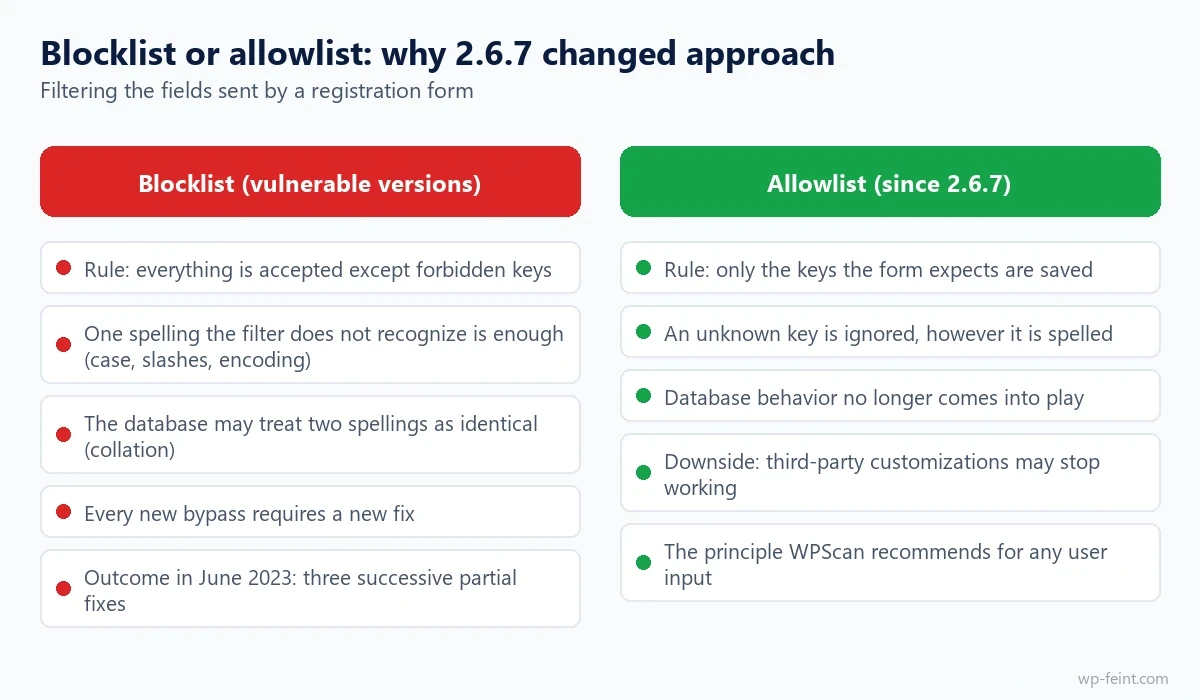
That is why versions 2.6.4, 2.6.5 and 2.6.6 were not enough: each fix closed one spelling while another remained possible. The authors acknowledged it publicly ("Versions 2.6.4, 2.6.5, 2.6.6 partially close this vulnerability", quoted by BleepingComputer). Version 2.6.7 changed approach: according to WP Tavern, it introduces an allowlist of the keys the plugin saves when forms are submitted, and separates form settings from submitted data. The developers warned that third-party customizations might stop working.
Timeline: exploited before it was known
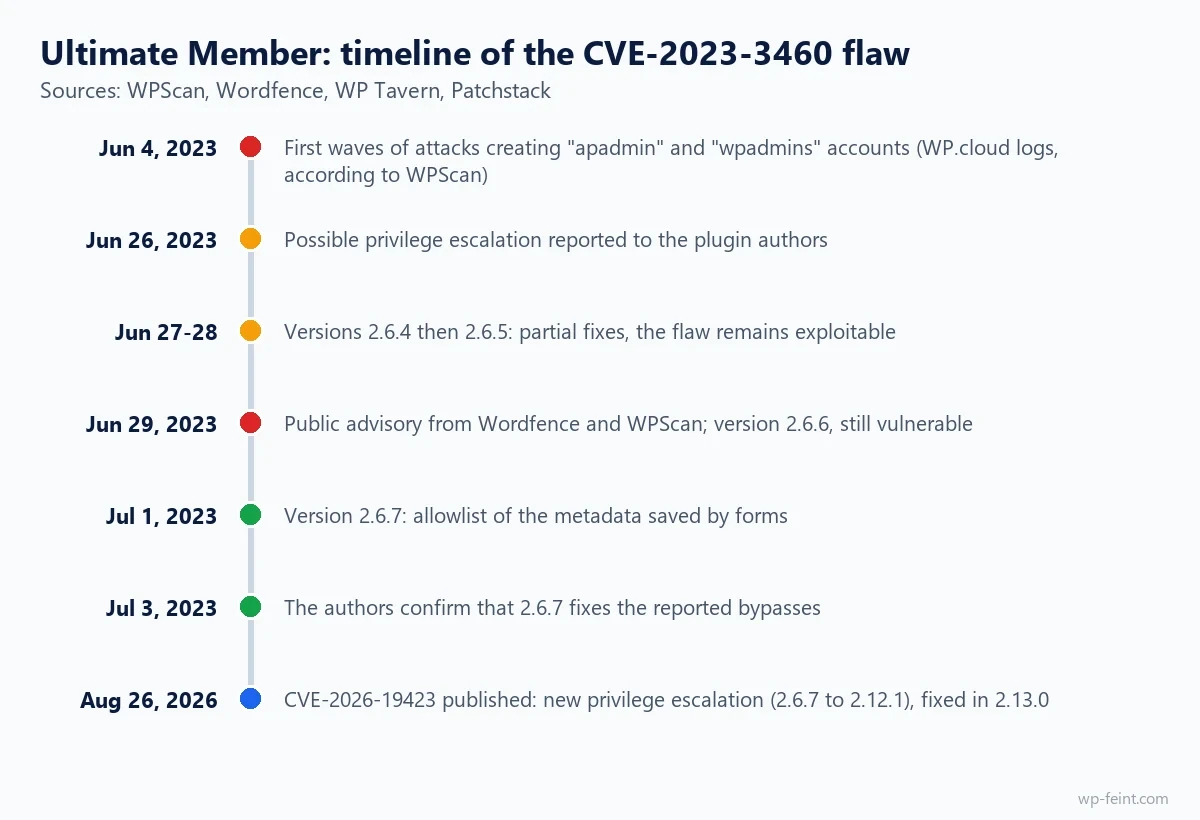
The most striking point is the order of events. According to WPScan, monitoring on the WP.cloud platform (Pressable, WordPress.com) recorded waves creating accounts named "apadmin" and "wpadmins" as early as June 4, 2023. The report to the authors dates from June 26, and Wordfence's public advisory from June 29. Between those dates, up-to-date sites remained vulnerable: updating quickly offered no protection, since no fixed version existed.
Wordfence therefore recommended uninstalling the plugin until a complete fix was released, noting that its firewall rule did not cover every scenario. In the comments on the advisory, the author states that simply deactivating the plugin is enough to block exploitation, with removal still preferable as a precaution.
How to tell if your site was hit
Updating closes the door, but it does not remove an account that was already created. If Ultimate Member was active on your site in June or July 2023 in a version earlier than 2.6.7, run the following checks.
1. List the administrators
In the Dashboard, open Users, filter on the Administrator role and sort by registration date if your admin theme shows it. With WP-CLI, the following command gives the full list:
wp user list --role=administrator --fields=ID,user_login,user_email,user_registeredAny administrator account that nobody recognizes should be treated as hostile. Note its creation date before deleting it: it tells you when the incident probably began.
2. Compare with the published indicators
| Indicator type | Published values | Source |
|---|---|---|
| Account usernames | wpenginer, wpadmins, wpengine_backup, se_brutal, segs_brutal, apadmins | Wordfence, WPScan |
| Email address domain | exelica.com | Wordfence |
| Malicious plugin | yyobang | WPScan |
| Malicious theme | fing | WPScan |
| Backdoor | autoload_one.php file added inside legitimate plugins | WPScan |
| Persistence | change to the active theme's functions.php to recreate a "wpadminns" user | WPScan |
| Logs | POST requests to the registration page (/register by default) followed by a login | Wordfence, WPScan |
These lists are not exhaustive: other groups may have used other names. Wordfence and WPScan also publish attacking IP addresses, which you can search for in your host's access logs for the period in question.
3. Look for persistence
- Plugins and themes you did not install, including deactivated ones.
- Recent PHP files in
wp-content/plugins,wp-content/themesandwp-content/uploads(that last folder should contain no PHP at all). - Changes to the active theme's
functions.php, especially code that creates a user. - Suspicious metadata: a query on keys that resemble
wp_capabilitiescan reveal unexpected variants. - A full server-side malware scan, in addition to an integrity check of the core files.
If you find a hostile account, WP Tavern relays the plugin authors' recommendations: delete unknown accounts, reset all passwords, including administrators' passwords, and notify members. Also regenerate the keys and salts in wp-config.php to invalidate open sessions. If a backdoor is confirmed, restoring a backup taken before the intrusion is often safer than a partial cleanup.
Three years later: CVE-2026-19423
The story is not over. On August 26, 2026, WPScan published CVE-2026-19423, a new unauthenticated privilege escalation in Ultimate Member, versions 2.6.7 to 2.12.1, fixed in 2.13.0 (CVSS score 8.1). This time, the problem lies in the forms' role field: when the plugin cannot determine which roles a form allows, it checks the submitted value against the site's roles instead of the form's own list. To our knowledge, neither WPScan nor Patchstack had reported any active exploitation at the time of writing.
| CVE-2023-3460 | CVE-2026-19423 | |
|---|---|---|
| Affected versions | before 2.6.7 | 2.6.7 to 2.12.1 |
| Fix | 2.6.7 | 2.13.0 |
| CVSS 3.1 score | 9.8 | 8.1 (high complexity) |
| Data abused | wp_capabilities metadata | form role field |
| Reported exploitation | yes, before the advisory | none reported to date |
The lesson is the same: as soon as a public form decides an account's role, the slightest validation flaw hands over the keys to the site. If you use Ultimate Member, make sure you are on version 2.13.0 or later.
Lessons for every registration plugin
Ultimate Member is not an isolated case: membership, store and form plugins that create accounts share the same exposure. A few rules significantly reduce the risk.
- Inventory: know which plugins create users on each of your sites. A registration plugin installed "for later" is a needless attack surface.
- WordPress settings: under Settings, General, check "New User Default Role". It should remain Subscriber or Customer, never an editorial role.
- Account monitoring: a weekly review of the administrator list catches this kind of intrusion within days rather than months.
- Threat intelligence: subscribe to a vulnerability feed (WPScan, Wordfence Intelligence, Patchstack) for your installed plugins. Here, the advisory came before the fix: only staying informed made it possible to deactivate the plugin in time.
- Plan B: know how to deactivate a plugin without the admin area (rename its folder over FTP or SFTP) and keep a recent, tested backup.
What WP Feint can and cannot do here
To be clear: no camouflage plugin fixes a validation flaw in another plugin. Against CVE-2023-3460, only updating (or deactivating) offered protection. WP Feint works around it:
- bot traps count the bots probing sensitive or closed URLs on your site, a useful signal when a campaign starts; with Pro, they feed a log and automatic banning;
- core integrity checking (Pro) helps you confirm, after an incident, that the WordPress files have not been modified; it does not cover plugins or the theme;
- email alerts and the weekly report (Pro) keep you informed; vulnerable plugin alerts (Pro) flag every known flaw in an installed plugin or theme, explain what it allows and give the fixed version.
Read also: Build a WordPress membership site and manage roles and users.
Key takeaways
- CVE-2023-3460 let an anonymous visitor create an administrator account through Ultimate Member's registration form.
- Only version 2.6.7 fixes it completely; versions 2.6.4 to 2.6.6 were partial fixes.
- Exploitation began in early June 2023, before any fix existed: staying informed mattered more than updating.
- Check the administrator list, unknown plugins and themes, and the theme's functions.php.
- A new flaw (CVE-2026-19423) affects versions 2.6.7 to 2.12.1: upgrade to 2.13.0 or later.
Sources
- NVD: CVE-2023-3460 (opens in a new tab)
- WordPress Trac: ticket #58679, meta_key collation (opens in a new tab)
Other sources consulted: trade press articles, Wordfence, WPScan and Patchstack databases.