

The word phishing is a play on fishing: the attacker casts a lure and waits for a victim to bite. MITRE classifies it among social engineering techniques (CAPEC-98): the attacker poses as a legitimate entity to obtain information, most often login credentials. No technical vulnerability is needed: it is the victim's trust that gets exploited.
How phishing works
The message imitates a familiar sender: a bank, a phone carrier, a government agency, an online store, a social network, a hosting provider. It creates a sense of urgency (account locked, payment declined, package on hold, domain about to expire) and offers a link to a fake site, a faithful copy of the real one. Everything typed there goes straight to the attacker. Phishing uses several channels:
- email, the original channel;
- text messages, known as smishing;
- phone calls, for example a fake bank representative.
Spear phishing is a targeted variant: the message is written for a specific person or company, with real details that make it believable. A freelancer or agency managing sites for several clients is a prime target.
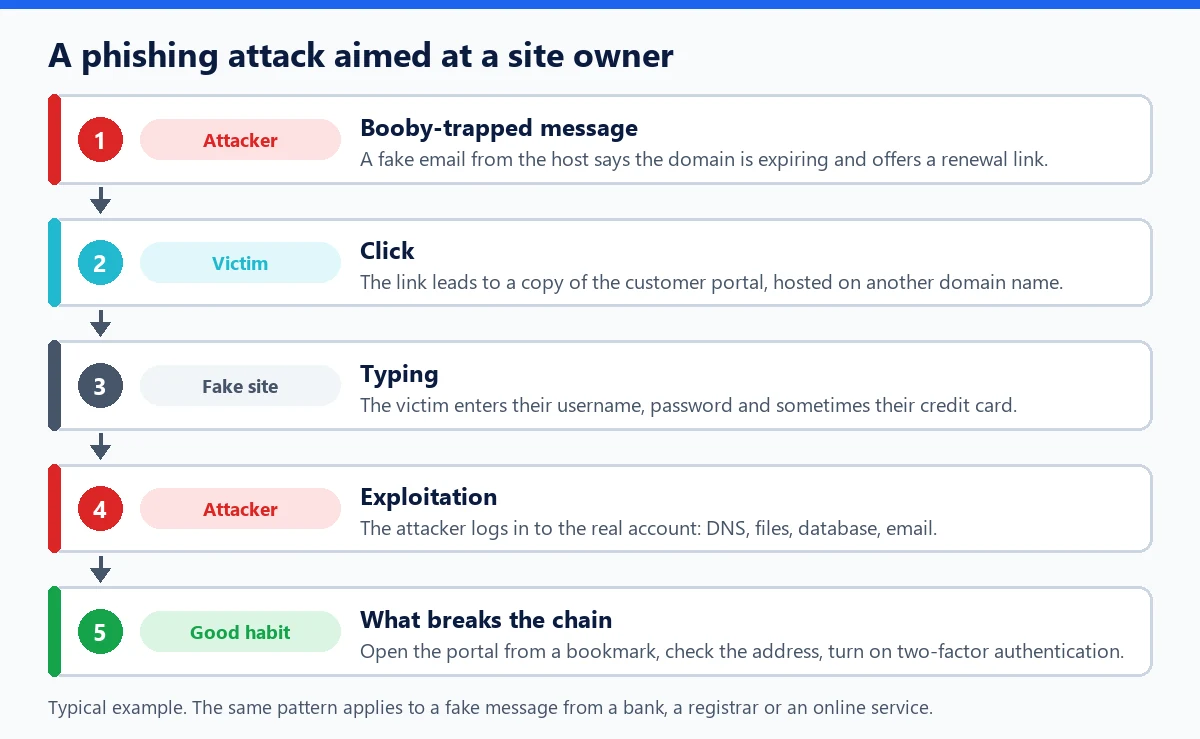
What a WordPress site is exposed to
Stolen credentials don't always relate to WordPress directly, but they lead to it. With access to the host's customer portal, the attacker can modify files, the database or DNS records. With an administrator account, they install a booby-trapped plugin and drop malware or a backdoor. With the email inbox, they reset the passwords of every linked service. And a password stolen here will be replayed elsewhere: that is the starting point of credential stuffing.
How to protect yourself
- Never share a password or bank details by message or over the phone: a legitimate organization doesn't ask for them that way.
- Hover over links without clicking to see where they really lead, and check the site's address letter by letter.
- Open your customer portals (host, registrar, bank) from a bookmark you created yourself, never from a link you received.
- When in doubt, contact the organization through a channel you already know.
- Use a password manager: it won't autofill a form on the wrong domain, which acts as a warning sign.
- Turn on two-factor authentication wherever it is available. WP Feint Pro's two-factor authentication protects the WordPress login; it limits the damage of a stolen password, but it can't stop a code from being relayed to a fake site in real time.
WP Feint doesn't filter emails or links: against phishing, vigilance and good habits remain the first line of defense.
What to do if you took the bait
- Change the affected password immediately, and everywhere you reused it.
- If you gave out bank details, contact your bank right away to block the card.
- Check your sites' administrator accounts and recent logins; at the slightest doubt, treat the site as potentially hacked.
- Keep the message and report it to the relevant authorities in your country. In the United States, for example, you can report it to the FTC at ReportFraud.ftc.gov and forward suspicious texts to 7726 (SPAM).