
Ransomware is a family of malware with a simple business model: holding data hostage. Attacks readily target organizations: their servers, their workstations and their backups, with the added threat of publishing the stolen data. Attackers can also increase the pressure with a DDoS attack on the victim's website or by contacting its customers.
How an attack unfolds
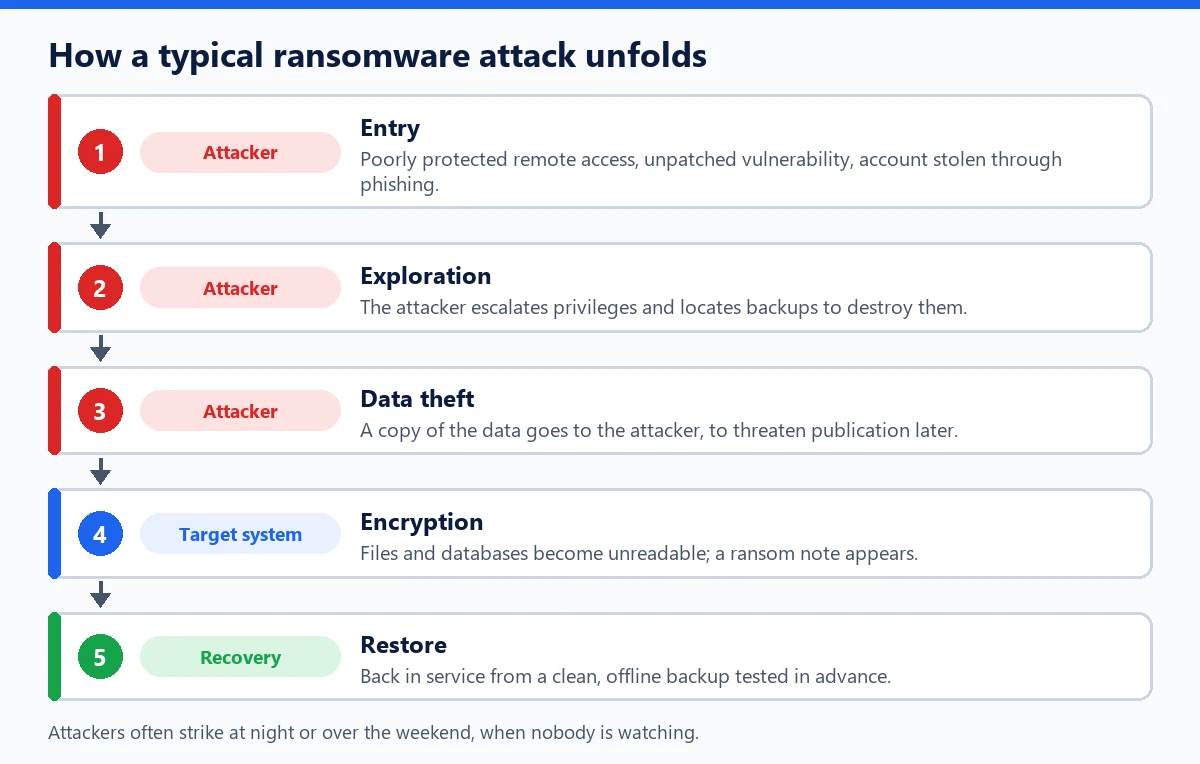
Encryption is only the last step. Before that, the attacker had to get in, often through an unpatched vulnerability, poorly protected remote access (remote desktop, VPN, NAS) or an account stolen through phishing. They then explore the network, look for higher privileges and locate the backups to make them unusable.
What it means for a WordPress site
A WordPress site can be hit directly if the server hosting it is compromised. But the risk also comes from everything around it: the administrator's computer, where FTP, SSH and hosting account credentials are saved; the NAS or network drive where backups are stored; the email account that can reset every password. A WooCommerce store adds another stake: stolen customer data threatened with publication.
How to protect against it
- Backups out of reach: at least one disconnected or offline copy that the attacker can neither encrypt nor delete. The 3-2-1 backup rule provides the framework, and our article on WordPress backups applies it to a website.
- Tested restores: a backup you have never restored is just an assumption.
- Prompt updates of operating systems, WordPress, plugins and exposed devices.
- Two-factor authentication on remote access, email, your hosting account and the site's admin area.
- Segmentation: a segmented network limits the spread from one machine to another.
WP Feint doesn't protect against ransomware and doesn't make backups: its features deal with the security of WordPress itself. An external backup solution remains essential.
What to do during an attack
Government cybersecurity agencies give consistent advice, summarized below. In France, Cybermalveillance.gouv.fr and ANSSI (France) also encourage victims to file a police report.
- Don't pay the ransom: nothing guarantees you will get your data back, and paying funds new attacks.
- Isolate: disconnect affected machines from the network and unplug connected backups, without shutting the devices down, to preserve evidence.
- Report the attack to law enforcement before reinstalling the affected devices, so the evidence is kept.
- Notify your data protection authority within 72 hours if personal data may have been accessed, altered or destroyed and the GDPR applies to you; other jurisdictions have their own breach notification rules.
- Get help from a specialized incident response provider.
To get a site back on its feet, the cleanup procedure for a hacked WordPress site details the order of operations.