

DDoS stands for Distributed Denial of Service. A denial-of-service (DoS) attack tries to exhaust a resource: bandwidth, connections, CPU, memory, database. When the attack comes from a single machine, blocking its address is often enough. The “D” for distributed changes everything: the traffic arrives from thousands of addresses at once, often hacked computers, servers or connected devices grouped into a botnet. MITRE classifies this mechanism among flooding attacks (CAPEC-125), which exploit insufficient rate limiting.
The different types of DDoS attacks
- Volumetric: a deluge of traffic saturates the network link of the server or the host. The site goes down without a single page actually being requested.
- Protocol: the attack exhausts the connection tables of servers, firewalls or load balancers by abusing network protocols.
- Application layer: normal-looking HTTP requests target pages that are expensive to generate, such as a search, a cart or an uncached page. Less traffic is needed, and it is harder to tell apart from real visitors.
Motives vary: ideology, the challenge, extortion, revenge or competition. A DDoS can also serve as a diversion during another attack, or as leverage during a ransomware attack.
How to protect against it
A website can't defend itself alone against a DDoS: protection happens upstream, where capacity is greatest. ANSSI (France) lists three levels, to be combined depending on what is at stake: the network provider, a specialized anti-DDoS service and a content delivery network (CDN).
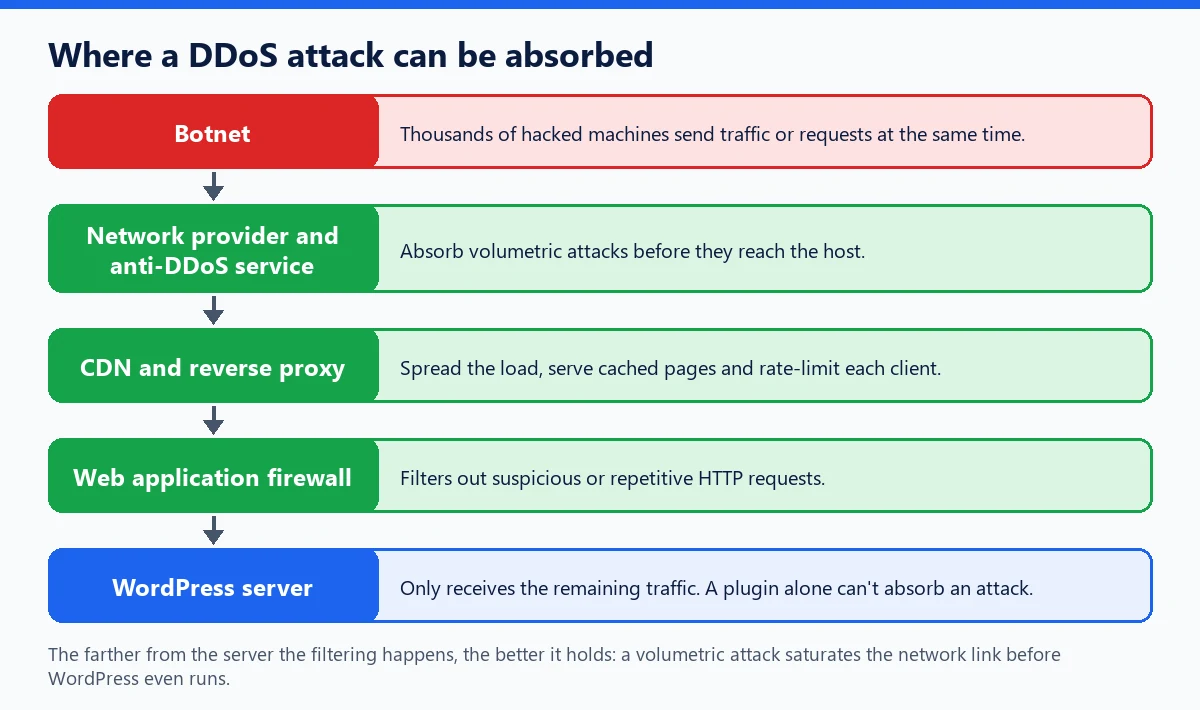
- Ask your host what protection is included and what they do during an attack: some take the site offline to protect their other customers.
- Put the site behind a reverse proxy or a CDN, and don't leave the server's real IP address exposed, otherwise the attacker targets it directly. Our article Cloudflare in front of WordPress covers the settings.
- Turn on a web application firewall with rate-limiting rules for application layer attacks.
- Serve as many pages as possible from cache: a cached page costs very little to deliver.
For WordPress
Some WordPress URLs bypass the cache and become easy targets for an application layer attack: wp-login.php, xmlrpc.php, admin-ajax.php, the ?s= search, the REST API. Disabling XML-RPC when you don't use it removes a door that is expensive to serve. A wave of failed logins on wp-login.php often looks like a small denial-of-service attack, too.
WP Feint is not anti-DDoS protection. Its login limiting doesn't limit network traffic; behind Cloudflare, its support for visitors' real IP addresses only prevents every visitor from sharing the proxy's counter.
What to do during an attack
- Contact your host and, if you have one, your protection service to filter the traffic.
- Don't pay a ransom: it funds the attackers without guaranteeing the attack will stop.
- Keep the server, firewall and proxy logs to file a report with law enforcement.
- Check afterward that no other intrusion took advantage of the diversion, and change passwords at the slightest doubt.