

WordPress already has an object cache: while a page loads, it keeps the options, posts and metadata it has read from the database in memory so it doesn't have to fetch them again. But as the WordPress documentation points out, this cache is not persistent by default. Everything is thrown away at the end of the request, and the next page repeats the same reads against MySQL or MariaDB. Redis and Memcached make that cache persistent.
How a persistent object cache works
The trick comes down to one file: object-cache.php, placed in wp-content. It's a “drop-in” that WordPress loads automatically at startup, replacing its default cache. Object cache plugins install this file, which routes the wp_cache_get() and wp_cache_set() functions to a Redis or Memcached server.
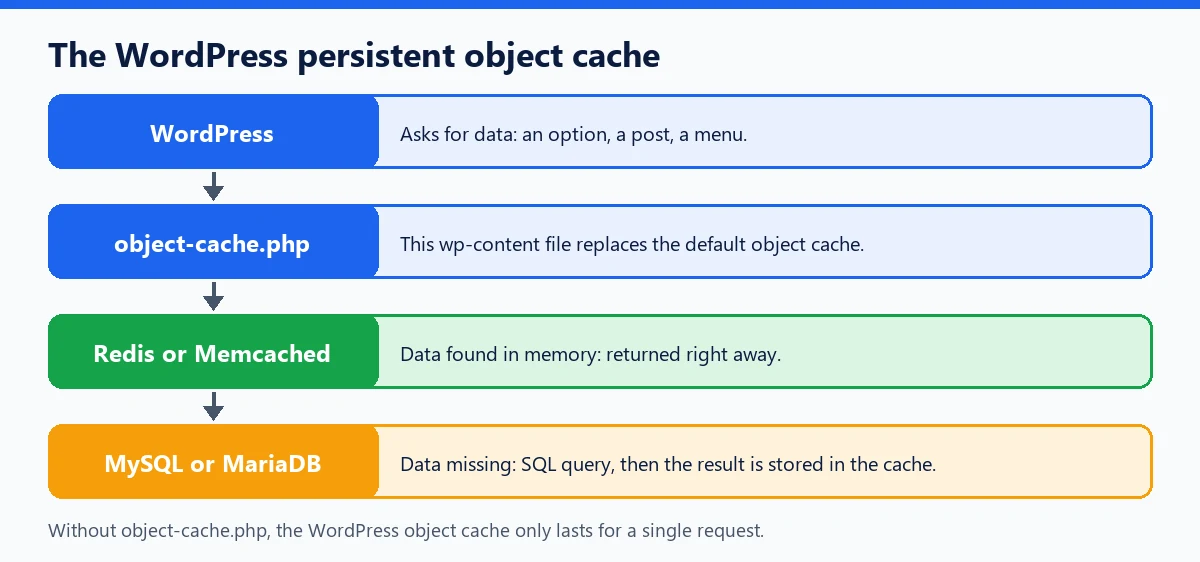
Don't confuse it with the WP_CACHE constant, which enables a different drop-in, advanced-cache.php, used by page cache plugins. A page cache skips PHP for entire pages; an object cache speeds up the pages that have to stay dynamic: the admin area, the cart, customer accounts, search. OPcache works at yet another level, on the compilation of PHP code.
Since WordPress 6.1, the Site Health tool includes a check that tells you whether a persistent object cache would help, based on how many options, posts or users the site has.
Redis or Memcached?
- Memcached describes itself as a high-performance, distributed memory object caching system. It's a simple key-value store that evicts the least recently used items (LRU) by default; its servers are unaware of each other, and adding a server adds memory.
- Redis is an in-memory data structure store that can serve as a cache, a database or a message broker. It can write its data to disk (RDB snapshots, AOF log) or skip persistence entirely, which its documentation presents as a common setup for a cache.
For WordPress, either one does the job. Redis is often preferred for its extra features, but the gain depends mostly on how close the cache server is to the site.
For WordPress
- Check availability: on cloud hosting, a VPS or a plan that includes it, either the host or you start the service; the matching PHP extension (redis or memcached) must be installed.
- Install an object cache plugin, for example Redis Object Cache, which supports PhpRedis, Predis and Relay and provides WP-CLI commands such as
wp redis status. The LiteSpeed Cache plugin also handles Redis and Memcached, on any web server. - One prefix per site if several WordPress installs share the same Redis server, otherwise their data gets mixed up.
- Never expose it to the internet: Redis and Memcached should listen locally or on a private network, with authentication when it's available.
After a settings change, WP Feint purges the page caches it recognizes; the hosting and cache compatibility page lists which ones.
Common mistakes
Turning on an object cache on a small site without measuring the effect, forgetting that a full or stopped cache can cause slowdowns, or installing two plugins that fight over the object-cache.php file. If things behave strangely after a migration, flush the object cache: it may still hold old URLs or old settings.