

OpenLiteSpeed is published by LiteSpeed Technologies, the developer of LiteSpeed Web Server, which presents it as the open source edition of its Enterprise version. Being free, it mainly appeals to VPS administrators who want LiteSpeed's performance and caching without a commercial license. It also ships in ready-to-use server images at several cloud providers.
How OpenLiteSpeed works
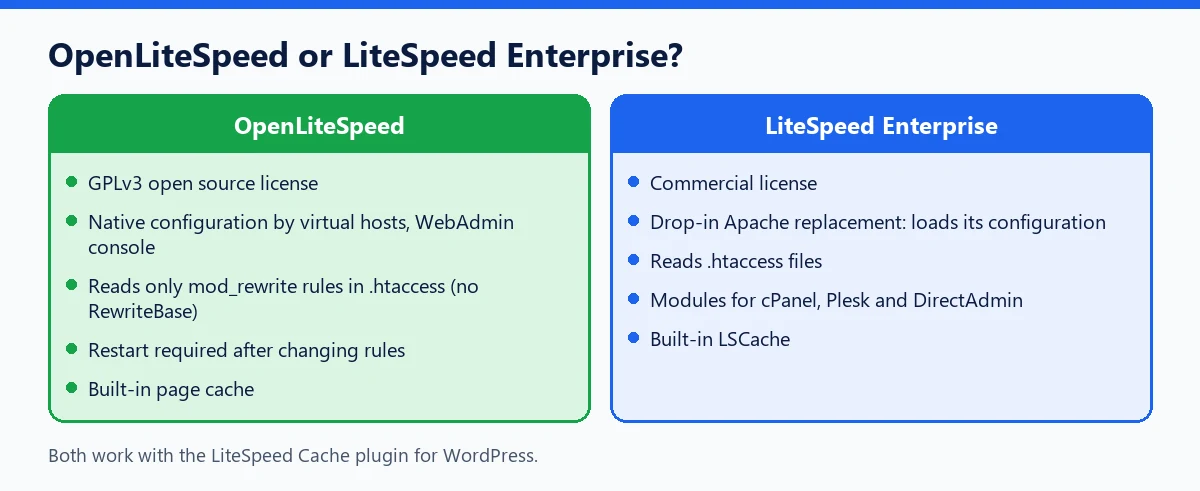
Like the Enterprise version, OpenLiteSpeed relies on an event-driven architecture: a small number of processes handle many connections at once. It includes a page cache module and is managed through a web administration console, the WebAdmin. PHP runs in lsphp processes, specific to the LiteSpeed ecosystem.
The big difference is the configuration. OpenLiteSpeed uses its own format, organized into virtual hosts, rather than Apache's files. The DirectAdmin documentation sums it up: it isn't a drop-in replacement for Apache, because it doesn't fully support .htaccess and uses a different configuration syntax.
.htaccess on OpenLiteSpeed
OpenLiteSpeed can automatically load the .htaccess files in each directory, but its documentation lists three limitations:
- only rewrite rules in mod_rewrite format are supported; other directives are ignored;
- the RewriteBase directive isn't recognized, so the folder has to be built into the rule's pattern;
- a server restart is required after any change to the rewrite rules.
The direct consequence for WordPress: permalink rules work, but a protection written in .htaccess with directives such as Require, Order or <Files> has no effect. PHP settings usually placed in .htaccess go in a .user.ini file instead.
For WordPress
- Caching: the LiteSpeed Cache plugin works with OpenLiteSpeed, page cache included. Update it without delay: its vulnerability history shows it's a frequent target.
- After changing permalinks or a plugin that writes to .htaccess, restart OpenLiteSpeed (or check that your host does), otherwise the new rules don't apply.
- Protections: translate access restrictions into rewrite rules or put them in the virtual host configuration.
- Control panel: DirectAdmin offers OpenLiteSpeed among its web servers through CustomBuild, which makes it easier to adopt on a VPS.
For the file aliases of WP Feint Pro, the rules go in the virtual host's rewrite section and a reload is often needed; the hosting and cache compatibility page gives the details.
Common mistakes
Migrating from Apache to OpenLiteSpeed expecting identical behavior, then discovering that folders protected by .htaccess are reachable. Another trap: changing a rule and testing right away without restarting: the server is still applying the old version.