

LiteSpeed Web Server is developed by LiteSpeed Technologies. Its commercial version, called Enterprise, is widespread among shared hosting providers: it replaces Apache without customers having to change anything on their sites. There's also an open source edition, OpenLiteSpeed, which doesn't share all of its capabilities.
How LiteSpeed works
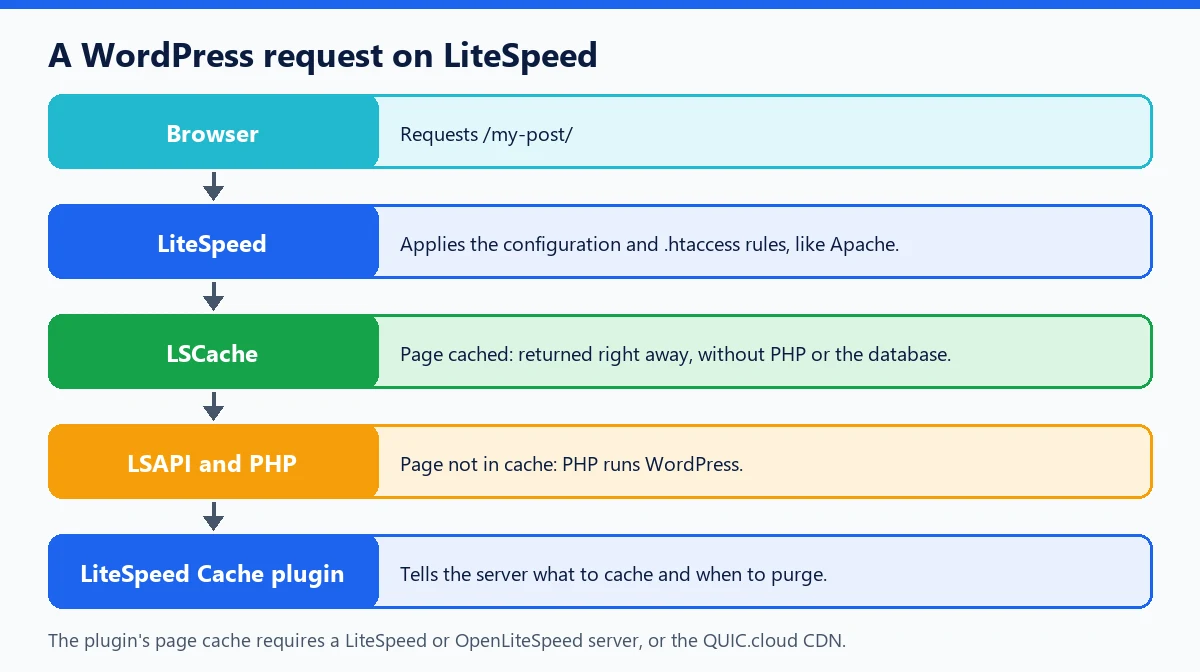
The vendor describes LiteSpeed as a drop-in replacement for Apache, able to load its configuration files directly and read .htaccess files. WordPress rewrite rules, access restrictions and protections added by plugins therefore keep working. It also claims compatibility with control panels written for Apache, with modules for cPanel, Plesk and DirectAdmin.
Under the hood, the architecture is event-driven, like Nginx's: a few processes handle a large number of connections. PHP runs in lsphp processes, which talk to the server through LSAPI, LiteSpeed's own interface. LiteSpeed also supports HTTP/3 and QUIC.
LSCache and the LiteSpeed Cache plugin
LiteSpeed's big strength for WordPress is LSCache, a page cache built into the server. When a page is cached, LiteSpeed returns it without starting PHP or querying the database. The LiteSpeed Cache plugin for WordPress talks to this cache: it decides which pages to store, which to exclude (cart, customer account, admin area) and when to purge them after a change.
The plugin's official page separates two groups of features. The exclusive features, including automatic page caching, require OpenLiteSpeed, a commercial LiteSpeed product, LiteSpeed-powered hosting or the QUIC.cloud CDN. The general features, such as image optimization, CSS, JavaScript and HTML minification or support for a Redis or Memcached object cache, work on any server, including Apache and Nginx.
For WordPress
- Check the server before installing the plugin: the
serverresponse header often says LiteSpeed. On Apache or Nginx without QUIC.cloud, the plugin provides no page cache. - Only one page cache: don't stack LiteSpeed Cache with another page cache plugin.
- Update the plugin promptly: because it's so widely used, it has had several serious vulnerabilities, including the 2024 privilege escalation flaws. Our history of LiteSpeed Cache vulnerabilities lists the affected versions.
- Exclude personal pages from the cache: an account page cached by mistake can show one customer's information to another.
WP Feint triggers a LiteSpeed Cache purge after its settings change and adapts its rules to the server; the hosting and cache compatibility page explains how this works.
Common mistakes
Installing LiteSpeed Cache on Apache hosting and expecting the same page cache; assuming LiteSpeed and OpenLiteSpeed are identical, when the latter only reads the rewrite rules in .htaccess; forgetting to purge the cache after changing a menu or a widget.