

A website should never store passwords in plain text: it only keeps their hash, computed by a one-way function. At login, it recomputes the hash of the password entered and compares the two. Without salt, this process has a major flaw: two people who chose the same password end up with exactly the same hash, and an attacker can prepare tables of hashes for the most common passwords in advance. The salt solves both problems.
How salting works
When a user signs up or changes their password, the site randomly generates a unique string, the salt, and adds it to the password before computing the hash. The salt is stored alongside the hash, in plain text: it doesn't need to be secret. Its job is to make every computation unique.
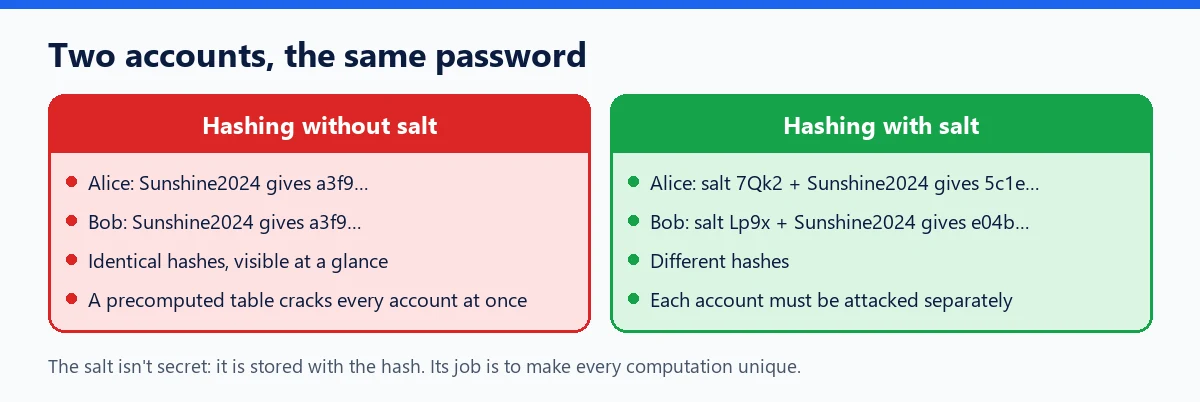
- Precomputed tables become useless: the attacker would have to recompute them for every salt.
- Identical passwords no longer stand out in a stolen database.
- Each account must be attacked separately, which multiplies the work of an offline attack.
Salt doesn't make a weak password strong, though: “Sunshine2024” is still among the first guesses of a brute-force attack. That's why salting is paired with a deliberately slow function such as bcrypt, scrypt or Argon2, which build the salt in automatically.
Salt, pepper and recommendations
OWASP distinguishes the salt, unique to each password and stored with it, from the pepper, a shared secret kept outside the database, for example in a secrets vault. The pepper adds defense in depth if only the database leaks. In France, the CNIL (France) recommendation on passwords (decision of July 21, 2022) requires never storing them in plain text and transforming them with a secure, non-reversible cryptographic function that includes a salt or a key.
For WordPress
In WordPress, the word “salt” refers to two things that shouldn't be confused.
The password salt
Since WordPress 6.8, user passwords are hashed with bcrypt by the PHP function password_hash(), which generates a random salt for each password and stores it inside the hash itself. There is nothing to configure: salting is automatic.
The keys and salts in wp-config.php
The wp-config.php file contains eight constants: AUTH_KEY, SECURE_AUTH_KEY, LOGGED_IN_KEY, NONCE_KEY and their counterparts AUTH_SALT, SECURE_AUTH_SALT, LOGGED_IN_SALT, NONCE_SALT. Despite their name, these values are closer to a pepper: they are secret and are used to sign login cookies and nonces. If they leak, someone can try to forge valid cookies.
- Generate them with the official
api.wordpress.org/secret-key/1.1/salt/service or the WP-CLI commandwp config shuffle-salts. - Change them after an intrusion: all existing cookies become invalid and every user has to log in again.
- Don't copy them from one site to another, and never publish them in a code repository.
Our article on wp-config.php security settings covers these constants and other useful options. For the other side of the problem, passwords reused from one site to another, see password leaks and how to defend against them: a salt doesn't protect a password the attacker already knows, which is why credential stuffing is so attractive to hackers.