

The word stands for “number used once.” In cryptography, MDN defines it as an arbitrary value used only once in a communication, to prevent an intercepted message from being replayed, to guarantee that a response is fresh or to add randomness to a computation. On the web, however, the term covers two fairly different things that are best kept apart: the “pure” cryptographic nonce and the WordPress nonce.
How nonces are used on the web
- In protocols: TLS handshakes and many authentication mechanisms include random one-time values so that a recorded conversation cannot simply be replayed.
- In a Content Security Policy: the server generates a random value for each response, places it in the
script-src 'nonce-…'directive and in thenonceattribute of allowed scripts. A strict CSP only runs scripts that carry the right value. MDN stresses that it must change with every response and stay unpredictable. - Against forged requests: a secret token added to forms proves that the request really comes from a page on the site, which blocks CSRF attacks. This is the main role of WordPress nonces.
WordPress nonces: not really nonces
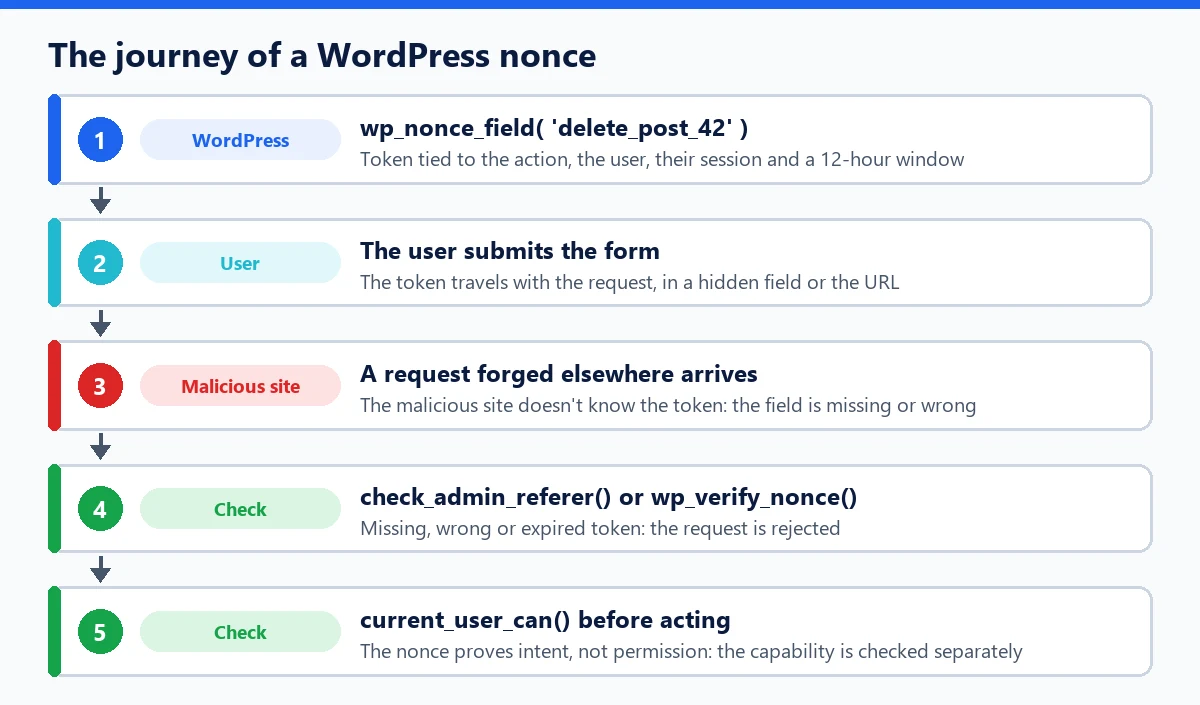
The official WordPress documentation admits it: its nonces are neither numbers nor single-use. The wp_create_nonce() function computes a ten-character hash from the requested action, the user ID, their session token and a time window. The computation uses the NONCE_KEY and NONCE_SALT keys from wp-config.php, which is why a unique salt matters.
- Lifetime: one day by default, split into two 12-hour windows. Depending on when it was created, a nonce therefore stays valid for 12 to 24 hours. The
nonce_lifefilter changes this duration. - Reusable: WordPress doesn't check that a nonce has been used only once. It therefore doesn't protect against replay during its validity period.
- Logged-out visitors: their user ID is 0, so all anonymous visitors can receive the same nonce for the same action.
For WordPress: using nonces correctly
For a theme or plugin developer, the rule boils down to three functions and a permission check:
// In the form
wp_nonce_field( 'delete_post_' . $post_id );

// When processing
check_admin_referer( 'delete_post_' . $post_id );
if ( ! current_user_can( 'delete_post', $post_id ) ) {
    wp_die( 'You are not allowed to do this.' );
}check_admin_referer()checks the nonce and the referrer on admin screens,check_ajax_referer()checks only the nonce for AJAX requests, andwp_verify_nonce()covers the other cases.- Name the action precisely (including the object ID) rather than using a generic name shared across the whole site.
- Never rely on the nonce for authorization: the documentation says to protect every function with
current_user_can().
Common mistakes
A good share of the plugin vulnerabilities reported each year comes from a missing nonce or a forgotten capability check, as our article on WordPress plugin vulnerabilities by the numbers shows. The typical case: an AJAX action checks the nonce but not the user's permission. Yet a nonce can leak into the code of a public page; if it is the only barrier, a mere subscriber can sometimes trigger an administrator action, which leads to privilege escalation. Our guide to WordPress roles and capabilities explains the logic of least privilege.
Another trap: a page cached for more than 12 to 24 hours serves an expired nonce, and the form fails with the message “The link you followed has expired.” Exclude pages containing forms meant for logged-in users from the cache.