
CSRF exploits an automatic browser behavior: with every request to a site, the browser attaches that site's cookies, including the session cookie. An external page can therefore trigger a request to your site, and the server receives it with the logged-in user's credentials. Nothing distinguishes it from a deliberate click, unless the site checks that it really comes from its own forms. MITRE lists it as CWE-352; it is also written XSRF.
How a CSRF attack works
The attacker prepares a page that contains a request to the target site: an invisible image whose URL triggers an action, or a hidden form submitted automatically by JavaScript. All that's left is to lure the victim to that page, through a link in an email, a comment or a message. If they are logged in to the target site at the same time, the request goes out with their session.
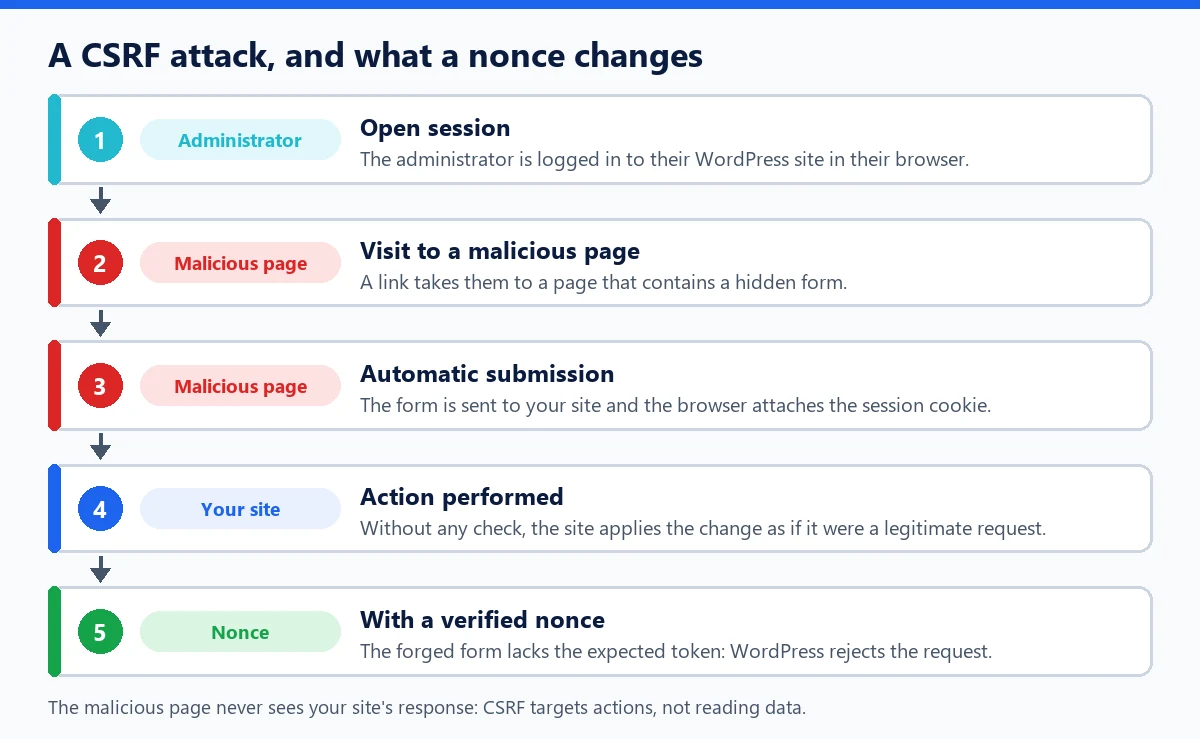
As OWASP points out, the attacker doesn't see the server's response. CSRF therefore targets requests that change something: modifying an account's email address, changing a setting, creating a user, deleting content. In a WordPress admin area, those actions are often enough to take over the site.
The role of SameSite cookies
The SameSite cookie attribute limits when cookies are sent from another site. With Strict, the cookie only accompanies requests coming from the same site; with Lax, it is also sent during top-level navigation with a safe method, such as a plain GET link. MDN notes that some browsers apply Lax by default when the attribute is missing. It is a useful but partial protection: an action triggered by a GET link still goes through, and not all browsers behave the same way. It therefore adds to anti-CSRF tokens without replacing them.
For WordPress: nonces and permission checks
WordPress protects its forms and action links with nonces: tokens tied to the user, their session and the requested action, which a third-party site can't guess. Their lifetime is 24 hours by default, split into two 12-hour windows. A plugin that adds its own actions must use them too:
// In the form
wp_nonce_field( 'myplugin_save', 'myplugin_nonce' );

// When processing
check_admin_referer( 'myplugin_save', 'myplugin_nonce' );
if ( ! current_user_can( 'manage_options' ) ) {
    wp_die( 'Access denied' );
}wp_nonce_field()andwp_nonce_url()add the token to a form or a URL;check_admin_referer()verifies it in the admin area,check_ajax_referer()in an AJAX request,wp_verify_nonce()elsewhere;current_user_can()is still mandatory: the WordPress documentation points out that a nonce is not meant for authentication or access control.
How to protect your site as an owner
Missing nonces are still common in plugins: CSRF is among the vulnerability categories regularly disclosed, as the numbers on WordPress plugin vulnerabilities show. On the owner's side, the habits are simple: update, avoid clicking unknown links during an admin session, log out after working on the site, and don't multiply administrator accounts. Neither WP Feint nor any Dashboard setting fixes a missing nonce in a plugin: only updating the plugin does.
Common mistakes
- Checking the nonce without checking permissions: a logged-in subscriber who picks up a valid nonce displayed on a page they can access can call an action meant for administrators. That opens the door to IDOR or access control vulnerabilities.
- Changing data on a plain GET request, which goes through even with
SameSite=Laxcookies. - Forgetting that a cross-site scripting flaw cancels the protection: a script running in the page reads the nonces it contains.
- Confusing CSRF with clickjacking: the latter makes the victim click on your real page, displayed in an invisible frame, which a nonce doesn't prevent.