
In MITRE's ATT&CK framework, privilege escalation is a tactic in its own right: the attacker tries to gain higher-level permissions by taking advantage of system weaknesses, misconfigurations or vulnerabilities. The CWE catalog files the most common cause under “Improper Privilege Management”: the software doesn't properly assign, track or check a user's privileges. On a WordPress site, it is one of the most dangerous vulnerability families, because it turns a simple registration form into administrator access.
Vertical and horizontal escalation
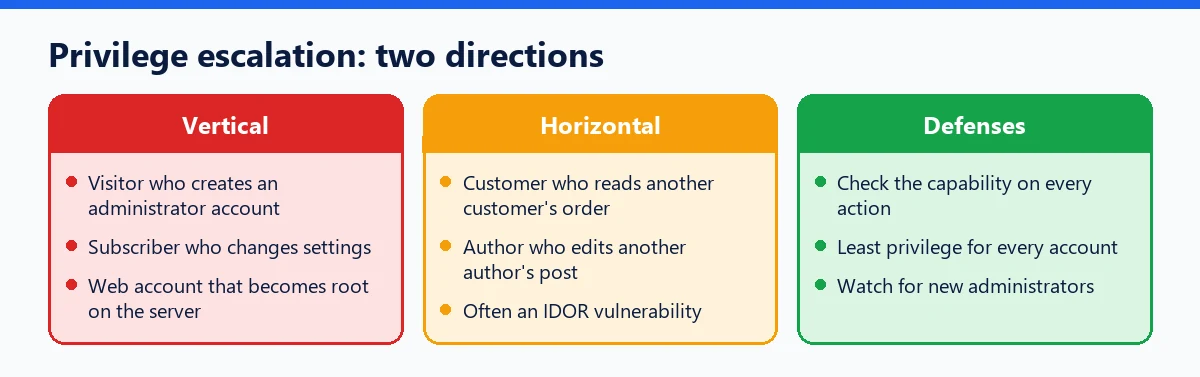
There are two directions. Vertical escalation grants a higher role: an anonymous visitor becomes an administrator, a subscriber changes settings. Horizontal escalation stays at the same level but crosses the barrier between users: a customer reads another customer's orders. This second form often goes through an IDOR vulnerability, where changing an ID in the request is all it takes.
WordPress examples
- Ultimate Member, CVE-2023-3460: before version 2.6.7, the plugin didn't stop visitors from creating accounts with arbitrary capabilities, and therefore administrators. The flaw was being exploited when it was disclosed. The full story lists the checks to run afterward.
- LiteSpeed Cache, CVE-2024-28000: an incorrect privilege assignment, with no authentication, up to version 6.3.0.1, rated 9.8 on the CVSS scale. The three LiteSpeed Cache vulnerabilities of 2024 show how a user simulation feature became a way in.
For WordPress: on the developer side
Every sensitive action must check a capability with current_user_can(), at the time of the action, rather than just hiding a button in the interface. The official documentation advises against checking a role name, which can give unreliable results: you check the capability actually needed, and for a specific piece of content you pass its ID.
if ( ! current_user_can( 'edit_post', $post_id ) ) {
    wp_die( 'You are not allowed to do this.', 403 );
}
REST API routes must declare a permission_callback: since WordPress 5.5, leaving it out triggers a notice, and __return_true is only acceptable for a truly public route. Finally, a nonce protects against request forgery but, as the documentation points out, it should never be used as authorization on its own.
For WordPress: on the administrator side
- Under Settings, General, only check “Anyone can register” if the site needs it, and keep Subscriber as the default role.
- Apply least privilege to roles and capabilities: an editor doesn't need to be an administrator, and neither does an agency outside of maintenance work.
- Update plugins that handle accounts, registrations or roles first.
- Check the list of administrators regularly, for example with
wp user list --role=administrator.
A successful escalation almost always leaves a trace: an account created or a role changed. The WP Feint Pro activity log records these events with their date, which helps you spot an unexpected administrator; it doesn't block exploitation of the flaw itself, which is the job of updates and a firewall.