LiteSpeed Cache is one of the most widely installed WordPress plugins: more than 7 million active installations according to wordpress.org. In 2024, it was hit by three flaws that let a visitor take over an administrator account, one of which was exploited on a massive scale. This article explains what happened without giving an attack recipe, who was actually exposed, and what to check if you use it, even if it is up to date.
A cache plugin with privileged access
A cache plugin does far more than store pages. To warm the cache for pages reserved for members or administrators, LiteSpeed Cache has a crawler that can simulate a user role: it visits the site the way a logged-in user with that role would. For the crawler to be recognized, the plugin uses a secret token. If that token can be guessed or read, anyone can pose as the crawler, and therefore as an administrator.
That is what the 2024 flaws have in common: an internal trust mechanism, handy for performance, that was not protected well enough.
CVE-2024-28000: a token that was too weak
Reported on August 1, 2024 by John Blackbourn through the Patchstack program (with a $14,400 bounty, announced at the time as a record for WordPress), this flaw affects every version up to 6.3.0.1. It is rated 9.8 out of 10.
According to the Patchstack advisory, the simulation token was generated only once with a non-cryptographic random number generator, was not tied to a user and was never renewed. The space of possible values was small enough for a bot to go through, which allowed an unauthenticated visitor to gain administrator rights and create their own administrator account. The attack required knowing an administrator's numeric ID (often 1) and did not work on a Windows server.
Version 6.4, released on August 13, 2024, fixed the flaw. The public advisory came out on August 21. According to BleepingComputer, Wordfence was blocking more than 48,500 attacks per 24 hours targeting this flaw in the following days. Wordfence's 2024 annual report ranks it as the most targeted vulnerability of the year based on its dedicated firewall rules.
CVE-2024-44000: cookies in a public log
A few weeks later, Patchstack reported a second flaw (rated 9.8 by NIST) of a different kind. When the LiteSpeed Cache debug log was enabled, the plugin wrote HTTP response headers to it, including the session cookies sent after a login. That log sat at a predictable address, /wp-content/debug.log. Anyone who could read it obtained valid cookies and could log in as that user, administrators included.
The key point for you: it was enough for the log to have been enabled at some point and never cleared. Version 6.5.0.1 (September 4, 2024) moves the log to a dedicated folder with random names and stops writing cookies to it. But the update does not delete an old debug.log file that is already filled.
CVE-2024-50550: role simulation, again
In October 2024, Patchstack published a third privilege escalation flaw, again tied to role simulation, but exploitable only with certain crawler settings. Patchstack rated it 8.1; NIST rated it 9.8. Version 6.5.2 (October 17, 2024) solved the problem by removing the role simulation process entirely.
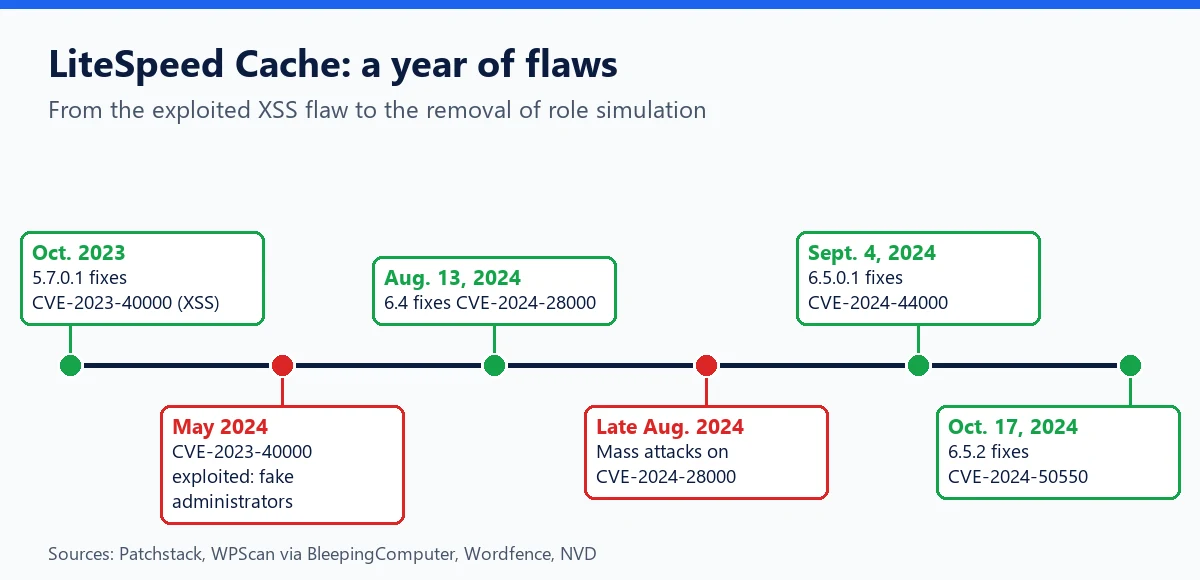
| CVE | Type | Affected versions | Fixed in | Known exploitation |
|---|---|---|---|---|
| CVE-2023-40000 | Unauthenticated stored XSS, used to create administrators | Up to 5.7 | 5.7.0.1 (October 2023) | Yes, reported by WPScan in May 2024 |
| CVE-2024-28000 | Unauthenticated privilege escalation | Up to 6.3.0.1 | 6.4 (August 13, 2024) | Yes, at scale from August 2024 |
| CVE-2024-44000 | Account takeover through the debug log | Before 6.5.0.1 | 6.5.0.1 (September 4, 2024) | Not documented in our sources |
| CVE-2024-50550 | Privilege escalation depending on crawler settings | Up to 6.5.1 | 6.5.2 (October 17, 2024) | Not documented in our sources |
Who was exposed
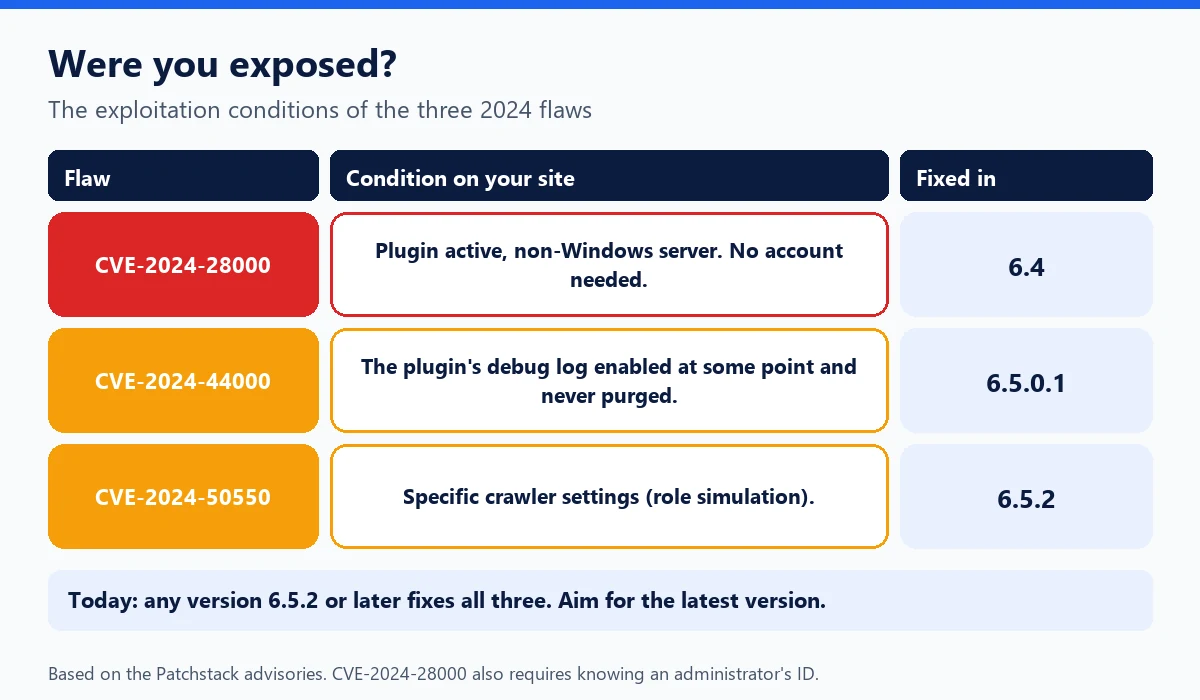
Not every site with the plugin active was exposed in the same way.
- CVE-2024-28000: nearly every site running an unpatched version on a server other than Windows. The plugin also installs on servers that are not LiteSpeed servers.
- CVE-2024-44000: only sites where the plugin's debug log had been enabled, often temporarily during troubleshooting.
- CVE-2024-50550: only sites with a specific crawler configuration.
Time worked against site owners. BleepingComputer noted at the end of August 2024 that downloads of the fixed version were still far below the number of installations, which left a large share of sites exposed during the attacks.
What to check today
The current version of the plugin fixes these flaws. But an update does not clean up a site that was compromised before it. If your site ran an old version in 2024, check:
- The version: Plugins, LiteSpeed Cache. Any version 6.5.2 or later fixes all three 2024 flaws; aim for the latest.
- Administrators: Users, Administrator filter. Any unknown account should be examined. In 2024, WPScan reported accounts created by attackers under the names
wpsupp-userandwp-configuser. - Old logs: delete
/wp-content/debug.logif it exists and contains LiteSpeed Cache entries. Make sure it no longer loads in a browser. - Sessions: if a log containing cookies was publicly accessible, log out all sessions and change administrator passwords.
- Files: look for unknown PHP files in
wp-content, especially inuploads.
The plugin has had other, less serious flaws since then (for example CVE-2025-12450, a reflected XSS affecting versions up to 7.5.0.1, rated 6.1). They are a reminder that a widely installed plugin remains a prime target and must be updated quickly, ideally automatically.
| Observation | What you can do |
|---|---|
| Cache plugins have high privileges | Treat them like security plugins: update them quickly |
| Debug logs can contain secrets | Enable them only for the duration of a diagnosis, then delete them |
| A widely installed plugin attracts mass attacks | Turn on automatic updates for it |
| Updating does not clean up | Check accounts, files and sessions after an exploited flaw |
With WP Feint
WP Feint does not fix plugin vulnerabilities. It works alongside LiteSpeed Cache: cache purging is built in, and the Pro version also rewrites addresses in pages generated by LiteSpeed Cache (see hosting and cache compatibility). Against account takeover, the Pro version's two-factor authentication does not stop the exploitation of a flaw that bypasses login, but it protects accounts against the reuse of a stolen password. Email alerts and the weekly report help you notice an unexpected change.
Key takeaways
- Three LiteSpeed Cache flaws in 2024 made it possible to become an administrator; according to Wordfence, CVE-2024-28000 was the most targeted WordPress vulnerability of the year.
- Versions to move past: 6.4, 6.5.0.1 and 6.5.2; install the latest version.
- An old
debug.logmay still contain valid cookies: delete it. - Review the list of administrators, especially the
wpsupp-userandwp-configuseraccounts. - Cache plugins deserve automatic updates.
Sources
- NVD: CVE-2024-28000 (opens in a new tab)
- NVD: CVE-2024-44000 (opens in a new tab)
- Wordfence: 2024 Annual WordPress Security Report (PDF) (opens in a new tab)
- WordPress.org: LiteSpeed Cache plugin (opens in a new tab)
Other sources consulted: further CVE records, trade press articles and Patchstack database.