
The “object” can be an order, an invoice, a profile, a file or a message; the “reference” is the identifier that points to it in the URL, a form or an API request. According to OWASP, the flaw comes from a missing access control check: the application verifies that the user is logged in, but not that they are allowed to view that particular object.
How an IDOR vulnerability works
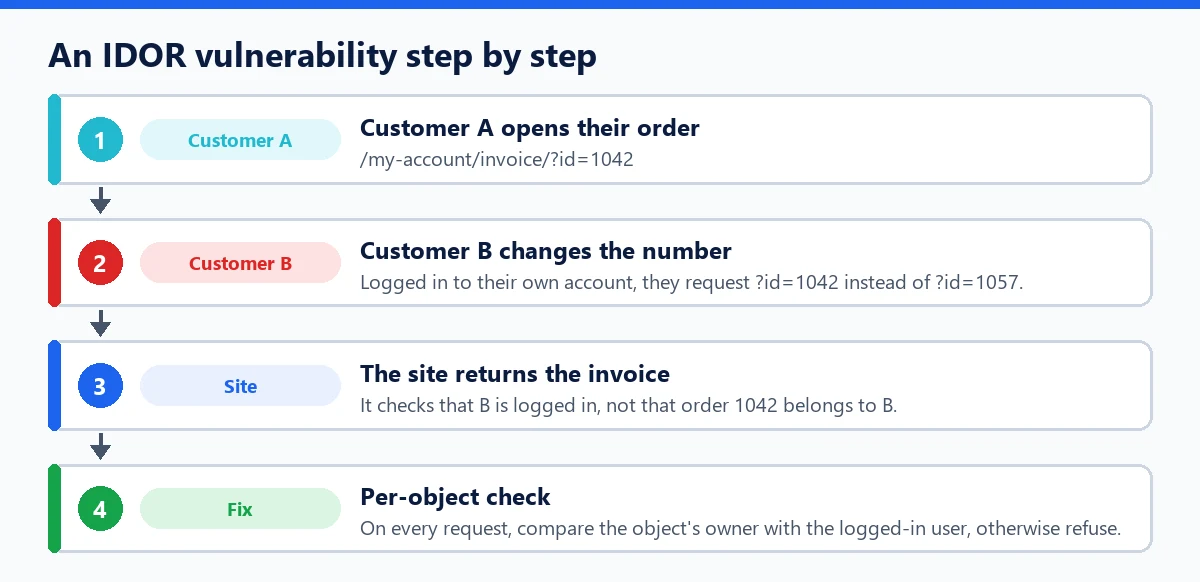
The attack requires no special tools. A logged-in customer views their invoice at /my-account/invoice/?id=1057. They replace 1057 with 1042, and the site displays another customer's invoice, with that person's name and address. The same scenario shows up in an API route (/wp-json/shop/v1/orders/1042), an attachment download or a delete action.
It is the most common form of horizontal privilege escalation: the attacker doesn't move up in rank, they access the data of a user at the same level. MITRE classifies it as CWE-639 (“Authorization Bypass Through User-Controlled Key”) and OWASP API Security calls it BOLA (Broken Object Level Authorization). In the OWASP Top 10, it falls under category A01, Broken Access Control, which explicitly mentions viewing or editing someone else's account by providing its identifier.
How to prevent it
- Check every object: on each request, compare the owner of the requested object with the logged-in user, on the server side.
- Only search within what belongs to the user: a query like “the current user's orders whose ID is X” will never return someone else's.
- Avoid exposing the identifier when it isn't needed: for “my profile,” the user can be derived from the session.
- Don't rely on random identifiers: they make guessing harder, but OWASP points out that they don't replace access control.
For WordPress
WordPress provides “meta” capabilities that check permission on a specific object. current_user_can( 'edit_post', $post_id ) doesn't just ask “can this user edit posts?” but “can they edit this post?”, taking the author and status into account:
$post_id = absint( $_POST['post_id'] ?? 0 );
if ( ! current_user_can( 'edit_post', $post_id ) ) {
    wp_send_json_error( null, 403 );
}
For a plugin's own data (orders, bookings, private files), you have to write this check yourself, for example by comparing the stored author with get_current_user_id(). In the REST API, this check belongs in the route's permission_callback. Two misconceptions come up often: a valid nonce proves the request really comes from the site and protects against request forgery, not that the user is allowed to access the object; and hiding a link in the interface doesn't stop anyone from calling the URL directly.
To test a plugin, create two accounts with the same role and try to open one account's objects from the other. Access control flaws are among the most frequent in plugins, as the statistics on plugin vulnerabilities show; our article on the REST API helps you spot what your site exposes publicly, and the one on roles and capabilities helps you limit what each account can reach.