

IIS is the web server that ships with Windows Server, where it's enabled as a server role. It's mostly chosen in Microsoft environments, for ASP.NET applications, but it can also run PHP and therefore WordPress. It's also the server that control panels such as Plesk use on their Windows servers.
How IIS runs PHP
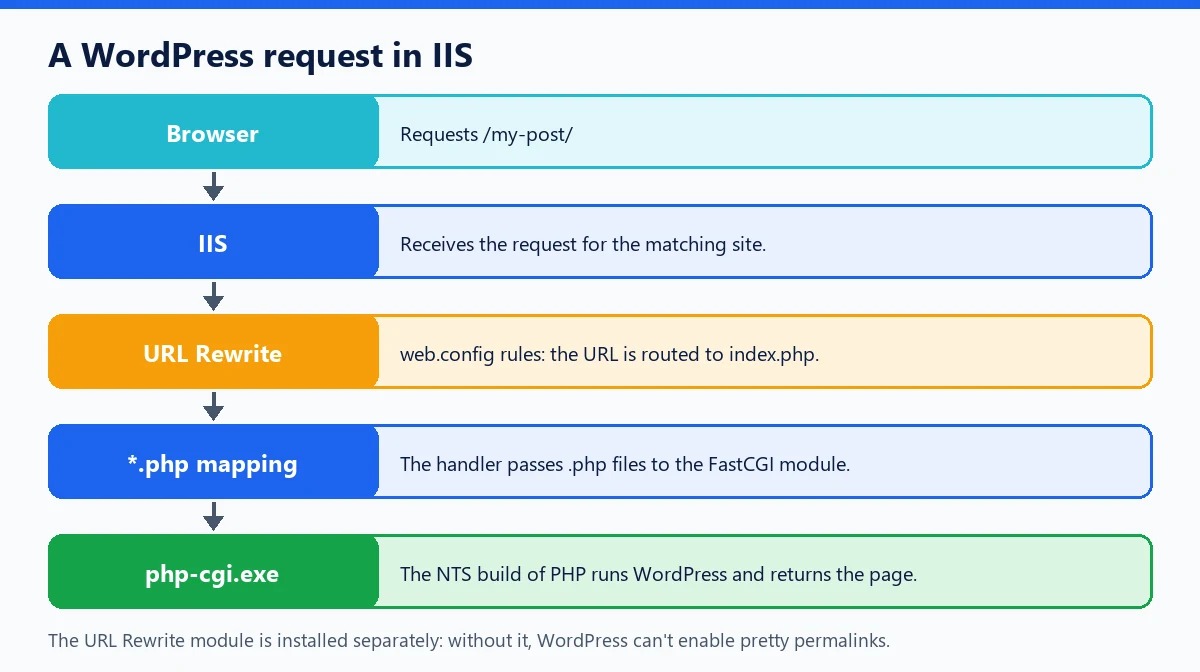
Since IIS 7.0, a FastCGI component has made it possible to run PHP and other languages; Microsoft states that it hasn't changed in IIS 10.0. Setting it up follows three steps described on Microsoft Learn:
- install the CGI role service, which registers the FastCGI module;
- declare a FastCGI application pointing to the PHP executable, for example
C:\PHP\php-cgi.exe; - create a handler mapping that sends
*.phpfiles to the FastCgiModule.
For this use, the PHP website recommends the “Non-Thread Safe” (NTS) builds, designed for FastCGI; the “Thread Safe” builds target Apache, when PHP is loaded as a module. PHP-FPM, widely used on Linux with Nginx, isn't the tool used here: IIS manages its own php-cgi.exe processes, with settings such as the maximum number of instances or of requests before recycling.
web.config and URL Rewrite
IIS doesn't read Apache's .htaccess files. Its configuration lives in applicationHost.config at the server level, or in web.config files at the site or folder level. URL rewriting requires the URL Rewrite module, downloaded separately, compatible with IIS 7 through IIS 10, and able to import Apache mod_rewrite rules.
WordPress can write its own permalink rules to web.config. It only does so when the conditions are met: IIS 7 or later, the URL Rewrite module loaded and PHP running as FastCGI, as its iis7_supports_permalinks() function checks.
For WordPress
- PHP version: on Windows, installing new PHP versions is often up to you. Follow the PHP end-of-life schedule and don't leave an old branch in place.
- The PHP-CGI flaw: in 2024, the CVE-2024-4577 vulnerability hit PHP in CGI mode on Windows with certain system languages. Check your version and your configuration.
- Don't overwrite web.config: add your rules to the existing rewrite section, without deleting WordPress's own rules.
- File permissions: the application pool identity must be able to write to wp-content/uploads, but not to the whole site.
WP Feint supports IIS: the Pro version's alias rules go in the system.webServer/rewrite/rules section of web.config, as explained on the hosting and cache compatibility page.
Common mistakes
Installing the Thread Safe build of PHP for IIS, forgetting the URL Rewrite module and then wondering why permalinks return 404 errors, or pasting .htaccess rules into a web.config without converting them: IIS doesn't understand Apache syntax as is.