

Where Apache scatters its configuration across .htaccess files placed in the site's folders, Nginx keeps it in one place. According to its documentation, the file is named nginx.conf and lives in /etc/nginx, /usr/local/nginx/conf or /usr/local/etc/nginx. It often includes other files, one per site, stored in conf.d/ or sites-available/ depending on the distribution.
How nginx.conf is organized
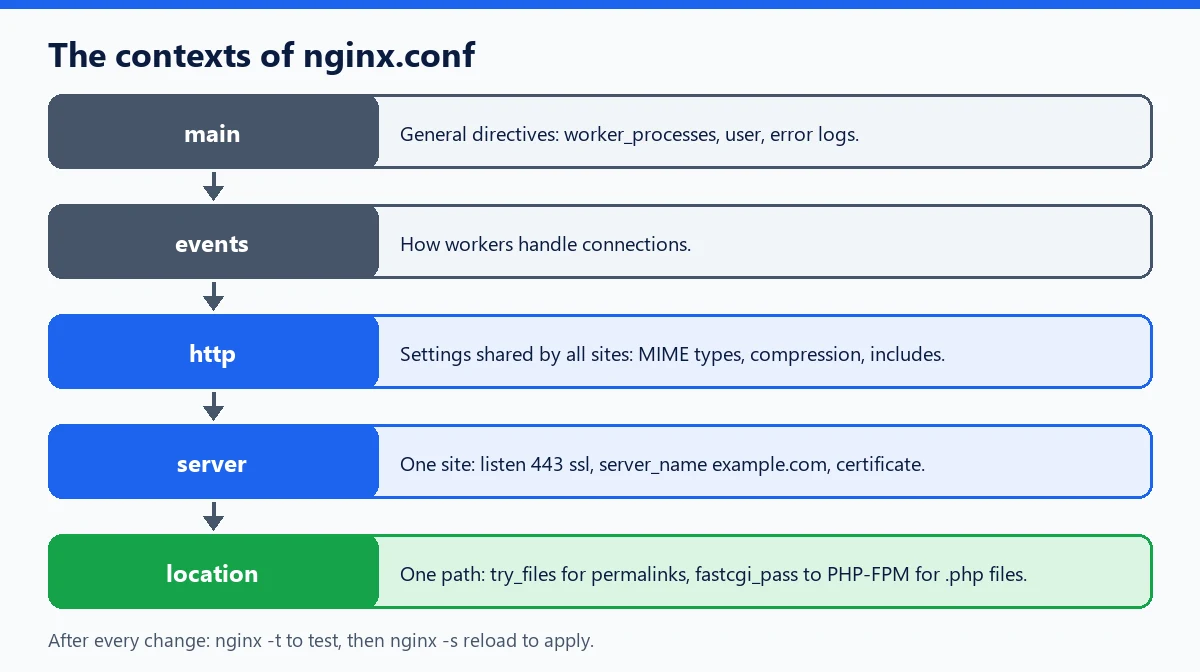
The file is made up of directives. A simple directive ends with a semicolon; a block directive holds other directives between braces, and is called a context when it can contain them. Anything outside every block belongs to the main context, which contains events and http; server goes inside http, and location inside server.
Here are the essentials for a WordPress site, with PHP-FPM listening on a socket:
server {
    listen 443 ssl;
    server_name example.com;
    root /var/www/example;
    index index.php;
    location / {
        try_files $uri $uri/ /index.php?$args;
    }
    location ~ \.php$ {
        include fastcgi_params;
        fastcgi_param SCRIPT_FILENAME $document_root$fastcgi_script_name;
        fastcgi_pass unix:/run/php/php-fpm.sock;
    }
}
The order of location blocks
This is the most common source of mistakes. According to the documentation, Nginx first looks for an exact match (=), which ends the search. It then remembers the longest matching prefix; if that prefix carries ^~, it stops there. Otherwise, it tests regular expressions (~, case-sensitive, and ~*, case-insensitive) in the order they appear in the file, and the first one that matches wins. Only when none matches does it fall back to the remembered prefix. In practice, a blocking rule written as a plain prefix can be bypassed by the ~ \.php$ block.
Testing and reloading
nginx -t checks the syntax and access to the files it references, without applying anything. nginx -s reload then applies the new configuration: the master process validates it, starts new workers and shuts down the old ones once their current requests are done; if there's an error, it keeps the old configuration.
For WordPress
- No plugin can edit nginx.conf: rules a plugin would write to an .htaccess file have to be carried over by hand or by the host.
- Block sensitive files with exact or regular-expression locations placed before the PHP block: backups, .git, .env, debug.log, as in our article on exposed files.
- Restrict the admin area by IP or HTTP authentication, following our guide to protect wp-admin on the server side.
- WP Feint only needs nginx.conf for the Pro version's file aliases, for which it displays the block to copy into the server block, and for one line that hides its folder: the hosting and cache compatibility page gives these rules. Test with
nginx -tbefore reloading.